

A Vancouver physiotherapy clinic can rank first when someone searches its name and still be nearly invisible when a new patient searches “physiotherapist near me” or “physiotherapist Kitsilano.” The website looks healthy in a branded report, but the phone stays quiet while competitors appear in the Map Pack, collect reviews, and answer service-specific searches.
That's the situation a proper SEO audit Vancouver project should uncover. An audit isn't a sales pitch or a list of generic tool warnings. It's a structured diagnosis of how search engines discover the business, how local customers find it, whether the site converts intent into enquiries, and whether the underlying data is reliable enough to support decisions.
British Columbia's online audience makes this a broad business issue. Statistics Canada reported that 96.9% of British Columbia residents used the internet in 2023, while 80.6% used digital government services according to the agency's internet-use data. Customers commonly have the ability to compare services, read reviews, request information, and contact a Vancouver business online.
This guide covers the practical scope, technical checks, Google Business Profile review, citation and review analysis, AI-search testing, prioritisation, deliverables, timelines, and realistic cost considerations. It also explains what a useful audit should hand to a business owner, rather than leaving you with a large export of issues nobody has assigned or fixed.
Why Your Vancouver Business Needs an SEO Audit
A local audit starts with a deceptively simple question: can the right customer find you at the moment they need your service? Brand-name rankings answer a different question. They show that Google understands your company, not that you're visible for non-branded demand.
A Vancouver plumber might appear prominently for its company name but fail to appear for “emergency plumber Mount Pleasant.” A dental practice may rank for its street address but not for “dentist Vancouver,” while a competitor with a better category, stronger service page, and more active review process receives the calls. Those gaps often remain hidden when reporting focuses on branded traffic or total organic sessions.
Practical rule: A ranking is useful only when it connects to a relevant search, a qualified visitor, and a measurable business action.
What a local audit actually diagnoses
A useful audit examines the full path from discovery to conversion:
- Technical access: Can Google crawl, render, and index the important pages?
- Search intent: Do service pages match the way Vancouver customers search?
- Local presence: Is the Google Business Profile accurate, complete, and competitive?
- Reputation signals: Do reviews, citations, and third-party references support trust?
- Conversion paths: Can a visitor call, book, request a quote, or buy without friction?
- Measurement: Can the business distinguish useful leads from low-value traffic?
- AI-search visibility: Is the business cited and accurately described in generated answers?
The scope matters because local SEO problems rarely live in one place. A perfect title tag won't rescue a suspended profile. A well-optimised Google Business Profile won't fix a service page blocked from indexing. More location pages won't compensate for inaccurate hours, broken forms, or missing call attribution.
Vancouver businesses also operate within a wider digital economy. Statistics Canada reported $67.7 billion in Canadian e-commerce revenue in 2023, and online sales increased 7.0% during that year in its retail trade release. British Columbia represented 14.0% of Canadian retail operating revenue in 2023, so an audit may need to connect local visibility with product discovery, checkout usability, and revenue tracking rather than treating SEO as a traffic-only exercise.
For a local service business, the finished audit should make the next decision easier. It should show what's broken, why it matters, who should fix it, how to measure the result, and which work can wait.
A useful local-search overview is available through Vancouver local search optimisation guidance, but the same principle applies whether you manage the work internally or hire an agency: diagnose the complete customer journey, not just the keyword report.
Defining the Scope of Your Local SEO Audit
Most audit failures happen before anyone opens a crawler. The directive is to improve local SEO, the analyst gathers every possible metric, and the business receives a document that contains plenty of information but no clear decision.
Start by separating search demand into three intent groups. Discovery searches describe a service and location, such as “dentist Vancouver.” Branded searches include the company or practitioner name. Service-plus-neighbourhood searches combine the offer with a specific area, such as “physiotherapist Kitsilano” or “plumber East Vancouver.”
These groups need separate reporting because they represent different levels of awareness and different optimisation problems. Branded visibility may be healthy while discovery visibility is weak. Neighbourhood searches may produce fewer impressions but stronger leads. Combining all three into one average ranking hides those distinctions.
Build the evidence set first
Export the last 90 days of Google Search Console and Google Business Profile data before changing pages or rewriting categories. The period is specified in the recommended audit sequence from local SEO guidance for service businesses, and it gives the team a consistent evidence window.
Separate the exports into:
- Search Console queries: Group branded, discovery, and service-plus-neighbourhood terms.
- Landing pages: Identify which service pages receive impressions, clicks, and conversions.
- Business Profile actions: Review calls, direction requests, website visits, and other available interactions.
- Lead records: Match calls and form submissions to the source wherever tracking allows.
- Device and location context: Note whether performance differs between mobile and desktop or between areas served.
Don't use impressions as a substitute for demand quality. A service page with strong impressions but weak clicks may need a clearer title and stronger search-result message. A page with clicks but no enquiries may have a conversion or trust problem. A profile with visibility but few calls may be attracting the wrong intent or presenting incomplete information.
Write a one-page audit brief
Before using tools, document the business model, service area, priority services, locations served, primary conversion actions, competitors, and known website changes. Define whether the audit covers one location, multiple branches, an e-commerce catalogue, or a regulated service where claims require human review.
Your brief should answer:
- Which searches matter commercially?
- Which actions count as qualified leads?
- Which locations and services deserve priority?
- Which competitors should be compared?
- Which systems contain the source-of-truth data?
- Who owns implementation and approval?
This structure prevents a common waste of time: optimising pages that attract visitors but don't support the business's actual services. It also gives an agency a meaningful basis for recommendations instead of encouraging a generic checklist.
The Technical and On-Page Checklist
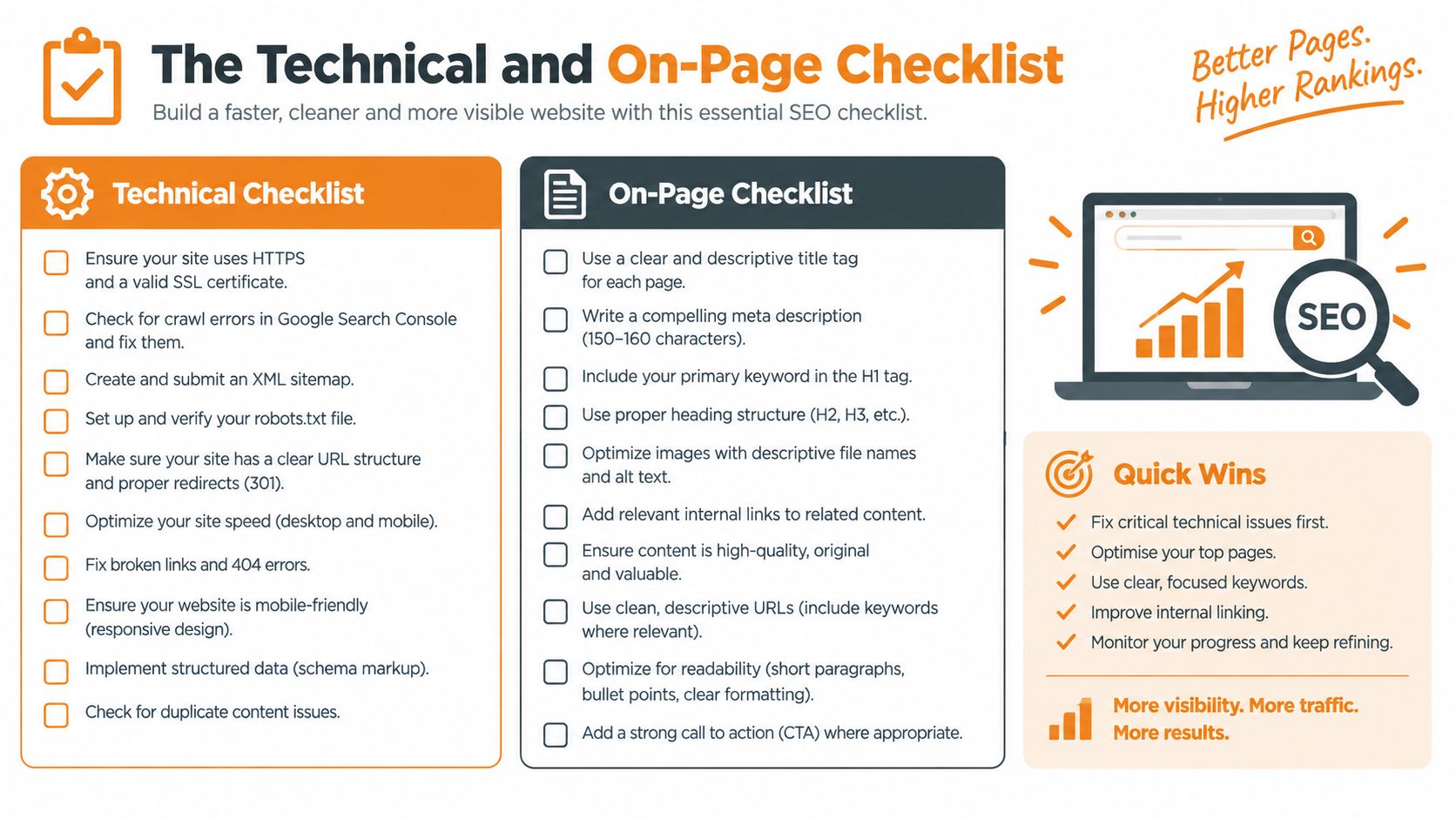
A technical audit should explain consequences, not merely identify errors. “Missing canonical” or “slow page” is not enough. The report should identify the affected URL or template, describe the user and search impact, and recommend a fix that someone can implement.
Crawlability and indexing
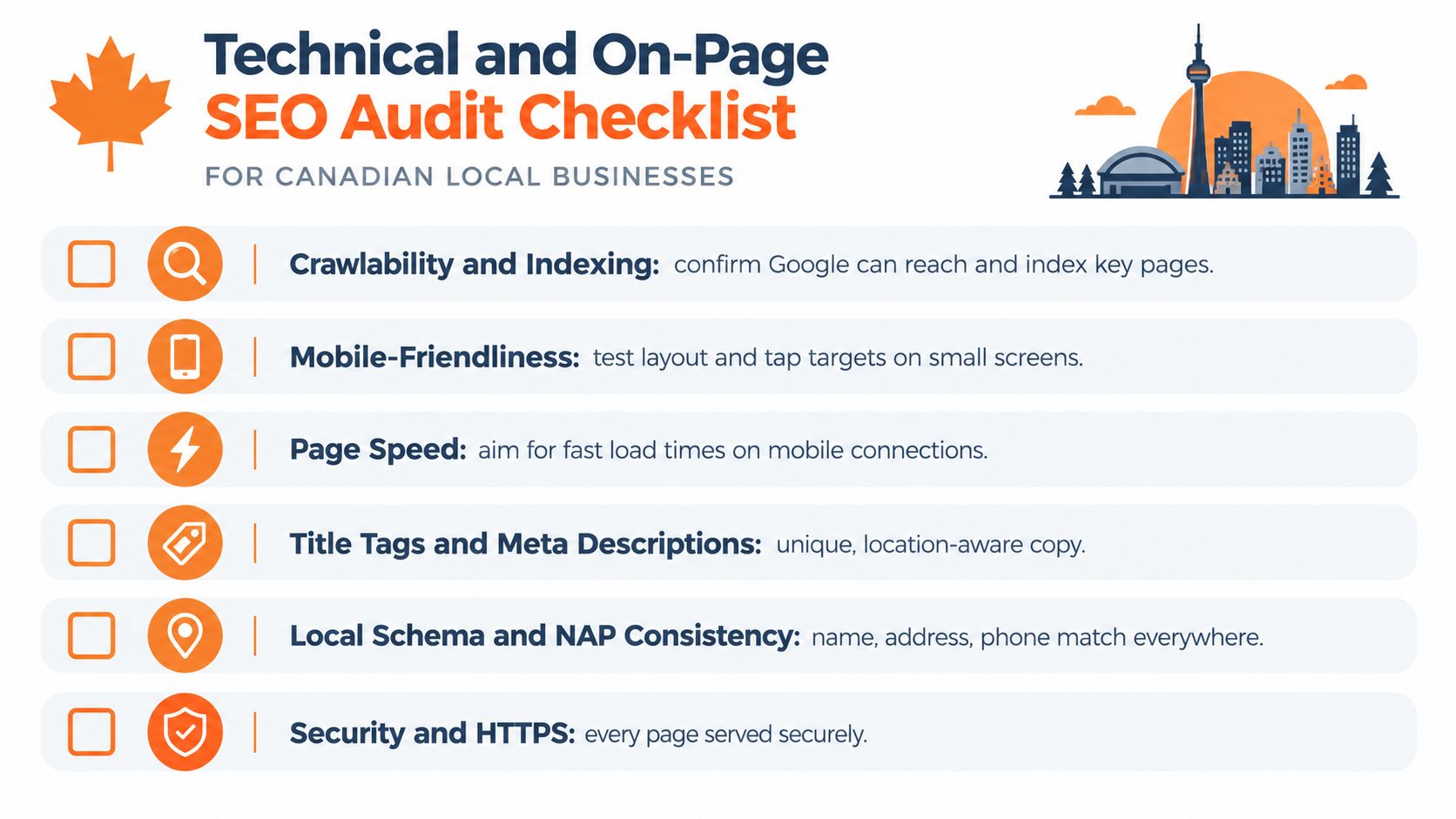
Confirm that Google can reach the pages that matter. Review the XML sitemap, robots directives, canonical tags, redirects, status codes, and internal links. Use Google Search Console for indexing evidence, then use a crawler such as Screaming Frog or Sitebulb to inspect patterns across templates.
Look for:
- Important service pages that aren't indexed.
- Pages marked as excluded without a deliberate reason.
- Redirect chains and broken internal links.
- Duplicate service or location URLs competing for the same intent.
- Orphan pages with no useful internal path.
- Parameter or filter URLs creating low-value crawl variations.
A page that can't be crawled or indexed can't compete, regardless of how carefully its copy was written. Don't automatically index every URL. Thin archives, duplicate filters, and near-identical location pages can make the site harder to understand.
Mobile experience and speed
Vancouver customers often search while travelling, between appointments, or from a phone. Test the actual mobile experience, not just a desktop layout resized in a browser. Check whether key content appears, whether buttons are easy to tap, whether menus work, and whether phone or booking actions remain visible.
Page speed should be reviewed on priority templates, especially service pages, product pages, and booking flows. Heavy scripts, oversized images, delayed consent tools, and intrusive pop-ups can slow the experience or obscure the next action. A lab score is useful for diagnosis, but real-user data and observed behaviour provide better context.
On-page intent and information architecture
Every important query should map to the right page. A broad service deserves a clear service page. A product query deserves a product or category page. An informational question may need an article, but an article shouldn't replace a conversion-focused service page when the searcher is ready to hire.
Prioritise pages where impressions are high but clicks or leads are weak. Review the title tag, H1, opening copy, headings, internal links, and call to action. The page should make its service, location, proof, availability, and next step obvious without forcing the visitor to search through generic marketing language.
Vancouver relevance without doorway duplication
A legitimate Vancouver service page should contain real evidence of service coverage. That may include the neighbourhoods served, access or parking information, local operating details, relevant project context, staff expertise, or service limitations.
Avoid producing dozens of near-identical pages that change only the neighbourhood name. Those pages create a poor user experience and may compete with one another. One strong Vancouver page can be more useful than a collection of thin pages, unless each area has distinct services, staff, facilities, or customer information.
Structured data and internal links
Use structured data to clarify what a page represents, not to decorate the code with unsupported claims. Organisation, LocalBusiness, Service, Product, Breadcrumb, and FAQ markup may be appropriate depending on the page and the information displayed. Validate the implementation and keep it aligned with visible content.
For implementation guidance, local business schema recommendations provide a useful reference point. Internal links deserve equal attention. Link from relevant, authoritative pages to priority services using descriptive anchor text, and make sure important pages aren't buried several clicks deep.
Google Business Profile, Citations, and Reviews
The website is only one part of Vancouver local search. A business can have well-written service pages and still lose visibility because its Google Business Profile uses the wrong primary category, lists incomplete services, or shows outdated hours.
Begin with the profile itself. Check the primary and secondary categories, service descriptions, service areas, opening hours, holiday hours, phone number, website URL, photos, attributes, booking links, and customer-facing updates. The category should reflect the core business, not a keyword the owner hopes to rank for. Service areas should describe where the company genuinely operates rather than creating a list of every nearby community.
Then reconcile the core business details across major Canadian directories and relevant industry platforms. Compare the name, address, phone number, hours, and URL. Small differences can confuse customers and make it harder for systems to connect references to the same entity. Don't chase every directory. A smaller set of relevant, accurate listings is more valuable than a large collection of low-quality profiles.
A practical verification routine
| Signal | What to Check | What Good Looks Like |
|---|---|---|
| Primary category | Compare the profile category with the main service | The category describes the core business accurately |
| Service areas | Check listed communities against actual operations | Areas reflect genuine coverage and capacity |
| Business details | Compare name, address, phone, hours, and URL | Key details match across important listings |
| Reviews | Review recent themes, replies, and competitor activity | Reviews are genuine, recent, relevant, and answered thoughtfully |
| Photos | Check freshness, quality, and local relevance | Images show the premises, team, work, or customer experience |
| Conversion actions | Test calls, booking links, forms, and directions | Every action works on mobile and reaches the right team |
Reviews need more than a total count. Examine the language customers use, the services they mention, the regularity of new reviews, and whether the business responds with useful, specific replies. Review velocity is a comparative signal, so assess it against direct Vancouver competitors rather than treating an old accumulation of reviews as permanent protection.
A repeatable process works better than occasional requests. Ask satisfied customers soon after a completed service, make the request easy, and never coach customers to use specific wording or offer incentives that compromise authenticity. Route complaints into service recovery rather than trying to bury criticism with generic responses.
Business owners can also use Google Business Profile setup support as a reference when reviewing configuration. The important point is operational: someone should own profile updates, hours, review responses, and listing corrections.
Testing Your Visibility in AI Search
A Vancouver customer may ask an AI tool for a nearby provider before opening a conventional search result. These tools can summarise options, compare businesses, and answer follow-up questions. Google introduced AI Mode to users in Canada in 2025, extending search into generated responses and conversational follow-ups.
CIRA's 2025 Canadian Internet Trends data reported that 33% of Canadians had used generative-AI tools in the previous year, compared with 16% in 2024. It also found that 47% of those users said they used AI for non-work searches as reported in Canadian AI search research. Those figures do not show whether a particular Vancouver business will receive leads, so AI visibility deserves its own test alongside Google rankings.
Run a prompt set, not a single query
Use realistic prompts tied to the business, service, and neighbourhood:
- “Best physiotherapist near Kitsilano”
- “Emergency plumber in East Vancouver”
- “Family dentist near Commercial Drive”
- “Licensed cannabis retailer near me”
- “CBD products in Vancouver with local pickup”
Run these prompts across relevant AI tools. Record whether the business appears, how the tool describes it, which services and locations it assigns, and whether the response contains outdated or unsupported claims. Test wording and location variations as well. AI responses can change between queries, so repeated patterns matter more than treating one answer as a fixed ranking.

Improve facts before multiplying pages
Publishing generic location pages is often an inefficient response to AI search. First, check whether the information sources are consistent enough for an answer engine to reconcile: the official website, Google Business Profile, service details, hours, staff information, reviews, structured data, and credible third-party references.
A physiotherapy clinic should clearly state its treatment areas, practitioner credentials, location, booking process, and service limitations. Regulated health, cannabis, CBD, and wellness businesses should review generated answers for unsupported therapeutic, product, or licensing claims. An inaccurate summary can create compliance and reputation risk even when the website wording is careful.
The audit should compare traditional rankings, Map Pack visibility, review and entity signals, structured data, third-party mentions, and conversion paths from AI-assisted discovery. It should also test whether the business's data layer is reliable enough to act on the findings. The working standard is discoverable, accurately represented, and commercially trackable across Vancouver search results.
Turning Audit Findings Into a Prioritized Plan
An audit becomes useful when it changes what the team does next. Rank findings by likely business impact, implementation effort, confidence in the evidence, and dependency on other fixes.
A blocked service page is a priority because it prevents visibility. A revised title may be a quick opportunity when the page already earns impressions. A new neighbourhood page should wait if existing service pages, tracking, or local data are unreliable.
Check readiness before adding automation
The overlooked question is whether the business can act on the findings. Are the Google Business Profile, service areas, inventory, booking availability, reviews, and conversion events consistent? Can the team identify a qualified call? Does someone review health or regulated-industry claims before publication?
The Greater Vancouver Board of Trade reported that 15% of B.C. businesses were using generative AI or planning to use it soon, while 39% of owners had considered integrating it in its 2025 AI adoption report. Across Canada, 73% of SMEs had not yet adopted AI, according to the same report. That makes operational readiness a more useful audit question than blindly scaling AI content.
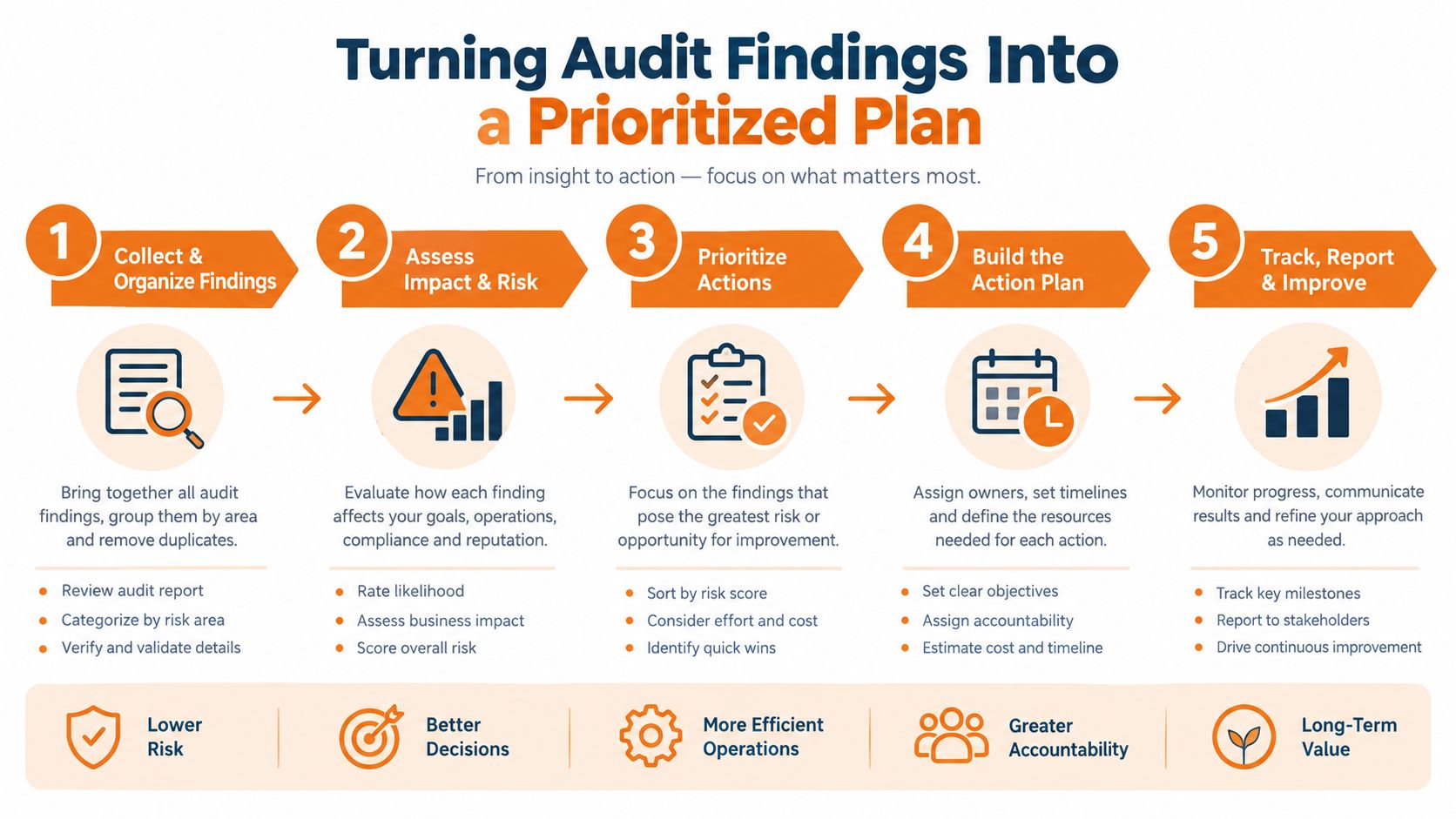
A sensible 90-day roadmap usually starts with source-of-truth cleanup, call and form attribution, profile accuracy, review ownership, and human approval. Only then should the team expand content or test more expensive AI workflows.
This short video offers a visual overview of audit prioritisation:
Deliverables, Timeline, and What an Audit Costs
A useful local SEO audit gives the owner decisions, not a spreadsheet dump. The deliverable should identify affected URLs, show evidence, rate severity, explain business impact, and recommend specific fixes. It should also include a prioritised action list, competitor comparison, local-profile review, technical and content findings, and a measurement plan for calls, forms, bookings, or sales.
A single-location service business audit typically lands in the low four figures and takes two to three weeks. A multi-location or e-commerce audit takes longer because it may include location templates, product and category structures, checkout paths, integrations, attribution, and competitor analysis. Cost should reflect the work required, not an arbitrary page count.
The report should test Vancouver-specific AI-search prompts alongside Google visibility. It should also check whether the business data layer is reliable enough to support decisions, including consistent services, locations, inventory, contact details, and conversion events. If those inputs are unreliable, recommendations need validation before implementation.
E-commerce requires a closer review of product indexing, category architecture, structured data, internal links, page speed, analytics, and checkout usability. Canadian businesses receiving e-commerce orders represented 32% in 2023, compared with 25% in 2019, according to Statistics Canada's e-commerce data. The audit should follow the path from search result to completed order.
Juiced Digital provides technical, content, local, and AI-search audits for Vancouver businesses, linking recommendations to lead and revenue paths rather than rankings alone.
Request a consultation through Juiced Digital.