

Local business schema is structured data that tells search engines what your business is, where it operates, and when customers can reach it. It supports local SEO by clarifying details that may appear in enhanced search features, though Google decides whether rich results display.
How Local Business Schema Supports Local SEO
Schema.org's LocalBusiness type describes a physical business or branch in machine-readable JSON-LD. Google can connect your name, address, phone number, opening hours, category, and location with the page content, reducing ambiguity about the entity.

Take a Vancouver clinic as an example. Accurate markup reinforces the connection between its location page, contact details, and how it shows up in local search results. It won't replace genuine reviews, useful content, or a thorough Google Business Profile setup guide, but it gives crawlers clearer context to work with.
British Columbia makes a strong case for why this matters beyond national chains. Roughly 98% of businesses in B.C. have fewer than 50 employees. These smaller firms account for 34% of provincial GDP and employ around 1.1 million people, which works out to 41% of the workforce. Learn more about Google's LocalBusiness structured-data guidance.
Core Properties and Their SEO Purpose
| Property | What It Represents | SEO Benefit |
|---|---|---|
name |
Business name | Identifies the entity |
address |
Physical location | Clarifies local relevance |
telephone |
Primary phone | Supports contact accuracy |
openingHoursSpecification |
Opening times | Communicates availability |
geo |
Latitude and longitude | Pinpoints the location |
@type |
Business category | Adds industry context |
When someone searches for a local restaurant, Google may display its address, hours, phone number, and map details alongside the standard result, assuming the page qualifies. Every value in your markup should match what's actually visible on the page, and it should stay current. Use the most specific subtype that fits: Restaurant, Dentist, DaySpa, and so on.
For agencies, the real win is repeatability. You build one validated template and roll it out across client sites and location pages, as long as each instance gets independently verified for accurate NAP data, hours, coordinates, and category specifics.
Google recommends using the most specific applicable subtype rather than defaulting to the broad LocalBusiness type. That choice gives search engines clearer context and can support eligibility for richer local results. Before publishing anything, review Google's LocalBusiness structured data guidance to make sure you're working with the latest requirements.
For a storefront, include the required name and a complete address. From there, recommended fields make the entity more useful and trustworthy:
telephoneandurlconnect customers with the right location without confusion.geopins the premises precisely on the map.openingHoursSpecificationcommunicates current hours accurately.priceRange,image, andsameAsadd context that helps both users and search engines.
Match the Subtype to the Business
Choosing the right subtype isn't just a technical detail. It directly shapes what rich results your business can appear for and what additional fields Google expects to see.
| Subtype | Typical Extra Fields | Rich Result Benefit |
|---|---|---|
Restaurant |
menu, servesCuisine, acceptsReservations |
Menu and dining context |
DaySpa |
priceRange, hasOfferCatalog |
Service and pricing context |
HealthClub |
amenityFeature, priceRange |
Facility information |
LegalService |
areaServed, availableLanguage |
Practice coverage |
Dentist |
medicalSpecialty, openingHoursSpecification |
Medical practice context |
Physician |
medicalSpecialty, availableService |
Provider information |
Think about three Vancouver examples to make this concrete. A neighbourhood spa should use DaySpa, not HealthClub, since the services and customer experience are fundamentally different. A dental clinic should select Dentist and describe its actual specialty rather than leaving it generic. A regulated retailer may need Store or a product-specific subtype, but it must avoid unsupported medical claims in descriptions and properties. That last point matters especially in industries where compliance reviews are routine.
Choose the narrowest accurate type, then add only information that appears visibly on the page.
Google's required fields support basic eligibility, but recommended properties strengthen clarity and trust. Never add ratings copied from Google, hidden addresses, or hours that differ from what's displayed on the website. When no subtype fits cleanly, use LocalBusiness or Organization honestly, then validate the result before moving forward. That approach keeps the markup useful, defensible, and easier to maintain across location pages as your business evolves.

For a single storefront, local business schema works best when the JSON-LD reflects the same facts visitors can actually see on that location page. Google's LocalBusiness structured data guidance requires the business name and address, while telephone, URL, image, coordinates, hours, price range, and social profiles add useful context.
Prepare the Location Data
Before publishing, gather the exact NAP details from the location page itself, the Google Business Profile, and major directories. Then choose a specific subtype — like MedicalClinic or DaySpa — that genuinely describes the business.
Take a wellness-clinic example. You'd typically include:
name,address, andtelephonefor identity and contacturlandimagepointing to visible, working page assetsgeowith accurate latitude and longitudeopeningHoursSpecificationfor each genuine schedulesameAslinks to official social profiles
Markup should confirm visible information, not add claims or details that customers cannot verify.
You can place the JSON-LD in the page head or inject it through a tag manager setup, as long as you have tight control over what gets deployed. For broader implementation advice, this guide to schema markup for local SEO covers the full picture.
Avoid Small Errors That Cause Big Problems
Here's where most single-location implementations go sideways. If the business is "Harbour Wellness Clinic," the name, address, phone number, hours, and service details in the markup must match what's on the visible page — exactly. No shortcuts.
Don't mark up a hidden address for a mobile practitioner. Don't invent holiday hours you can't verify. Don't copy headquarters details onto a branch location page and hope nobody notices. These are the kinds of mistakes that trigger warnings in Google Search Console.
Before you hit publish, run through this:
- Check every URL actually returns the right page and image
- Compare phone formatting and postal details against the visible page
- Use separate hours objects when weekdays have different schedules
- Validate the finished JSON-LD with Google's Rich Results Test and the Schema Markup Validator
A passing syntax check isn't the finish line though. Revisit the page after it goes live. CMS updates have a habit of silently creating duplicate business entities, altering opening hours, or removing the image your markup references.
When you’re working across multiple locations, your local business schema should follow the same logic as your website structure. A Vancouver franchise with dedicated pages for each branch needs one LocalBusiness entity per location. A head office page, on the other hand, can use Organization with subOrganization links pointing to individual branches.
Choosing the Right Multi-Location Pattern
Here’s a decision matrix to help you pick the right structure fast:
| Business Setup | Recommended Pattern | Watch Out For |
|---|---|---|
| One storefront | Single LocalBusiness entity |
Inconsistent name, address, or phone number across platforms |
| Franchise branches | Distinct entity per location | Accidentally duplicating phone numbers or office addresses |
| Mobile mechanic | Organization with areaServed |
Fabricating or hiding a physical address |
| Agency serving Metro Vancouver | Organization with defined service areas |
Claiming coverage across every municipality if that’s not accurate |
Match the pattern to reality. If each branch has its own URL, phone number, hours, and services, treat it as a distinct entity. Connect it to the parent brand with parentOrganization or branchOf, and assign every entity a unique @id.
For businesses without a public storefront, such as a mobile mechanic or a marketing agency, skip the fake address. Use areaServed or serviceArea to describe municipalities, regions, or a metro area, and lean on Organization when there’s no physical customer-facing location.
Small businesses across British Columbia generated 31% of total provincial payrolls in 2022, the highest share among Canadian provinces, which means accurate local visibility is important for many independent operators. For deeper reference, check out Google’s LocalBusiness structured-data guidance.
Preventing Duplication Across Listings
Every branch should have one authoritative record. Line up the business name, address, phone, opening hours, and landing-page URL across schema, Google Business Profile, directories, and your own website. Our guide to local citation building covers practical consistency checks worth running.
One real location should have one clear entity, not several competing markup blocks.
Before deploying, audit every template for duplicated LocalBusiness objects, reused head-office details, and overlapping location URLs. For franchises, keep verified NAP data in a central spreadsheet or database, and require local managers to approve changes before anything goes live. That way your schema stays accurate when branches open, move, or adjust their hours.
Regulated businesses need truthful LocalBusiness schema that supports search visibility without turning markup into an advertising claim. For a Vancouver CBD retailer, clinic, or functional mushroom brand, every property should match the visible page and applicable provincial rules.
Use the narrowest accurate type, such as Store, Pharmacy, MedicalClinic, or Physician. If no subtype fits, choose LocalBusiness or Organization rather than forcing an inaccurate classification. Google's LocalBusiness guidance requires the business name and address for local eligibility.
Keep Claims Narrow and Verifiable
Schema isn't a place to imply that CBD treats anxiety, mushrooms prevent disease, or a clinic guarantees results. Leave out unsupported descriptions, medicalSpecialty values, ratings, reviews, and service claims unless the page clearly supports them and the business is genuinely qualified to make them.
For example, a functional mushroom shop can describe products as mushroom supplements and identify its storefront, hours, phone, and official profiles. It shouldn't encode "boosts immunity" merely because that phrase appears in promotional copy.
Markup must reflect compliant, customer-visible facts, not the strongest claim a marketer can write.
Images deserve the same caution. Use a real storefront, team, or product image that appears on the page, and avoid imagery suggesting intoxication, medical outcomes, youth appeal, or prohibited consumption. Also check that alt text and surrounding copy tell the same story.
Coordinate Compliance Before Publishing
Create a review loop involving the client's legal or compliance contact, especially when provincial advertising rules, age restrictions, or health-product requirements apply. Compare schema against:
- On-page headings, descriptions, and service pages
- Product labels and approved wording
- Provincial advertising guidance
- Google's structured-data policies
Finally, validate with the Rich Results Test and Schema Markup Validator. A clean technical result doesn't approve a claim, so document who reviewed each regulated location and schedule quarterly checks for changed hours, services, images, and wording.
Testing local business schema goes well beyond confirming that your JSON-LD parses without errors. Cross-reference what's in the markup against what visitors actually see on the page — your name, address, phone number, opening hours, subtype, URLs, and coordinates should all match up. Then run it through Google's Rich Results Test to check eligibility, and use the Schema Markup Validator to catch any Schema.org-level issues.
Google prefers you use the most specific subtype available. A restaurant should use Restaurant, not LocalBusiness. A gym should use HealthClub, a spa should use DaySpa. That specificity matters. Read Google's local business structured-data guidance for the full picture.
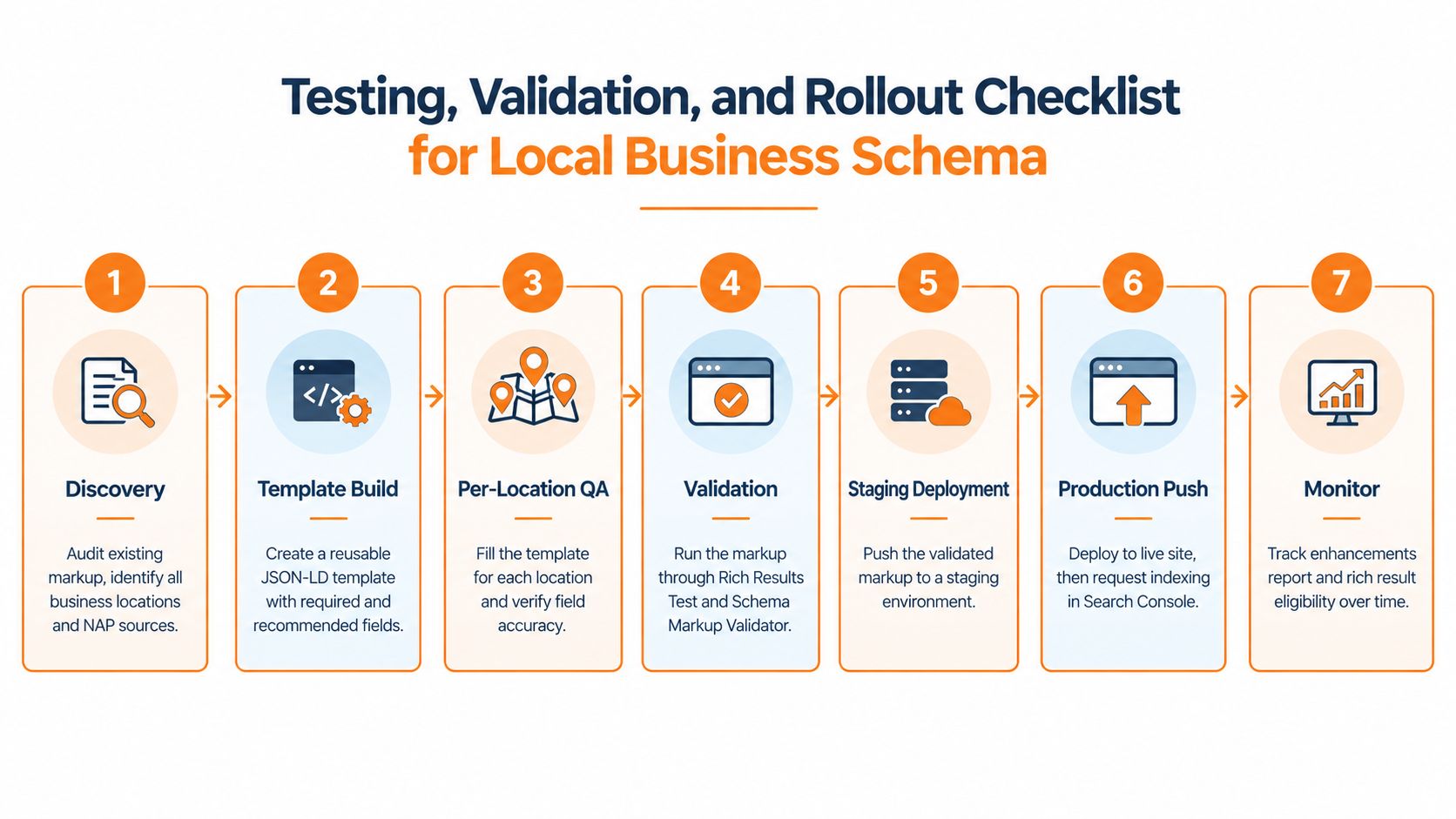
The chart above maps out seven agency checkpoints from discovery through ongoing monitoring. The core message is straightforward: validation happens before you go live, monitoring never stops after.
Catch Issues Before You Launch
Run through each location and look for these common problems:
- Missing
name,address, or recommended contact fields - Invalid latitude or longitude values (one misplaced decimal can push your pin kilometres off)
- NAP mismatches between visible page content and what's buried in the markup
- Conflicting
LocalBusinessblocks on a single URL - Unsupported property combinations or made-up claims
Even a clean validator result doesn't guarantee rich results. Once you've published, keep an eye on Search Console's enhancements reports. Watch for new warnings, pages getting dropped, or eligibility shifting without obvious reason.
A Practical Agency Rollout Checklist
- Audit all locations, templates, and NAP sources first.
- Build a single reusable JSON-LD template that works across the board.
- Complete per-location QA and get client sign-off before touching anything.
- Validate, then deploy to staging — never skip this step.
- Push the production markup and request indexing through Search Console.
- Monitor Search Console regularly, updating hours, services, images, or addresses as things change.
Think of schema as a maintained asset, not a checkbox you tick once and forget. If you're managing businesses in Vancouver or anywhere else, build in quarterly reviews and re-test after any CMS migration, rebranding, or new location opening. Schema breaks quietly when you aren't looking, and catching those breaks early is what separates a solid local SEO strategy from one that slowly falls apart.
When Do Rich Results Appear
Once you've added LocalBusiness schema to your site, patience is the name of the game. Google doesn't crawl every page on a fixed schedule—it prioritises, so recrawling can take anywhere from a few days to several weeks depending on your site's authority and crawl budget.
Rich results also aren't guaranteed, no matter how perfect your markup looks. Google ultimately decides whether to display them based on a mix of factors including relevance, query intent, and the competitiveness of the result page.
The practical move: confirm your schema is technically accurate using the Rich Results Test, then manually request indexing through Google Search Console. That alone won't trigger a rich result, but it does speed up the reprocessing.
Tip: Don't resubmit the same URL repeatedly in hopes of forcing a rich result. It doesn't work, and it can actually slow down your crawl rate.
Can Schema Fix a Weak Google Business Profile
This comes up a lot, and the short answer is no. LocalBusiness schema helps Google better understand the information on your website—your business name, location, hours, services, and so on. It clarifies. That's it.
What it won't do is fill in gaps on your Google Business Profile. If your profile is missing categories, has no photos, hasn't posted updates in months, or has a handful of one-star reviews with no responses, schema markup on your site isn't going to paper over those problems.
Treat schema and your Google Business Profile as complementary, not interchangeable. Schema improves how your website feeds into Google's knowledge base; the profile is your actual local listing. Both matter, and they need to be maintained independently.
The strongest local SEO setups I've seen keep both layers accurate and consistent—schema mirrors the profile, and the profile is actively managed.
Why Do Competitors Show More Stars
It's frustrating to see competitors with star ratings in search results when yours don't show up. Before assuming they're doing something clever, understand what's actually happening.
Star ratings in rich results come from Review or AggregateRating markup—and that markup has to be backed by real, visible reviews on your own site. You can't copy Google reviews into your schema. You can't invent ratings. Google's spam detection is aggressive about fabricated review markup, and getting flagged can hurt your visibility more than the missing stars ever would.
The honest play: focus on generating genuine customer feedback through your normal operations. Encourage reviews post-purchase, after appointments, or at natural service touchpoints. Once you have visible, legitimate reviews on your site, mark them up correctly with schema. Only then will Google consider showing those stars.
Key rule: Never mark up reviews that aren't actually displayed on the page. If a visitor can't see them, your schema shouldn't either.
How Does It Work Across Languages
If your business serves customers in multiple languages—say, English and French across Canadian markets—your schema setup needs to mirror your content structure. Pointing machine-translated pages at each other without proper markup creates confusion for both Google and users.
Here's what works in practice:
- Create dedicated language-specific pages rather than relying on browser auto-translation. A
/en/and/fr/structure keeps things clean. - Translate visible details accurately. Names, addresses, hours, and service descriptions need to match what users see on each version of the page.
- Connect equivalents with
hreflang. This tells Google which pages serve which language and region, preventing the wrong version from surfacing for a query. - Keep names, addresses, hours, and URLs consistent across all language versions. Inconsistencies between your schema and your actual content are one of the fastest ways to get rich results suppressed.
Real-world scenario: A dental clinic I worked with had English and French pages but only marked up schema on the English versions. Their French listings never appeared with rich results. Once matching schema was added to the French pages and
hreflangconnected them properly, both versions started qualifying within a few weeks.
Juiced Digital can audit your local SEO and schema to find exactly where the gaps are. Book a consultation.