
Before you can even think about fixing cannibalization, you have to get a clear picture of what you're working with. It all starts with a deep dive into your existing content to find which pages are stepping on each other's toes, all fighting for the same keywords. Once you've identified those overlaps, you can start making strategic decisions—consolidating, re-optimizing, or redirecting pages to create one, single authoritative source for each keyword you care about. This whole process is about sending crystal-clear signals to search engines, telling them exactly which page deserves to rank.
Understanding Cannibalization and Its Hidden Costs

Keyword cannibalization is far more than a simple SEO headache; it's a silent killer of your marketing ROI. When multiple pages on your site are all gunning for the same keyword, you're essentially making them compete against each other. This internal rivalry just confuses search engines, watering down your authority and splitting valuable backlinks and traffic across several weaker pages instead of concentrating them on one powerful one.
This isn't just a search problem—it points to a much bigger issue in your overall business strategy. In the Canadian digital marketing scene alone, it's estimated that around $4 billion is wasted every year because of poor targeting and fragmented campaigns. A lot of that waste comes directly from cannibalization, not just in SEO but across different marketing channels.
The True Impact on Your Website
When Google's web crawlers find a handful of pages on your site all talking about the same thing, they have a tough time figuring out which one is the definitive source. That confusion can trigger a cascade of problems for your site's performance.
- Diluted Authority: Instead of one page collecting all those hard-earned backlinks and building up its authority, that link equity gets spread thin across several URLs.
- Lower Rankings: Search engines might end up ranking the "wrong" page—maybe one with weaker content or a lower conversion rate—or worse, they might just push all the competing pages down in the rankings.
- Wasted Crawl Budget: Search engines don't have unlimited time to crawl your site. When you make them index a bunch of redundant pages, you're wasting their resources, which could be better spent on your more important content.
In short, you're becoming your own biggest competitor. By splitting your SEO efforts, you're stopping any single page from ever reaching its true ranking potential, which directly hurts your traffic and, ultimately, your bottom line.
To get you started, I've put together a quick-reference table. It breaks down the most common types of cannibalization I see and points you toward the best way to fix each one.
Cannibalization Types and Top-Level Solutions
| Type of Cannibalization | Primary Symptom | Go-To Solution |
|---|---|---|
| Content Overlap | Multiple blog posts or articles cover nearly identical topics, causing fluctuating rankings. | Consolidate the weaker pages into the strongest one and use 301 redirects. |
| Product & Category Page Conflict | A specific product page outranks its parent category page for a broader keyword. | Refine internal linking to signal the category page's authority for the broad term. |
| Homepage vs. Internal Page | The homepage ranks for a specific, transactional keyword that a service or product page should own. | De-optimize the homepage for that specific term and strengthen the target internal page. |
| Local Landing Pages | Multiple city-specific pages compete for a non-geo-modified keyword (e.g., "plumbers" instead of "plumbers in Vancouver"). | Optimize each page only for its specific local intent and build a strong "main" service page for the general term. |
Think of this table as your initial diagnostic tool. As you start digging into your own site's data, you'll likely spot one or more of these scenarios playing out.
Finding Your Cannibalization Hotspots
Before you can fix anything, you have to find the problem areas. Pinpointing where your own pages are fighting each other is a mix of quick manual checks and digging deeper with the right SEO tools. The goal here isn't just to spot a problem, but to really understand what the data is telling you about how Google sees your site.
The Quick-and-Dirty Diagnostic: A Google Search
The fastest way to get a read on the situation is with a simple Google search operator. Think of it as the SEO's stethoscope.
Just type site:yourdomain.com "target keyword" into Google. This command tells Google to only show you results from your website for that specific phrase. If you see two, three, or even more of your own URLs popping up on the first page, that’s your first major clue—you’ve likely got a cannibalization issue on your hands.
For instance, an e-commerce store selling running gear might search site:theirbrand.com "best trail running shoes". If a blog post titled "The 10 Best Trail Runners of the Year" and their main "Trail Running Shoes" category page both show up, they're competing for the same clicks. This simple search gives you an immediate, real-world snapshot of how Google is trying to interpret your site's structure.
Going Deeper with SEO Tools
Manual spot-checks are great, but for a full-blown audit, you need to bring in the heavy hitters like Ahrefs or Semrush. These platforms let you see every single keyword your domain ranks for, making it much easier to find URLs that are tripping over each other.
In Ahrefs' Site Explorer, for example, you can plug in your domain, head over to the "Organic keywords" report, and start looking for keywords that have multiple pages ranking. Ahrefs often flags this for you with a small icon, signalling that more than one of your pages is showing up for the same search. That's your cue to investigate.
Here’s the Ahrefs Site Explorer dashboard you’ll start with.
From this overview, you can dive into specific keyword reports to uncover that overlapping content. If you want a masterclass on interpreting this kind of data, you should check out our guide on how to track keyword rankings.
A Real-World Example from Vancouver
Let's imagine a local business, say, a wellness clinic in Vancouver. They might have three separate blog posts all trying to rank for phrases around "physiotherapy for back pain." One might be "5 Stretches for Lower Back Pain," another "When to See a Physio for Your Back," and a third "Physiotherapy Treatments for Sciatica." While the intent behind each seems slightly different, Google might lump them all together, get confused, and end up ranking none of them well.
This is a classic trap for businesses trying to cover all their bases.
In a crowded market like Vancouver, this kind of self-competition is a killer. The intense digital marketing competition in Canada can lead to a 20% dilution in performance from these overlapping efforts. In fact, one analysis of BC wellness clinics found that a staggering 18% of their content was cannibalizing itself. After they fixed the problem by consolidating and creating unique, localized pages, they saw a 28% jump in bookings. To get a better sense of these regional hurdles, you can explore insights into Canadian digital marketing.
The big lesson here? More pages isn't always better. If multiple pages are serving the same user intent, you’re just splitting your authority and making it that much harder for any single page to claim the top spot.
So, to properly diagnose cannibalization, your workflow should look something like this:
- Prioritize Your Keywords: Start with the commercial or informational keywords that actually drive your business. Don't boil the ocean.
- Run a
site:Search: Use this for a quick gut check on your most important terms to spot the obvious conflicts. - Dig into an SEO Tool: Export a full list of your organic keywords and filter it down to find terms where multiple URLs are ranking.
- Look for SERP Fluctuations: Pay close attention to keywords where the ranking URL keeps changing from day to day. This "rank swapping" is a dead giveaway that Google can't decide which of your pages is the most relevant.
Choosing Your Strategy: Content Pruning and Consolidation
Alright, so you’ve found the cannibalization culprits. Now what? The next step isn't just about deleting pages willy-nilly. It’s a strategic decision that hinges on performance data. You need a solid framework to decide if a competing page should be tweaked, merged into a stronger piece, or cut loose entirely.
This simple decision tree is a great starting point for figuring out if your URLs are fighting each other.
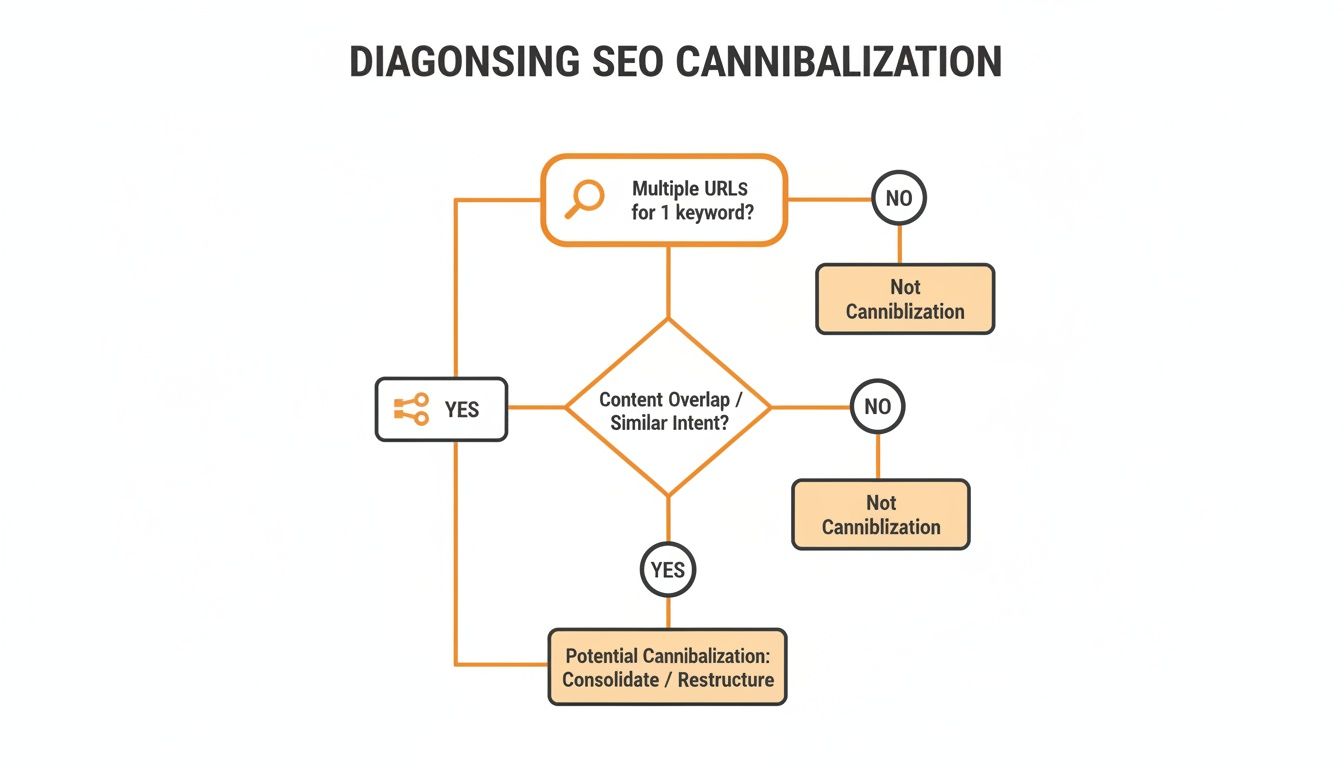
As the flowchart shows, if you've got multiple URLs all chasing the same keyword, your best bet is usually to merge or consolidate them. That's the most direct way to resolve the conflict and focus your ranking power.
The 3R Framework: Re-optimize, Redirect, or Remove
To make the right call consistently, I lean on a simple "3R" framework. It forces you to look at each competing page and evaluate it based on what it actually brings to the table—its traffic, backlinks, conversions, and unique value.
Here’s how it breaks down:
Re-optimize: This is your go-to move when two pages target the same general keyword but could serve different user intents. Think of an informational blog post and a product page both ranking for "CBD oil." Instead of axing one, you can sharpen its focus. Re-optimize the blog post for a more specific, informational keyword like "benefits of using CBD oil for sleep." This carves out a distinct niche for the page, ending the direct competition.
Redirect (and Consolidate): When you have a few pages covering the exact same topic and one is clearly the winner, it’s time to consolidate. The idea is to merge the best bits of content from the weaker pages into the strongest one. Then, you set up a 301 redirect from the old URLs to your new, powerhouse page. This is critical because it passes along all that valuable link equity and ensures both users and search engines find the one, definitive version.
Remove: Let's be honest—sometimes a page is just dead weight. If it has virtually no traffic, no decent backlinks, and terrible engagement, it’s probably safe to prune. Getting rid of this low-quality content can actually improve your site’s overall health by focusing your crawl budget on the pages that truly matter. Just be sure to redirect the old URL to a relevant page as a safety net.
A Practical Consolidation Scenario
Imagine a Canadian wellness blog has two articles: "Does CBD Help with Anxiety?" and "Using CBD for Panic Attacks." Both are getting a trickle of traffic, but neither has cracked the first page. They're full of overlapping info and are obviously tripping over each other for the main keyword "CBD for anxiety."
In this situation, merging is the clear winner. By combining the best elements of both posts, you're not just fixing a technical SEO issue—you're creating a superior resource for the user, which is what Google ultimately wants to reward.
The process is pretty straightforward:
- Pick the stronger URL: Dive into your analytics. Which post has more backlinks, better traffic, or slightly higher rankings? Let's say it's the "Does CBD Help with Anxiety?" post. That's your champion.
- Merge the good stuff: Scour the "Panic Attacks" post for any unique insights, useful data, or well-written sections. Integrate that valuable content into the stronger article to make it truly comprehensive.
- Set up the redirect: Once you’ve salvaged everything of value, delete the weaker post and implement a permanent 301 redirect from its URL to your newly beefed-up guide.
This simple action channels all authority and link juice into a single URL, sending a loud and clear signal to Google that this is your definitive page on the topic.
Technical Fixes and Internal Linking Masterclass

Once your content is consolidated, you need to send crystal-clear signals to the search engines. This is where the technical side of SEO, along with some smart internal linking, comes into play. It’s how you tell Google exactly which page is the real deal, clearing up any lingering confusion.
One of the most effective tools for this job is the canonical tag (rel="canonical"). It’s a simple snippet of HTML in the <head> section of your page that tells search engines, "Hey, this page exists, but that other URL over there is the one you should pay attention to."
This is absolutely essential for e-commerce sites. Think about a product page for "Men's Trail Running Shoes." You probably have unique URLs for every single colour and size, right? Without canonicals, Google sees dozens of pages that are nearly identical, and your ranking power gets split. By adding a canonical tag to all those variants that points back to the main product page, you funnel all that SEO value into a single, powerful URL.
Mastering the Canonical Tag
The canonical tag is more of a strong suggestion than a strict command. Google usually follows it, but you have to implement it correctly, or you might just make things worse.
- Be Absolute: Your canonical URL should always be the full, absolute version. Use
https://www...and not a relative path like/page-a/. This leaves no room for misinterpretation. - One Per Page: A page should never have more than one canonical tag. If you send conflicting signals, Google will probably just ignore all of them.
- Self-Referencing is Smart: It's considered best practice for a page to have a self-referencing canonical tag. This is just a clear way of saying, "Yes, this is the definitive version of this content."
Using canonical tags isn't about hiding duplicate content; it's about managing it properly. You're guiding search engines to the page you want to rank, which helps you sidestep cannibalization while still offering users all the product variations they need. To dive deeper, check out our guide on understanding canonical tags in SEO.
Sculpting Authority with Internal Links
The way you link between your own pages is just as critical as any technical tag. Internal linking is your way of guiding both users and search engine crawlers through your site, showing them what’s important and how your content is related. The anchor text—the words you actually click on—is a huge hint for Google.
For instance, if you have a dozen blog posts that all mention "local SEO services," and every single one links to your main service page using that exact phrase, you’re creating a powerful web of relevance. You’re essentially casting a vote for that service page as your site’s primary authority on the topic.
This is the whole idea behind the 'pillar page' and 'topic cluster' model.
- Pillar Page: This is your big, comprehensive guide on a broad topic, like "The Ultimate Guide to Digital PR."
- Topic Clusters: These are smaller, related articles that go deep on specific subtopics, such as "How to Build a Media List" or "Writing a Press Release."
Each cluster article links back up to the main pillar page, channelling authority and relevance to your most important piece of content. This structure is a fantastic, built-in method for how to avoid cannibalization because it establishes a clear content hierarchy right from the get-go.
Advanced Scenarios for Local and E-commerce Brands
Keyword cannibalization isn't a one-size-fits-all problem. The headaches a local plumber runs into are completely different from what a massive e-commerce store deals with. Knowing how these issues pop up in different business models is crucial for picking the right solution and preventing it from happening again.
Let's look at local businesses, especially ones with a few locations. The classic problem I see is with service area pages. Imagine a roofing company creates separate pages for "roofers in Toronto" and "roofers in Mississauga." On the surface, it makes sense. But if the content on those pages is basically a copy-paste job with the city name swapped out, they'll start competing for broader terms. Search engines get confused about which page is the real authority.
The fix? Get hyper-local. Each location page needs to be genuinely unique and valuable to people in that specific area.
- Add local testimonials from clients who live right there.
- Show photos of your crew working on projects in that neighbourhood.
- Reference local landmarks or even well-known streets to tie the content to the map.
This approach sends crystal-clear signals to Google that each page serves a distinct local audience, stopping them from stepping on each other's toes.
E-commerce and Product Variant Headaches
E-commerce sites have their own set of nightmares, usually tied to filtered navigation and product variations. A single t-shirt might have a dozen different URLs for every colour and size. If you don't have your technical SEO sorted, search engines see a bunch of nearly identical pages and have no idea which one to rank. Your authority gets split across all of them.
This is where the canonical tag becomes your best friend. By adding a rel="canonical" tag to all your product variant pages and pointing it back to the main product page, you're telling Google, "Hey, this is the master version." It consolidates all that ranking power into a single URL and clears up the confusion instantly.
Another common pitfall for online stores is when a specific product page starts outranking its parent category page for a general search term. For example, your "Nike Air Max 90" product page might start showing up higher than your main "Men's Trainers" category page for the search "men's trainers." That's a huge red flag that your internal linking is a mess. You need to strengthen the category page by making sure most of your internal links for "men's trainers" point directly to it, not to a single product.
The name of the game is intent alignment. Someone searching for a broad term like "men's trainers" wants to see a page full of options, not be dumped on a single product page. Getting this wrong creates a frustrating user experience and kills your conversion rates.
Challenges in Regulated Industries
For businesses in tricky sectors like cannabis or CBD, cannibalization isn't just an SEO issue—it's a compliance and authority risk. If you have multiple pages talking about a sensitive topic with slightly different wording, you're not only diluting your SEO authority, but you also look inconsistent. In these industries, that's a major red flag.
The problem goes beyond just your website. A study on brand expansion found that many franchises have weak local pages, resulting in a 12-18% loss in brand equity. The same thing happens online. Brands in regulated spaces risk the same kind of damage if their message isn't tightly controlled across all channels. You can dive deeper into these findings in this comprehensive analysis on ListenFirstMedia.com.
For these brands, the best strategy is often to consolidate content into a single, comprehensive, and fully compliant pillar page. This not only fixes the cannibalization problem but also builds a definitive source of truth that strengthens trust and authority with both customers and search engines.
Common Questions About Keyword Cannibalization
Even with the best game plan, keyword cannibalization can throw some curveballs. Let's tackle some of the most common questions I get from clients. These are the tricky situations that often pop up, and getting the answers right can make all the difference.
Can Two Pages Ranking for the Same Keyword Ever Be a Good Thing?
Almost never. It's one of those things that sounds good in theory, but in practice, it's a symptom of a problem.
Sure, you might occasionally see Google serve up a couple of results from the same site for a really broad, informational search. But counting on this happening for your important commercial keywords is not a strategy—it's a gamble. For the terms that actually drive business, seeing two of your pages duking it out on page one means you're splitting your authority, confusing search engines, and diluting your click-through rate.
You're almost always better off consolidating your strength into one knockout page. A single, authoritative resource will almost certainly achieve a higher and more stable rank than two weaker pages fighting for scraps.
How Long Does It Take to See Results After Fixing Cannibalization?
That really depends on the fix. The timeline can vary quite a bit.
If you've implemented technical fixes like 301 redirects or merged two pages into one, you could see movement in just a few days or a couple of weeks. These are powerful signals. How fast things change really just depends on how quickly Google gets around to re-crawling and re-indexing those URLs.
On the other hand, if your changes are more about content—like re-optimizing a page for a different user intent or rebuilding your internal linking—you'll need to be more patient. Think a few months. These kinds of adjustments require Google to reassess your site's topical authority as a whole, which just takes more time. Keep a close eye on your rankings and impressions in Google Search Console to track your progress.
My Two Cents: Patience is key, especially with content-heavy fixes. SEO isn't an overnight thing. You've got to give Google the time it needs to process your site's new, clearer structure to see those lasting results.
Is Targeting Long-Tail Keywords the Same as Cannibalization?
Not at all. This is a super important distinction, and it's where a lot of people get tripped up. Targeting long-tail keywords is a smart, foundational SEO strategy. Cannibalization is a self-inflicted wound.
Cannibalization happens when you have multiple pages going after the exact same keyword and the same user intent. A classic example is having two separate blog posts both trying to rank for "best protein powder." That's a direct conflict.
Targeting long-tail keywords is the opposite. It's about creating distinct content for related but different searches. For instance, you could have a main pillar page on "best protein powder" and then support it with separate, in-depth articles on "is whey protein good for weight loss" and "plant-based protein versus whey." Each article serves a unique purpose and a specific audience, building a powerful topic cluster without any overlap.
Ready to stop competing with yourself and start dominating the search results? At Juiced Digital, we use AI-driven strategies to diagnose and fix cannibalization issues, ensuring every page on your site has a clear purpose. Book a free consultation today and let's build a powerful, cohesive SEO strategy that turns your rankings into revenue.