

Canadian retail ecommerce revenue reached C$73.7 billion in 2024, growing 9.0% year over year while total retail spending grew 3.0%, according to Statistics Canada's annual retail trade release. Online demand in this market is expanding three times faster than the retail sector around it, and the terms shoppers type are the cheapest demand signal a store owner can buy.
That signal has a wide base. CIRA's 2025 Canadian Internet Trends report found 86% of Canadians had made an online purchase in the previous year. Every one of those purchases started with a question typed somewhere, and most of those questions are answerable by a page you already own or could build.
The work is matching the question to the page. Ranking keywords by expected orders and by page fit, rather than by the size of a volume number, is what separates a keyword list that looks busy from one that produces shipments.
What Ecommerce Keyword Research Actually Covers
A warehouse's shelves are organised by someone else's logic: category, size, colour, supplier code. Shoppers never see that map. They arrive with a question in a search bar, and the store either has a page that answers it or it doesn't.
Search is where most of those questions begin. In 2024, 55% of Canadian online shoppers surveyed by Capterra said they typically started their shopping journey on a search engine, compared with 43% who started on retailer websites and 13% on social media.

Ecommerce keyword research is the process of finding the terms shoppers use for products, categories and purchase decisions, then assigning each term to the page that can answer it. It differs from blog SEO in three ways that change how you budget the time. The terms carry buying intent, so one ranking can produce an order rather than a reader. They map to pages with prices, stock levels and filters, not to articles. And the vocabulary moves with the catalogue, so the list needs rebuilding as products are added and discontinued.
Three layers organise everything: product terms like "Brooks Ghost 16 men's size 10", category terms like "men's running shoes", and informational terms that shape the decision, such as "how to choose running shoe size". Each layer needs its own kind of page and its own measure of success.
The deliverable at the end of the process is four things: a candidate list, a metric check on each term, a priority order built on expected orders, and a page map that gives every priority term exactly one owner.
Keyword Types and the Page Each One Belongs On
Buying intent runs from learning to ready to buy, and each stage needs a different page. Put a product term on a blog post and you waste it. Put an informational term on a product page and the shopper leaves because nothing there answers the question.
| Keyword type | Example | Shopper stage | Target page |
|---|---|---|---|
| Product-specific | 'Brooks Ghost 16 men's size 10' | Ready to buy | Product page |
| Category | 'men's running shoes' | Browsing | Category page |
| Attribute modifier | 'waterproof trail running shoes' | Narrowing | Category or filtered page |
| Comparison | 'Brooks Ghost vs Asics Nimbus' | Choosing | Comparison or buying guide |
| Informational | 'how to choose running shoe size' | Learning | Guide or blog post |
| Trust and logistics | 'ships from Canada', 'free returns' | Deciding | Returns page or category copy |
Two rules make the table work in practice. The first is one primary keyword per page, with supporting modifiers carried in filters, product attributes, subheadings and FAQs. A running shoe store splits "men's running shoes" (the category page) from "waterproof trail running shoes" (a filtered view) from the exact model name (the product page), and never asks one URL to rank for all three. Once a term is assigned, the on-page work of optimizing product pages for SEO is mostly about answering the query in the first screen rather than repeating the phrase.
The second rule is that trust and logistics terms get a visible answer on the page where the decision happens, not a link buried in the footer. The friction data is blunt. DHL's 2025 Canada country report found 82% of Canadian shoppers would abandon a basket without their preferred delivery options and 78% without their preferred returns options, while 68% actively seek Canadian products. Those are search behaviours waiting to be captured by phrases like "ships from Canada", "no duties", "free returns" and "Vancouver same-day delivery".
Privacy belongs in the same place. A plain answer about what the store collects and who it shares data with removes an objection that no product photograph can address, and older shoppers in particular weigh it before they enter card details.
The test for any new term: ask whether the shopper is learning, comparing, deciding or buying, then choose the page that matches that stage. If the page you'd send them to doesn't match the stage, you have a content gap, not a keyword.
How to Find Ecommerce Keywords in Five Steps
Canadian category demand is lopsided, which is why a wide net beats a tidy one. Trade.gov's Canada e-commerce market intelligence puts online sales at 6.1% of total Canadian retail in December 2024, and within online spend fashion took 23.3%, hobby and leisure 20.7% and electronics 20.6% that year. A store in the largest categories needs many more candidates than a store in a narrow niche, and the same effort applied evenly across a catalogue will under-serve the category that pays.
Aim for 100 to 300 candidates grouped by target page before you filter anything. Filtering is a later step, and a short list at this stage usually means you looked in one place.
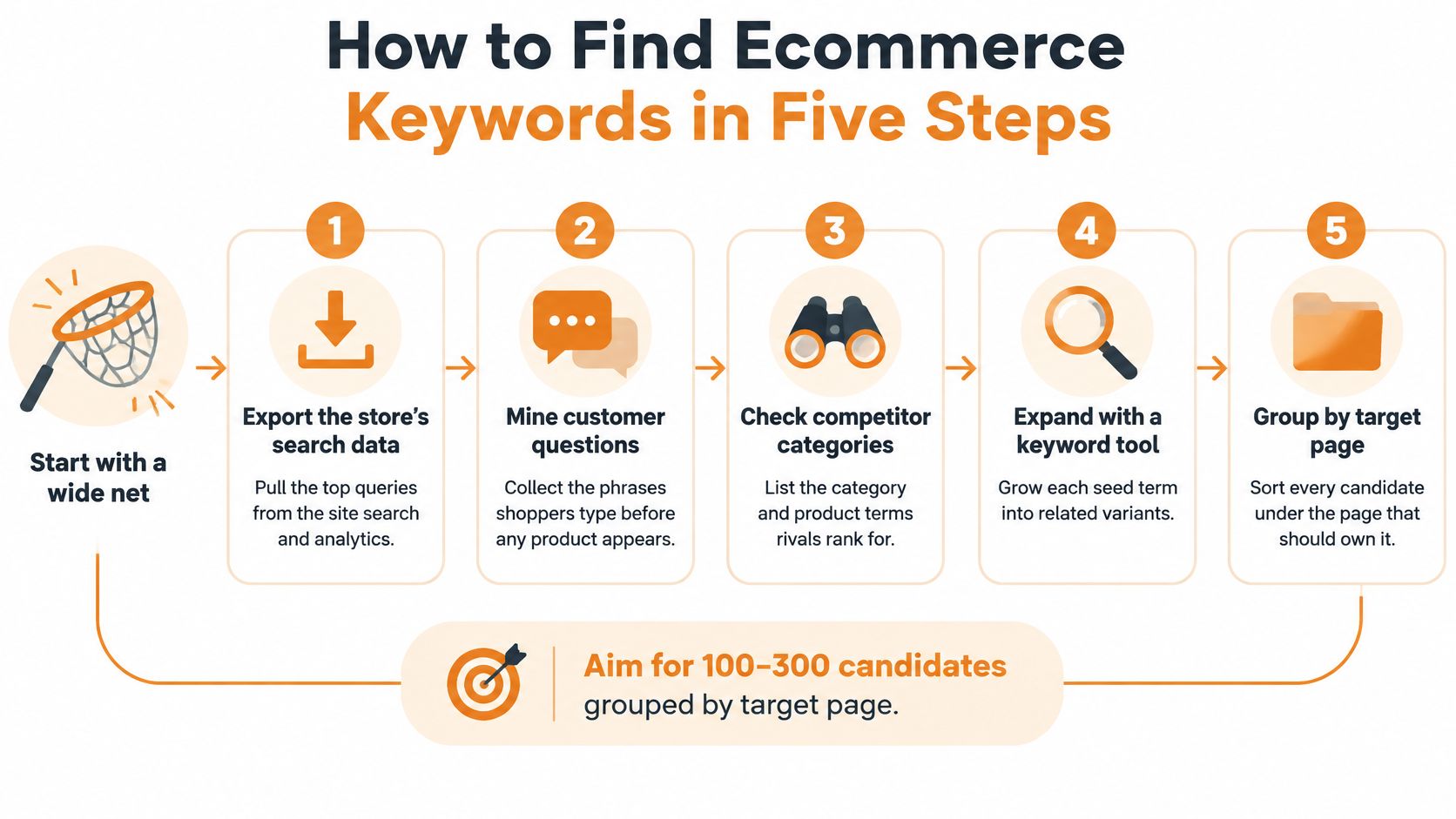
- Export the catalogue. Pull product titles, category names and attribute fields such as size, material, colour, origin and use case. Those fields are the modifiers shoppers type, so a shoe catalogue that records "waterproof", "women's" and "size 10" already contains three keyword patterns, and it's the only list that matches what you can ship.
- Mine search suggestions. Run each core category through Google autocomplete and the People also ask box, then pull the queries that already earn impressions in Google Search Console. Suggestions show raw demand; Search Console shows demand Google already associates with your pages, which is the faster of the two to win.
- Read your on-site search logs. Zero-result queries and repeat searches reveal the words shoppers use when your navigation fails them, such as "shoes for wide feet" when your filters only say "width". Fixing the filter label and the copy at once usually captures demand no external tool reports.
- Study competitor categories and marketplace suggestions. Note the product terms in their headings, filter labels and facet names. Marketplaces index shopper phrasing faster than brands do, so their suggestion list is a free vocabulary check on your own category structure.
- Expand every seed with modifiers. Combine each category with brand, size, use case, price, location and buying verbs, so "trail running shoes" becomes "buy trail running shoes Canada". This is the same expansion pattern we used for the mushroom chocolate brand, researching thousands of functional mushroom and chocolate-related terms to separate high-volume terms from low-competition ones.
A long list is correct here because ranking and filtering come next. The volume of long-tail variants also tells you where a dedicated page is worth building, which is the core of a long-tail keyword strategy.
Metrics to Read Before You Trust a Keyword
Every metric answers a different question and hides something different. Read them in the order below and treat each as a filter, not a verdict.
| Metric | Where to find it | Reading guide | Blind spot |
|---|---|---|---|
| Monthly search volume | Google Keyword Planner, Semrush, Ahrefs | Relative demand; compare inside one tool | Estimates vary between tools |
| Keyword difficulty | Ahrefs, Semrush, Moz | 0 to 100 within that tool's index; under about 30 is often reachable for a newer store, above 60 usually needs established authority | Relative to each tool's link index |
| Cost per click | Google Keyword Planner | High bids signal commercial value | Reflects paid bidding, not organic gain |
| SERP features | Manual check of live results | Shopping carousels and AI overviews take the top slots | Changes by query and location |
| Seasonality | Google Trends, Keyword Planner monthly data | Peaks show when to publish and stock | Short histories mislead |
| Conversion potential | Your analytics and sales data | Judge by your conversion rate on similar pages | Unknown for new products; use proxies |
Volume and difficulty
Monthly search volume is relative demand inside one tool's estimate, nothing more. Set the location to Canada before you record anything, and never compare a number from Ahrefs with a number from Keyword Planner in the same spreadsheet. Difficulty is a 0 to 100 score relative to the links each tool has indexed, so a score of 25 in Semrush is not a score of 25 in Moz.
Cost per click and SERP features
Cost per click tells you what advertisers are willing to pay to appear, which is a decent proxy for commercial value and a poor proxy for organic opportunity. Check the live results yourself before committing: if a query returns a shopping carousel, three product grids and an AI overview, the organic link below them earns a fraction of the clicks a plain result would.
Seasonality and conversion potential
Seasonality decides when copy goes live and when stock lands, and Keyword Planner's monthly breakdown shows it better than annual averages. Conversion potential is the metric that decides revenue and the one no tool reports. Use your own conversion rate on a similar page, or the closest proxy you have, and label the estimate as an estimate.
The rule that outranks the rest: a 90-search buying term usually sells more than a 5,000-search informational term. Volume measures curiosity; conversion measures fit.
Scoring and Prioritizing Keywords by Expected Orders
Estimated monthly orders are search volume times an assumed click-through rate of 10% for a page ranking in positions three to five, times the conversion rate. That 10% is a planning assumption, not a measurement, and it should stay visible in the sheet so nobody mistakes the output for a forecast.
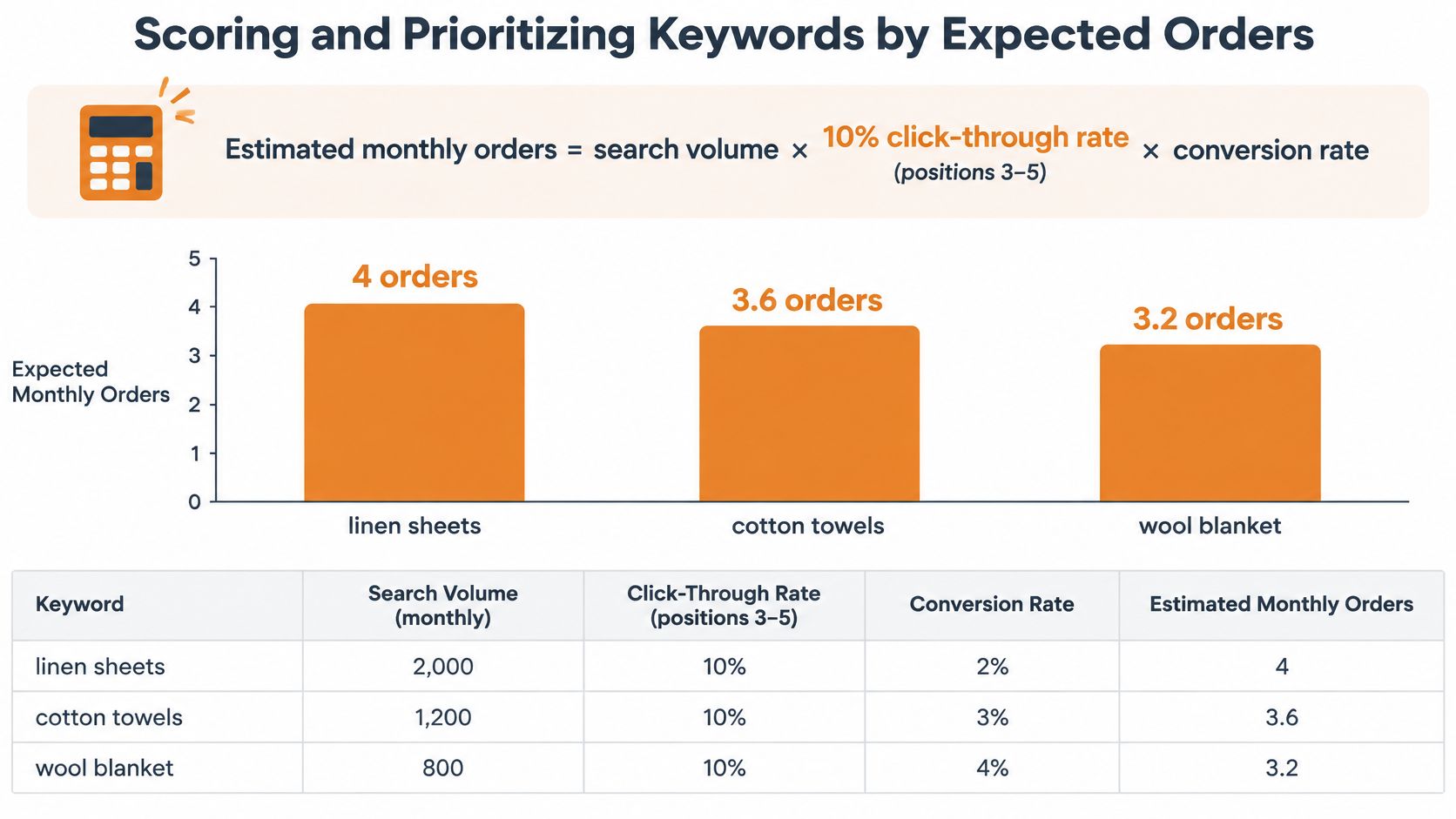
The arithmetic is simple enough to run in a spreadsheet, and it reorders the list fast. Here is a running shoe store with four candidates and illustrative values.
| Keyword | Difficulty | Est. orders per month | Priority |
|---|---|---|---|
| Waterproof trail running shoes women | 32 | 3.0 | Build now |
| Best trail running shoes | 71 | 8.6 | Build later |
| Canadian made running shoes | 9 | 0.8 | Quick win |
| How to choose trail shoe size | 18 | 0.3 | Support page |
Waterproof trail running shoes women leads the build order: 1,200 monthly searches, difficulty 32 and an assumed 2.5% conversion produce about 3.0 orders a month. It isn't the biggest number on the list, but it's the biggest number a page like yours can realistically capture within a couple of quarters.
Best trail running shoes produces more estimated orders on paper, because 4,800 searches at an assumed 1.8% conversion is 8.6 orders a month. Difficulty 71 is why it moves to build later. Chasing it now spends a year of effort for a position you probably can't hold yet.
Canadian made running shoes is the quick win. At 210 searches, difficulty 9 and an assumed 4% conversion it returns 0.8 orders a month, and the shopper searching it is close to buying. Low difficulty plus late-stage intent is the cheapest win available to a store without authority.
How to choose trail shoe size returns roughly 0.3 orders a month from 1,500 searches at an assumed 0.2% conversion. It earns its place as support content that feeds the product pages through internal links, not as a revenue page.
The four priority tiers
Build now goes to terms where volume, difficulty and conversion line up in the same quarter. Quick wins are low-difficulty terms with late-stage intent, which often means origin, delivery and sizing modifiers. Build later holds the high-volume, high-difficulty terms you'll revisit once internal links and content have built some authority. Support pages exist to answer questions and pass relevance to product and category pages.
Recalculate at 90 days. Difficulty moves, competitors publish, and conversion rates on new pages settle after a few weeks of traffic. A priority order that never changes is a priority order nobody is checking.
Three adjustments sharpen the ranking before you commit. Boost terms that answer shipping, returns or origin concerns, because they remove friction that would otherwise cancel the order after the click. Discount seasonal terms whose window closes before your page can realistically rank. Recheck scores after 90 days against actual impressions and orders rather than leaving the original estimates in place.
Special Cases and AI Prompts Standard Tools Miss
Low volume is not the same as low demand. Some buying questions have moved into longer prompts that keyword tools undercount, and a store that reads only volume will conclude the demand disappeared when it relocated.
The AI layer is real and growing unevenly. Deloitte's 2025 Canadian retail outlook reports that 50% of Canadians used AI in the previous three months in 2025, up from 33% the year before, and that 33% of Gen Z Canadians used AI for product research against 9% of Baby Boomers.
Prompts as hypotheses, not proven volume
Treat conversational prompts as tests. "Which product is safest for beginners", "compare ingredients and delivery options" and "best Canadian-made alternative" are the kinds of questions shoppers now ask a chat interface instead of typing four words into Google. Validate them from sources you already own: support emails, product reviews, live chat transcripts and on-site search. Then ask a few AI assistants directly and check whether they name your products or a competitor's.
Adoption is still uneven. In 2024, only 15% of Canadian online shoppers surveyed by Capterra had tried using chatbots to search for products, as Media in Canada reported. The layer is growing but far from universal, so it belongs in the plan as a hypothesis with its own test, not as a settled volume figure.
Three cases that break the standard workflow
Brand-new products have no search history at all. Research the category and the problem the product solves instead, and put the product name in a supporting role until people start searching it.
Regulated categories such as cannabis, CBD and supplements restrict what promotional wording can say. Keyword selection has to reflect both demand and compliance, which usually means informational and availability phrasing over direct claims. Our work in those sectors runs through informational, value-driven copy rather than direct promotion.
Seasonal gifting spikes need publishing months ahead of the peak, because a page that ranks in mid-December captured nothing. Map the publish date backwards from the month the seasonality curve starts climbing, not from the week you want the sales.
Map Each Priority Keyword to One Page Before Publishing
A ranked list is only useful once each priority keyword has a single owner page. Work this checklist for every priority term before any new copy gets written.
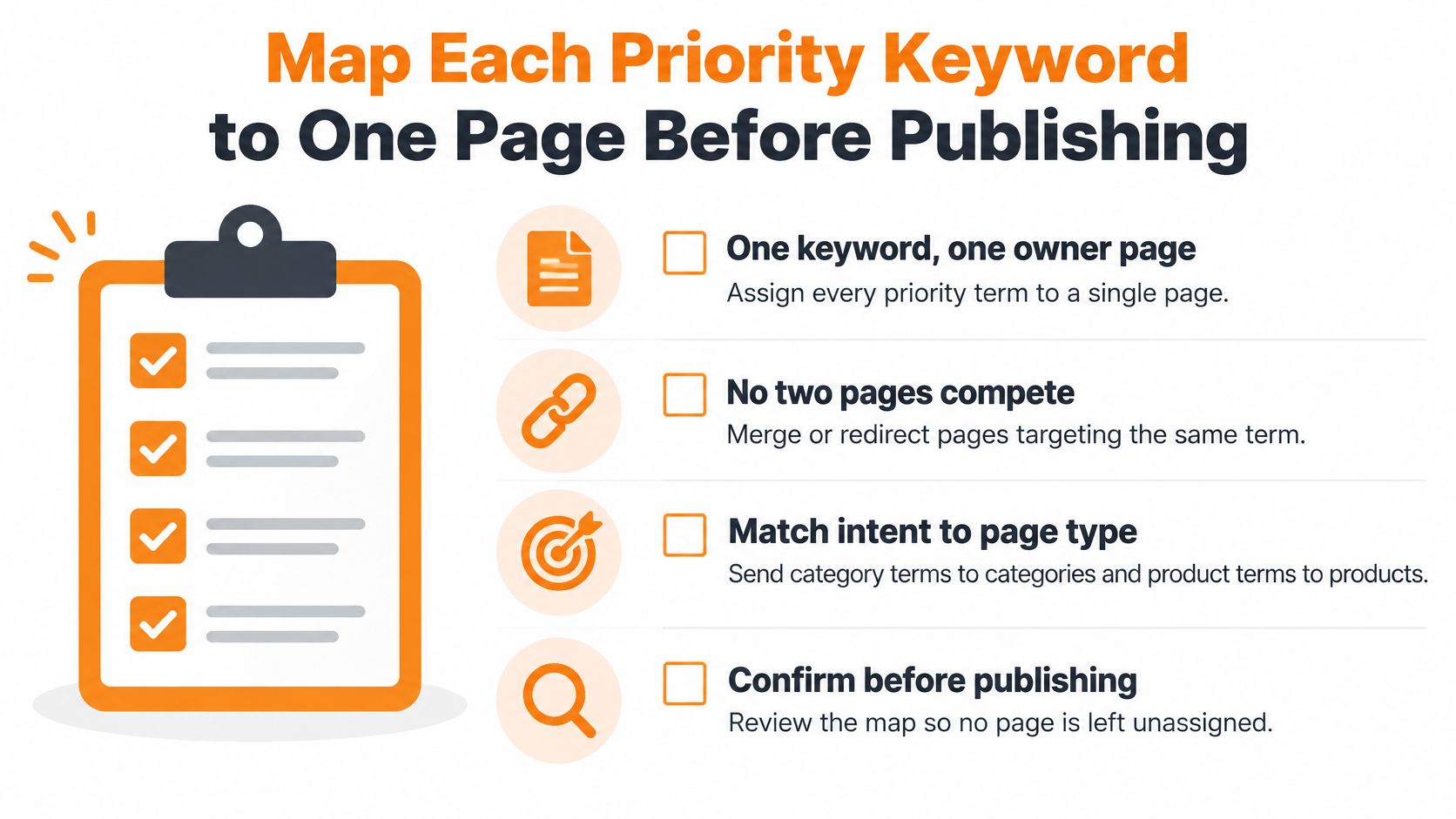
- Confirm the owner page for each priority keyword, and check that no two pages target the same primary term. Competing pages split internal links and usually both lose.
- Add two to five supporting modifiers to the page's filters, product attributes, subheadings and FAQs, such as "waterproof" or "wide fit". Modifiers widen relevance without changing what the page is about.
- Place the primary keyword in the title, H1, URL slug and first 100 words, written for shoppers first. If the sentence only makes sense to a search engine, rewrite it.
- Answer the trust and logistics questions on that same page: delivery times, returns, Canadian origin and how customer data is used.
- Log the target keyword, baseline ranking and conversion rate in one sheet, then review the scores after 90 days. Without a baseline, nobody can tell whether the work moved anything.
Our keyword research covers product, category and informational terms with a bias toward buyer intent, and the mapping step above is what stops those terms from landing on the wrong page. Work through the category page SEO guidance when the term needs a category rather than a product to carry it.
The first task this week is small: take the three highest-ranked keywords from your scoring table and assign each one an owner page. No new copy until those three pages have names.
Juiced Digital builds this kind of keyword research and page mapping for e-commerce brands, covering product, category and informational terms with a bias toward buyer intent, then scoring them by expected orders instead of raw volume. If your catalogue has outgrown its keyword list, or you're launching into a regulated or competitive category in Canada, we can audit what you already rank for and show you which terms are worth building pages around. Visit Juiced Digital to book a free consultation and see where the quick wins sit in your catalogue.
