

Your downtown location shows up every time you search, takes the calls, and collects most of your reviews. Your second branch, twenty minutes away, barely appears on the map, even though it offers the same services with a strong local team. That gap isn't bad luck. It's what happens when one brand tries to rank with one homepage, one shared profile, and copy copied across every town. Multi location SEO fixes that by treating each branch as its own local entity, with its own evidence, while keeping one coherent brand behind it.
What Multi-Location SEO Covers and Which Model Fits
Say a regional clinic group runs five sites across Metro Vancouver. The downtown branch ranks well for its core treatments, answers its reviews, and has current hours everywhere. The suburban branch uses the same service copy, points to the downtown phone number, and disappears from local results. Customers nearby find a competitor instead, not because the care is weaker, but because search engines can't tell that branch apart as a real, separate place.
Multi-location SEO means making each physical establishment visible in its own local market while keeping company level brand authority intact. That separation matches how businesses are counted in the economy. In December 2024, Canada had 1.36 million employer businesses and 3.48 million non-employer businesses with annual revenues above $30,000, and Statistics Canada counts each operating location separately, including multiple locations belonging to one business. One firm can therefore be many local entities in search, not one listing with extra addresses attached.
Business models and their main SEO risk
| Business model | Typical example | Main SEO risk |
|---|---|---|
| Single brand with company-owned branches | Clinic chain with five sites in Metro Vancouver | Duplicate pages and shared reviews |
| Franchise network | Franchised fitness studios | Templated copy and inconsistent listings |
| Multi-brand group | Holding company with three brands | Brand confusion and split authority |
| Agency managing client locations | Agency running forty clinic profiles | Data mixed between clients |
A single brand with company-owned branches has the cleanest setup, because one team controls the site, profiles, and data. Its risk is laziness at scale, where pages and reviews get pooled instead of assigned to the branch that earned them.
A franchise network adds local owners who edit listings, invent categories, or publish their own pages. You gain local knowledge, but you lose consistency unless head office owns the master record and the template rules.
A multi-brand group faces a different problem. Separate names need separate trust signals, and forcing them under one brand voice confuses customers and divides authority across sites that compete for similar terms.
An agency managing client locations must guard against cross contamination. One client's phone number, tracking tag, or review link pasted into another client's account can misdirect leads and corrupt reporting for months.
Place your business in one row by answering two questions. Do the locations share one brand name? Who controls each location's Google profile and website content? Your answers tell you whether you need central governance, franchise guardrails, separate brand architecture, or strict client separation before you build anything else.
Site Structure and Location Pages That Stay Distinct
A common initial mistake is debating design, keywords, and copy before deciding whether each branch should have its own page within a single site structure. Prioritize getting the URL pattern right first, as changing it later leads to redirects, lost internal links, and profiles linking to pages that no longer exist.
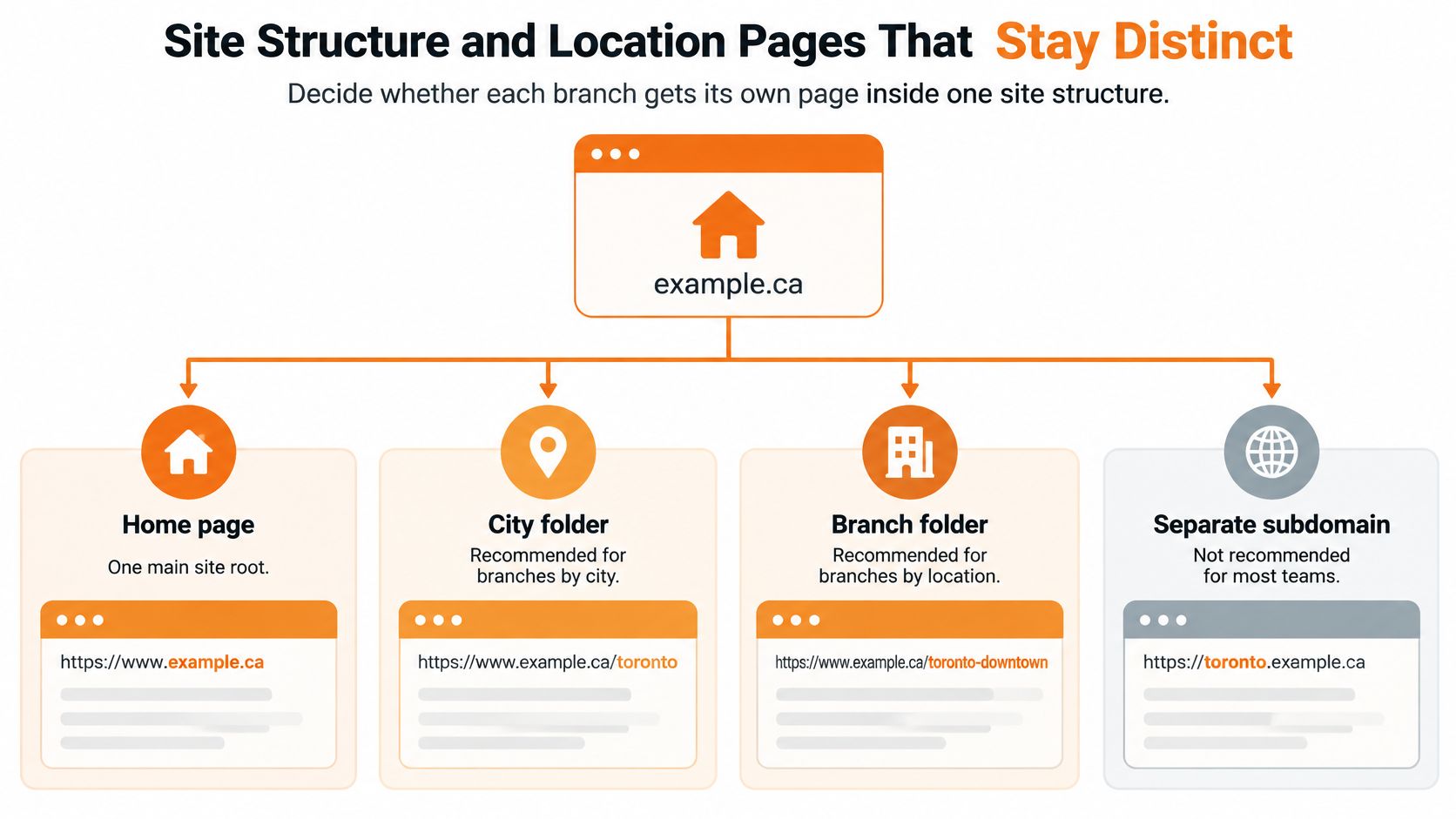
URL structures for multi-location sites
| Structure | Example URL | Best for | Main trade-off |
|---|---|---|---|
| Folder by city | example.com/locations/vancouver/ | Most brands with under 100 locations | Shares domain authority but needs strict page templates |
| Folder by branch | example.com/locations/vancouver/downtown/ | Dense markets with several branches per city | Deeper hierarchy and more pages to maintain |
| Subdomain per location | vancouver.example.com | Brands running separate technology stacks | Authority is split from the main domain |
| Separate domain per location | vancouverclinic.ca | Only distinct brands that need their own identity | Loses shared authority and doubles upkeep |
I would recommend folders by city or by branch for most brands under a single domain. Folders inherit the authority your homepage and service pages have already earned, and you maintain one analytics property, one sitemap system, and one set of templates. Subdomains and separate domains sound tidy, but they split authority and force each location to earn trust almost from scratch. Reserve them for distinctly separate brands or technology constraints you can't remove.
What every location page must contain
A template is fine. Identical pages aren't. Every branch page needs fields that prove a real place operates there:
- Civic address and phone: The branch's own address and local number, never head office details.
- Hours: Regular and holiday hours that match the profile exactly.
- Services at this branch: Only services offered there, with local availability notes.
- Staff or facilities: Named practitioners, team photos, equipment, or accessibility details specific to that site.
- Service area statement: Real neighbourhoods served, written in the language customers use.
- One local proof point: A storefront photo, a neighbourhood case outcome, or reviews earned at that branch.
Add the technical layer under the copy. Give each branch one canonical URL, so print, social, and directory links consolidate instead of creating variants. Publish a LocalBusiness structured data block on the page that uses the same branch identifier as the Google profile, following a consistent approach to local business schema so name, address, phone, hours, and coordinates match across the page and the markup. List only open locations in your sitemap, because submitting closed branches wastes crawl attention and keeps dead pages discoverable.
Practical rule: If you swap the city name and the page still reads perfectly for another branch, you haven't written a location page yet.
Closures need a rule before they happen. When a branch closes, redirect its page to the nearest open branch or to the parent location hub, update internal links, and remove it from the sitemap and store locator. Don't leave a soft 404 that tells customers the page moved while giving search engines nothing useful to index.
City pages with only the town name swapped read as doorway pages to search engines and customers alike. They promise local relevance, deliver generic copy, and funnel everyone to the same contact form. A distinct page does the opposite. It answers who works there, what happens there, how you get there, and why that branch fits a person searching from that neighbourhood right now.
How to Set Up and Maintain Each Google Business Profile
Each branch needs its own verified Google Business Profile, because the profile is what places that branch in the map pack. A strong website can't compensate for a missing, duplicate, or unverified profile. Treat profile setup as data entry from a controlled record, not as a creative exercise branch managers improvise.
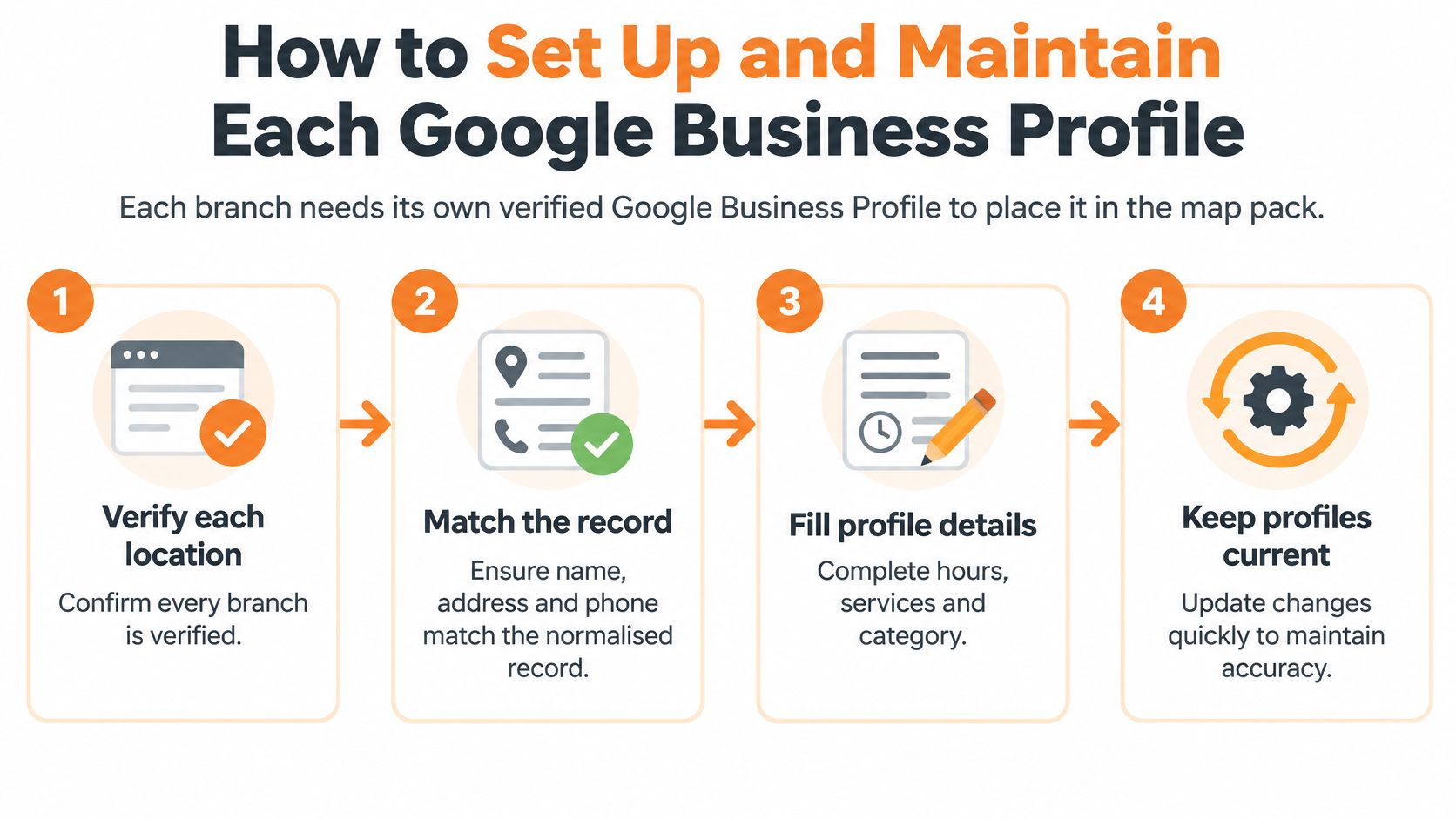
Eight steps for every branch
- Verify each location under business control. Use ownership or manager access the company controls, documented in your location register. The common slip is one shared personal login across branches, which locks you out when that person leaves.
- Choose categories that match real services. Set the primary category to the branch's main service, and add secondary categories only for services offered there. Copying every category from a flagship dilutes relevance for smaller sites.
- Enter name, address, and phone from the normalised record. Use the exact trading name with no keywords or city names added. A disciplined Google Business Profile setup prevents the small variants that later split citations and reviews.
- Set regular and holiday hours, and mark temporary closures. Customers forgive a closed branch faster than a wasted trip. Forgetting holiday hours is the slip that generates angry reviews in January.
- List each service with a short description. Link services to the matching location page, not the homepage. Generic service lists copied across branches tell customers nothing about local availability or booking rules.
- Upload photos taken at that branch. Use storefront, interior, and team images from the actual site. Stock photos and flagship images reused everywhere weaken trust when the premises look different.
- Answer reviews and questions within two business days. Name the branch and neighbourhood naturally in replies. Silent profiles look unmanaged, and unanswered questions get answered by strangers instead.
- Mark a closed branch as closed on the day it closes. Don't leave it open to catch stray calls. Incorrect hours and addresses send customers to locked doors and damage the whole brand.
Finish with a local check. Search from that neighbourhood, on a phone, for your main service plus the area name. The right profile should show the correct pin, hours, and phone number, and its website link should land on that branch's page. If any field points to another location, fix the master record first, then update the profile from it.
Citations and NAP Consistency Across Directories
Directories and maps match records by consistency, so each branch must read identically everywhere it appears. This isn't about chasing hundreds of low value listings. It's about entity resolution, making sure Google, Apple Maps, Bing, review platforms, and industry directories all recognise separate mentions as the same physical establishment, and different branches as different establishments.
That starts with address standardisation. Statistics Canada's National Address Register provides standardized, georeferenced civic addresses, validates addresses using two independent data sources, and identifies British Columbia with province code 59. Build your routine the same way. Store each branch as a structured address object with civic number, street name, unit, municipality, province code, and postal code. Validate it against a geospatial source, then generate every listing, location page, and schema block from that single normalised record.
Standard format for each location data field
| Data field | Standard format | Common error | Check frequency |
|---|---|---|---|
| Business name | Exact trading name, the same on every listing | Adding the city or a keyword to the name | Monthly |
| Street address | Civic number, street type and unit as in the normalised record | Street abbreviations that differ between directories, missing unit numbers | Monthly |
| Postal code | Six characters with a space, such as V6B 1A1 | Using a neighbouring branch's postal code | Quarterly |
| Phone | Local number with area code, one per branch | Tracking numbers on some listings but not others | Monthly |
| Hours | Same regular and holiday hours on profile, site and directories | Holiday hours missing from directories | Before each holiday period |
| Primary category | Same category wording where the directory allows it | Inventing new categories | Quarterly |
Don't let postal code alone decide city targeting. A postal code can cross geographic units and cover a wider area than the municipality, so combine it with the verified civic address, coordinates, municipality, and the branch's real service area. That's especially important near municipal boundaries in Metro Vancouver, where a Surrey address and a Delta service area can sit minutes apart.
Structured local citation building works when it distributes your controlled record to the platforms that matter, rather than spraying variants across the web. Prioritise core maps and data sources, then high value industry directories for clinics, trades, legal, or hospitality.
A citation you can't update after a move or closure isn't an asset. It's a future error with your phone number on it.
Run a monthly reconciliation. Compare directory records against the normalised record and your CRM, log every mismatch, and send each one to a named person for review. Fixing listings ad hoc, whenever someone notices a problem, guarantees the same unit number, abbreviation, or old phone number keeps reappearing through aggregator feeds.
Local Content and Reviews That Differ by Branch
A customer visiting a Vancouver branch often isn't making a single purpose trip. According to Square's Canadian local economy report, 55% of Vancouver sellers share regular customers with at least one other local business, and 74% of Canadian consumers say they visit multiple local businesses on the same trip. Your branch page competes inside that trip, not in isolation against a map pin.
That changes what local content should do. Uniform templates answer what your brand sells. Trip level content answers whether this branch fits the customer's route, timing, and next stop.
Five trip questions each page should answer
- What's nearby: Complementary businesses and landmarks named by street, so customers can place you in their route.
- How do I get there: Parking options, transit stops by name, bike storage, and step free access where it exists.
- Can I collect or receive it: Pickup and delivery areas with clear boundaries, cut off times, and fees where they apply.
- Can I book now: Live availability and the next open slot at that branch, not a generic contact form.
- What's specific here: Offers, practitioners, stock, or services that apply only to that location.
Operational convenience separates branches with similar rankings. The same Square survey found pickup or delivery influences 34% of consumers, mobile payment 31%, and reservations or booking 27%. Publish those details per branch, because a downtown site with easy pickup and a suburban site with free parking win different customers for different reasons.
Add proof that only that branch can claim. Use questions real customers ask at that location, credentials for staff who work there, and short case examples with the neighbourhood named. Don't move a flagship testimonial onto a new branch page to fill space.
Reviews follow the same rule. Send each customer a link or QR code for that branch's own profile, through receipts, follow up emails, or your booking system. Never use a shared link that sends reviews to head office or your strongest location. Don't offer incentives, and don't gate reviews by screening unhappy customers into private forms. Reply to every review with the branch name and neighbourhood, and address the specific service mentioned.
A centralised brand page with uniform location templates creates less value than branch pages built around local movement, accessibility, and conversion logistics. Customers choose the branch they can reach, book, and combine with the rest of their trip.
Measuring Each Location and Its AI Visibility
Map rankings no longer show the full picture of local visibility. The example below shows the kind of per location reporting view you need when branches perform very differently under one brand.
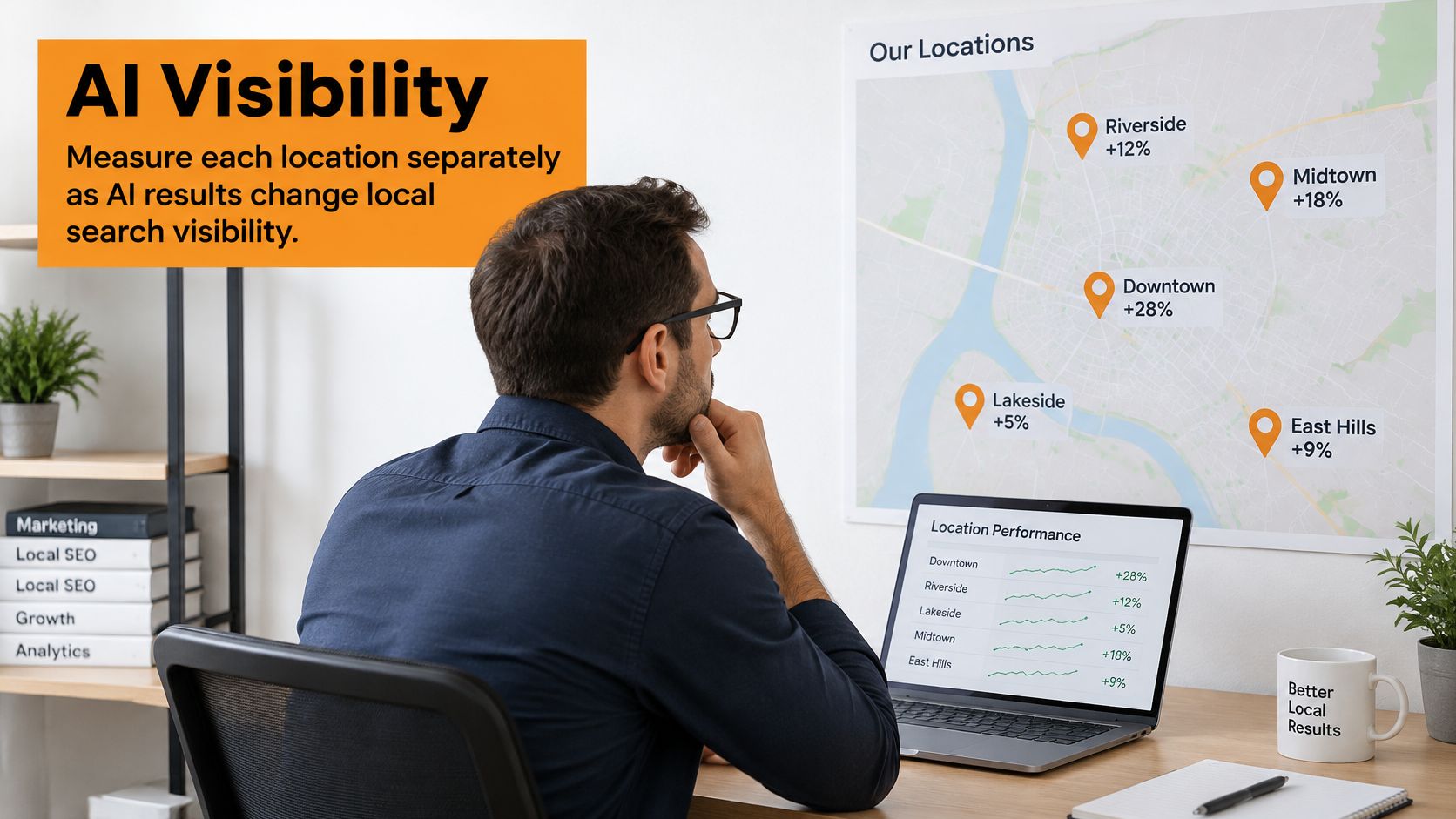
A 2025 Whitespark study of local-business searches found AI Overviews appearing for an average of 68% of tested queries, while local-pack results appeared for only 39%. A branch can hold a map position and still be absent from the AI answer a customer reads first, especially for informational questions about services, eligibility, pricing factors, or booking rules.
AI systems need verifiable evidence to distinguish one branch from another. Publish location specific service availability, practitioner credentials, accessibility, booking rules, delivery boundaries, and independently attributable customer outcomes. Identical copy gives an answer engine no reason to name your Surrey branch for a Surrey question instead of your Vancouver flagship, or instead of a competitor with clearer local evidence.
Metrics to track per location
Report one row per branch, every month, with the same fields:
- Calls: Tracked calls from the profile and location page, tagged with a location ID.
- Direction requests: A strong signal of visit intent from that neighbourhood.
- Bookings and orders: Appointments, reservations, and pickup orders assigned to the correct branch.
- Map visibility: Local pack impressions and profile views for core service terms.
- Assisted conversions: Branch page visits that precede a call, form, or booking elsewhere in the journey.
Add a monthly AI sampling routine. Choose 20 to 30 queries per branch that mix service, neighbourhood, and question formats. Record whether the branch is named in the AI answer, appears in the local pack, or ranks organically, and note what evidence competitors cited. Repeat after content updates so you can see which additions changed visibility.
The short walkthrough below covers how local signals are evaluated, which helps when you compare AI mentions against traditional rankings.
Set expectations. SEO generally requires 3-6 months to produce desired results, so judge location trends over quarters rather than weeks. Use a monthly dashboard by branch for operational fixes, and a quarterly review to decide which branches need new evidence, which pages should be consolidated, and which locations are strong enough to support a rollout pattern for new sites.
Run a Location Audit Before You Add Another Branch
Don't open a new location on top of broken location data. Audit what you have first, score each item yes or no, and treat every no as work that will multiply if you copy your current setup to another branch.
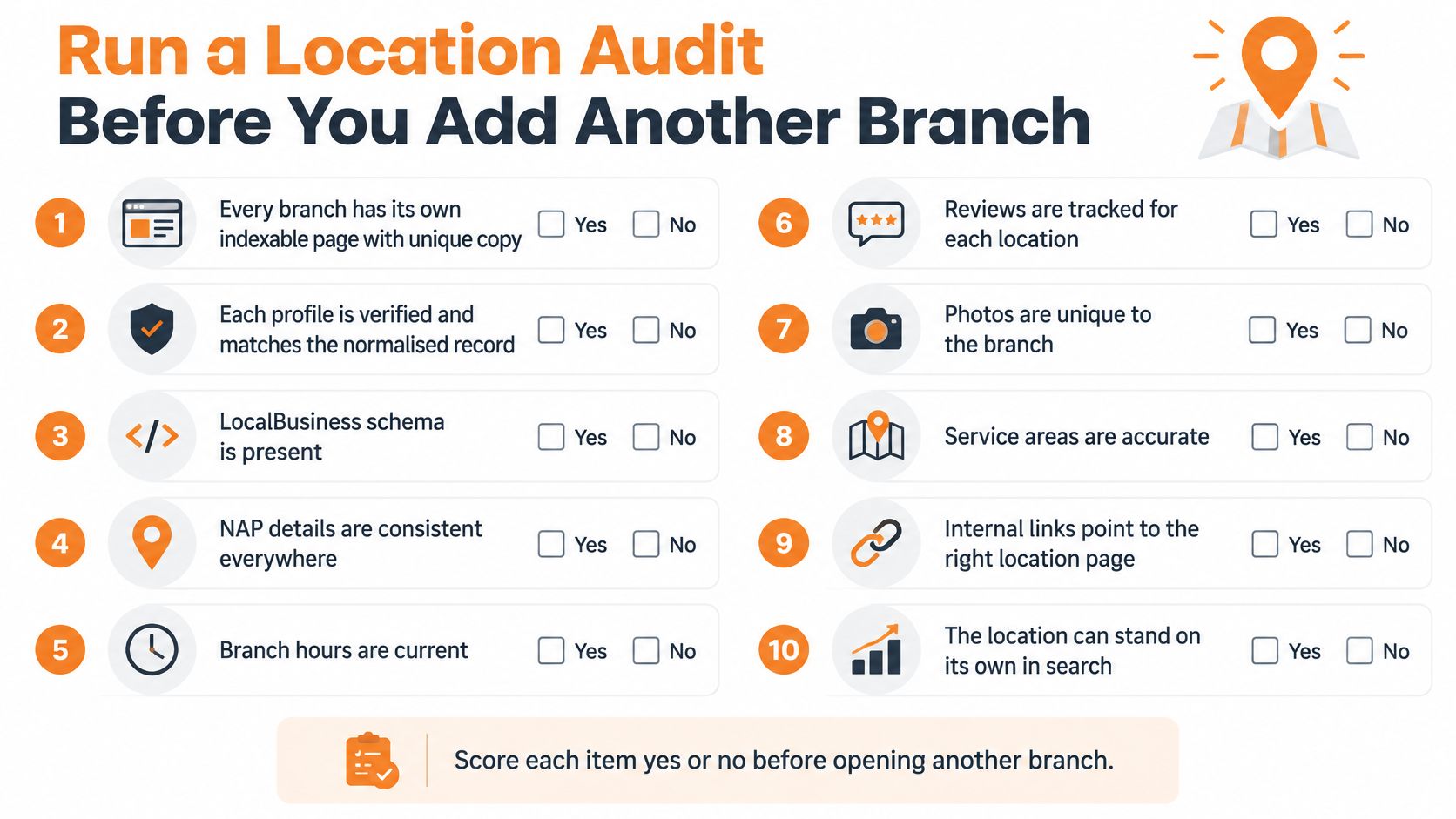
Ten item location checklist
- Unique page: Every branch has its own indexable page with unique copy.
- Verified profile: Each profile is verified and matches the normalised record.
- Matching identifier: LocalBusiness data uses the same branch identifier as the profile.
- Clean sitemap: The sitemap lists only open branches.
- Closure redirects: Closed branches redirect to the nearest open branch or the parent hub.
- Branch review links: Reviews are requested through each branch's own link.
- Response time: Reviews are answered within two business days.
- Trip answers: Branch pages answer parking, transit, pickup, and booking questions.
- Tracked conversions: Each location has a tracked calls, bookings, or orders path.
- Reporting row: A reporting row exists for each branch.
The most frequent failures come from familiar slips. One shared login across branches leaves profiles unmanaged when staff change. City only templates read as doorway pages and fail items one and eight together. Closed branches left as soft 404s keep sending customers and crawlers to dead ends.
Decision rule: If three or more items fail, fix your current branches before adding another one.
A new branch doesn't dilute existing gaps. It multiplies them across another profile, another page set, another batch of citations, and another reporting row nobody trusts.
You can run this audit in house with the checklist and your master location record. If you'd rather have an outside review, Juiced Digital, a Vancouver based agency, offers a free consultation. During the consultation, we audit an existing website for search engine optimization and marketing funnels, and we build SEO optimized local landing pages for neighbourhoods and key delivery terms in a client's service area. Our local SEO results case studies include Tree People. Treat that as one option alongside doing the work internally, not as a substitute for owning your location data either way.
If your branches are competing with copied pages, mixed up listings, or reviews landing on the wrong profile, we can audit your current setup and build location pages and profiles that give each branch its own evidence in search. Start with a free consultation through Juiced Digital and get a clear, branch by branch plan before you add another location.
