
You search your company's name and see a competitor, an old address, or nothing at all. The front desk starts receiving fewer calls, your staff open laptops to compare results, and the first assumption is usually that Google has removed the listing. Sometimes it has. Often, the profile still exists, but it isn't eligible, trusted, or competitive enough to appear where customers are looking.
The useful question isn't only “why is my business not showing on Google Maps?” It's which visibility failure are you dealing with? A missing profile, a hidden profile, a suspension, a verification problem, and a weak local ranking can look similar from the outside, but each requires a different response. The fastest path is diagnosis first, followed by the smallest appropriate fix.
When Your Business Vanishes from Google Maps
A customer searches your business, finds an old address or competitor, and calls reception asking whether you have closed. Meanwhile, the listing still appears in Business Profile Manager. That mismatch usually means public visibility has failed, not necessarily that Google deleted the profile.
Start with diagnosis, not edits. Search the exact business name in a signed-out or incognito browser, open Google Maps directly, and repeat the search from nearby locations. Then search your main service with the city or neighbourhood. A profile that appears for its brand name but not for service searches is usually facing a relevance or ranking problem. A profile absent from every view requires an account-status and eligibility check.
Practical rule: Confirm that Google allows the profile to appear publicly before changing its details.
Google Business Profile remains the main visibility layer for Maps-based local discovery in Canada. Canadian industry summaries report that the local Map Pack appears for about 93% of searches with local intent, as reported by Canadian local SEO statistics. A profile can still be present in the account while remaining unverified, restricted, poorly matched to the search, or hidden by weak ranking signals.
The triage sequence
Use this order so routine edits do not obscure an account problem:
- Confirm public existence. Open Business Profile Manager and check for a public profile URL, verification prompt, suspension notice, or processing message.
- Identify the failure state. Separate a missing profile from a weakly ranking profile, a suspension, a soft suspension, or a listing still processing an approved change.
- Check eligibility and legitimacy. Review ownership, business type, address, service area, and category. Service-area businesses must genuinely serve the areas they list, and a virtual or false address can create a policy problem.
- Correct relevance signals. Review the primary category, services, hours, website details, and local landing pages.
- Build authority last. Strengthen genuine reviews, citations, and locally relevant website signals only after the profile is eligible and publicly visible.
The correct response depends on the failure state. A wrong category or incomplete field may be fixed quickly. A suspension, ownership dispute, duplicate listing, or false address can require documentation and review. Waiting makes sense after legitimate verification or profile changes that are still processing, but it will not resolve a policy violation or an ineligible service area.
Missing, Hidden, or Suspended
These three conditions often produce the same complaint, but their evidence is different. A missing profile usually exists in the dashboard but has never gained a public presence, often because verification is incomplete or Google hasn't finished processing a new listing. A hidden profile is live and verified, yet it ranks so weakly for relevant searches that the owner sees it more easily than customers do. A suspended profile has been removed from public view because Google has restricted or disabled it.
Google states that verification confirms ownership and is required before a business can publicly appear on Search or Maps, as explained in its Canadian Business Profile FAQ. Google also explains that profiles violating its guidelines may be disabled or suspended, which makes account status a more urgent issue than optimisation.
| Failure Mode | What You See in Search/Maps | What You See in GBP Dashboard | Typical Cause | Where to Go Next |
|---|---|---|---|---|
| Missing | No public profile by name, or no visible Maps result | Listing exists but lacks full public visibility | Unverified profile, pending activation, new listing processing | Check verification and public status |
| Hidden | Profile may appear by exact name but not for service searches | Dashboard looks normal | Weak category fit, distance, relevance, reviews, or prominence | Repair ranking signals and validate search scope |
| Suspended | Profile disappears from public Search and Maps | Suspension, disabled, or restriction notice may appear | Guideline violation, ineligible address, duplicate, or account issue | Correct the violation and request reinstatement |
| Soft suspension | Owner may access the profile, but customers cannot find it | No obvious warning, or profile appears normal internally | Public indexing or account-level restriction | Contact support and request a status review |
Three quick tells
Search the exact name first. If nobody can find the profile, treat verification, restriction, and suspension as higher-priority possibilities. If the profile appears by name but not for “service plus city” searches, relevance, distance, and prominence are more likely.
A “Profile disabled” notice is not a ranking signal. It's an account-status event. Don't respond by creating a new profile, because a duplicate can complicate ownership and split the business's public information.
If the dashboard appears healthy but the public listing is absent, document the discrepancy with screenshots and test from a signed-out account. That soft-suspension pattern needs support investigation, not a random sequence of category and address edits.
Verification and Ownership Problems
Verification is the gate that comes before local SEO. If Google hasn't confirmed that you own and represent the business, improvements to reviews, service pages, or citations may not restore public visibility.
Open Business Profile Manager and check the verification state directly. A pending postcard, rejected video, failed phone method, or request for reverification can leave the listing in limbo. Google's verification guidance explains that available methods vary by eligibility, so use the strongest legitimate option Google offers rather than repeatedly submitting weak or inconsistent evidence.
Check the account before changing the profile
Ownership problems create false diagnoses. Confirm that you're signed into the Google account that owns the profile, not merely an account with manager access. Review pending invitations, recent ownership transfers, and agency permissions, then identify whether another profile represents the same business.
Duplicates are particularly damaging when one listing holds the reviews and another contains the current phone number or website. Consolidate or remove the duplicate through the proper process. Creating another profile to “start fresh” usually adds another entity for Google to reconcile.
For a practical walkthrough of the foundational fields, use this Google Business Profile setup guide. It's useful before you submit verification because the business name, category, address, phone, and website should describe the same real-world operation.
Watch for soft suspension signals
A soft suspension can look deceptively normal. You may be able to open and edit the listing, while customers see nothing in Search or Maps and the dashboard offers no clear reinstatement route. Compare the public result from a signed-out browser with the internal profile, save screenshots, and record recent edits.
Don't add location keywords, taglines, or promotional language to the business name to force relevance. The name should match the actual business name, and keyword stuffing can trigger another review or block verification. Fix ownership, duplicates, and verification first. Only then should you move to categories, service areas, and authority signals.
Categories, Address, and Service Area Setup
A valid profile still needs to describe the business accurately. Google Maps weighs relevance, distance, and prominence, so the primary category and location configuration determine whether the profile can match the searches you care about.
Choose the category that best describes the service customers are seeking. A Vancouver electrician shouldn't select a broad contractor category just because it sounds more expansive. A clinic should use the category that reflects its principal patient service, not the legal entity's corporate structure. Secondary categories can add context, but irrelevant categories dilute the profile's meaning and create contradictions.
Match the profile to the real operation
A storefront with customer visits should use a legitimate public address that customers can find. A service-area business that travels to customers may hide its address, but it still needs to operate from a real eligible location and represent its service area accurately.
Virtual offices, PO boxes, mail drops, and coworking receptions create serious eligibility risks when they don't represent a staffed business location. Canadian guidance identifies these setups, incorrect hidden-address configurations, and overbroad service areas as common causes of non-visibility, as discussed in why Canadian businesses disappear from Google Maps.
| Setup Type | Address Visible on Maps | Best For | Common Risk |
|---|---|---|---|
| Storefront business | Yes | Customer-facing shops, clinics, restaurants, and offices | Using an address customers can't actually visit |
| Service-area business | Usually hidden | Trades, mobile services, and businesses visiting customers | Claiming areas the business doesn't genuinely serve |
| Hybrid business | May be visible if eligible | A real location plus customer visits and field service | Mixing storefront and service-area settings inaccurately |
| Virtual office | Should not be used as a business location | Not an eligible substitute for a real operating location | Suspension or disabled profile |
Keep the service area credible
A wide service radius may appear attractive, but it weakens practical relevance when the business rarely travels that far. If the owner lives in one BC city but serves customers in another, configure the profile around the actual operating model and customer-facing service area, not the owner's preferred city.
Review the primary category, address visibility, service-area entries, and secondary categories together. Then use this Google Business Profile editing guide to make controlled changes. Avoid changing the name, address, category, and service area simultaneously, because you'll lose the ability to identify which edit triggered a review or visibility change.
NAP Consistency and Local Authority Signals
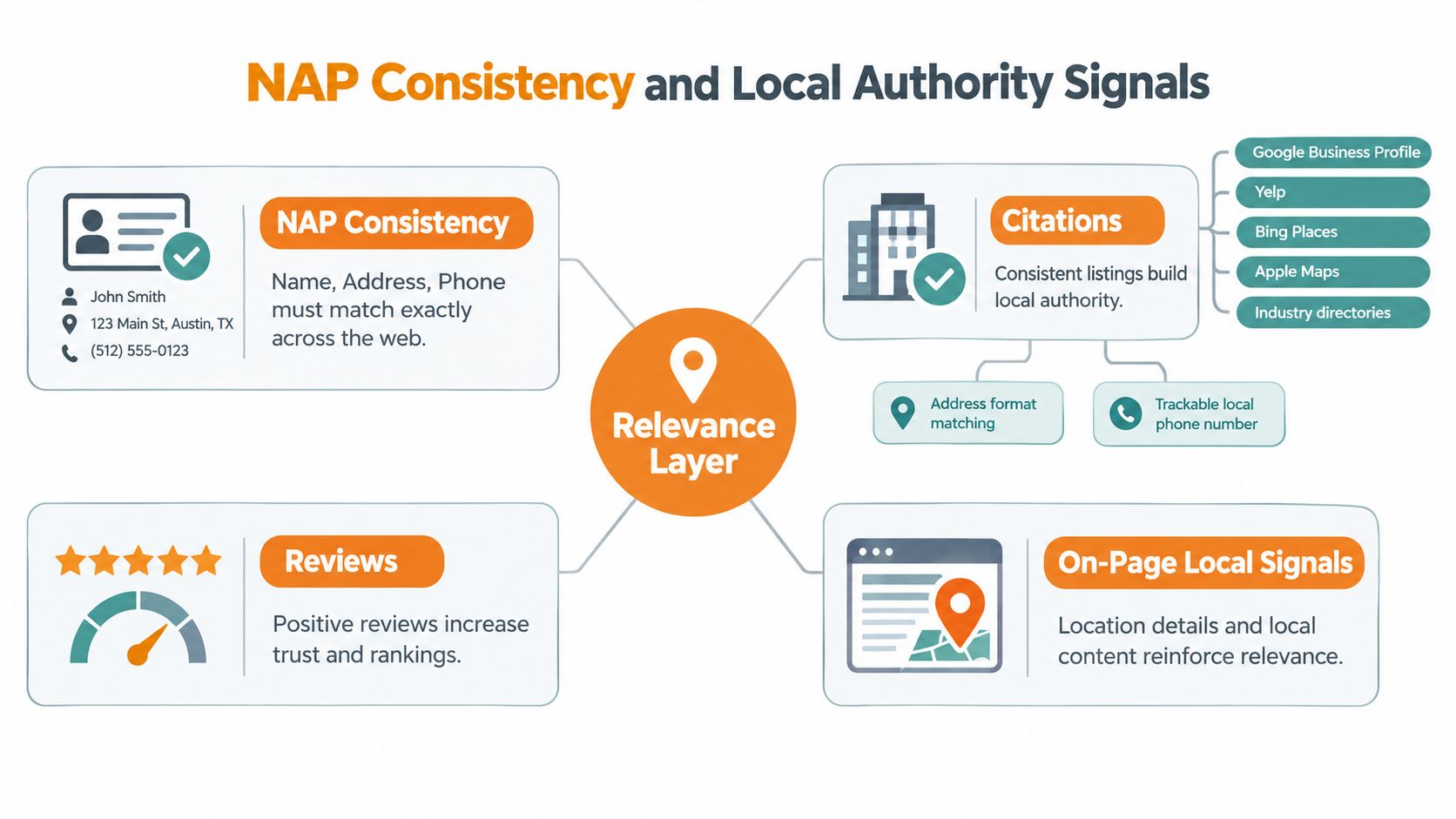
Once the profile is eligible and correctly configured, assess whether Google can connect the business across the web. NAP consistency, the alignment of name, address, and phone details, supports that connection across the Google Business Profile, website, directories, and relevant industry platforms.
Small differences can create avoidable ambiguity. “123 Main Street, Suite 4” and “123 Main St” may identify the same location to a customer, while inconsistent suite details, phone numbers, abbreviations, or business names make automated matching less reliable. Audit the website, Google Business Profile, Apple Maps, Bing Places, Yelp, trade directories, and major industry platforms. Correct outdated records or remove obsolete profiles where possible. Conflicting listings can weaken trust even when the profile itself is verified.
Reputation is more than a star average
As noted earlier, complete, consistent profiles tend to earn stronger engagement, but reviews add another layer of local trust. Review volume, rating, recency, and the relevance of customer comments can all affect how competitive a profile appears. These signals do not override poor proximity, an unsuitable category, an ineligible address, or an unresolved suspension.
A high rating alone cannot restore a hidden or restricted listing. Ask genuine customers for honest feedback, respond professionally, and avoid manufactured review language or incentives that distort the process. Reviews should describe real experiences, services, and locations without coaching customers to repeat keywords.
Reinforce the location on the website
The website should confirm the same entity and service geography as the profile. Use a clear contact page, matching business details, an embedded map where appropriate, LocalBusiness schema based on real information, and service pages that explain the communities the business genuinely serves.
Internal links between service-area pages and relevant service pages help users and crawlers connect each offering with its location. Avoid thin city pages that only replace one place name with another. A detailed Vancouver plumbing page should explain actual coverage, customer needs, travel limits, and local context.
For citation work, local citation building helps organise directory corrections and locate records that still publish obsolete NAP details. The objective is selective accuracy, not collecting every available listing. Prioritise authoritative, relevant references and document each correction so later audits can distinguish unresolved conflicts from completed updates.
A Prioritized Troubleshooting Order
Random edits create noise. Use a fixed sequence, record every change, and define what completion looks like before moving to the next layer.
Account status comes first. Check for suspension, disabling, restriction, or a public and private visibility mismatch. If Google has removed the profile, submit the reinstatement request through the official Business Profile reinstatement process after correcting the underlying issue. Don't spend time rewriting service descriptions while the account is restricted.
Resolve ownership and duplicates. Confirm the correct owner account, withdraw stale invitations, and identify duplicate profiles. Completion means the legitimate profile is controlled by the right account and no competing listing contains conflicting core details.
Finish verification. Use the available phone, SMS, postcard, video, or other legitimate method. Google's Canadian support documentation confirms that verified profiles are the ones eligible for public Search and Maps visibility. If verification repeatedly fails, preserve the error messages and evidence rather than submitting the same incomplete request.
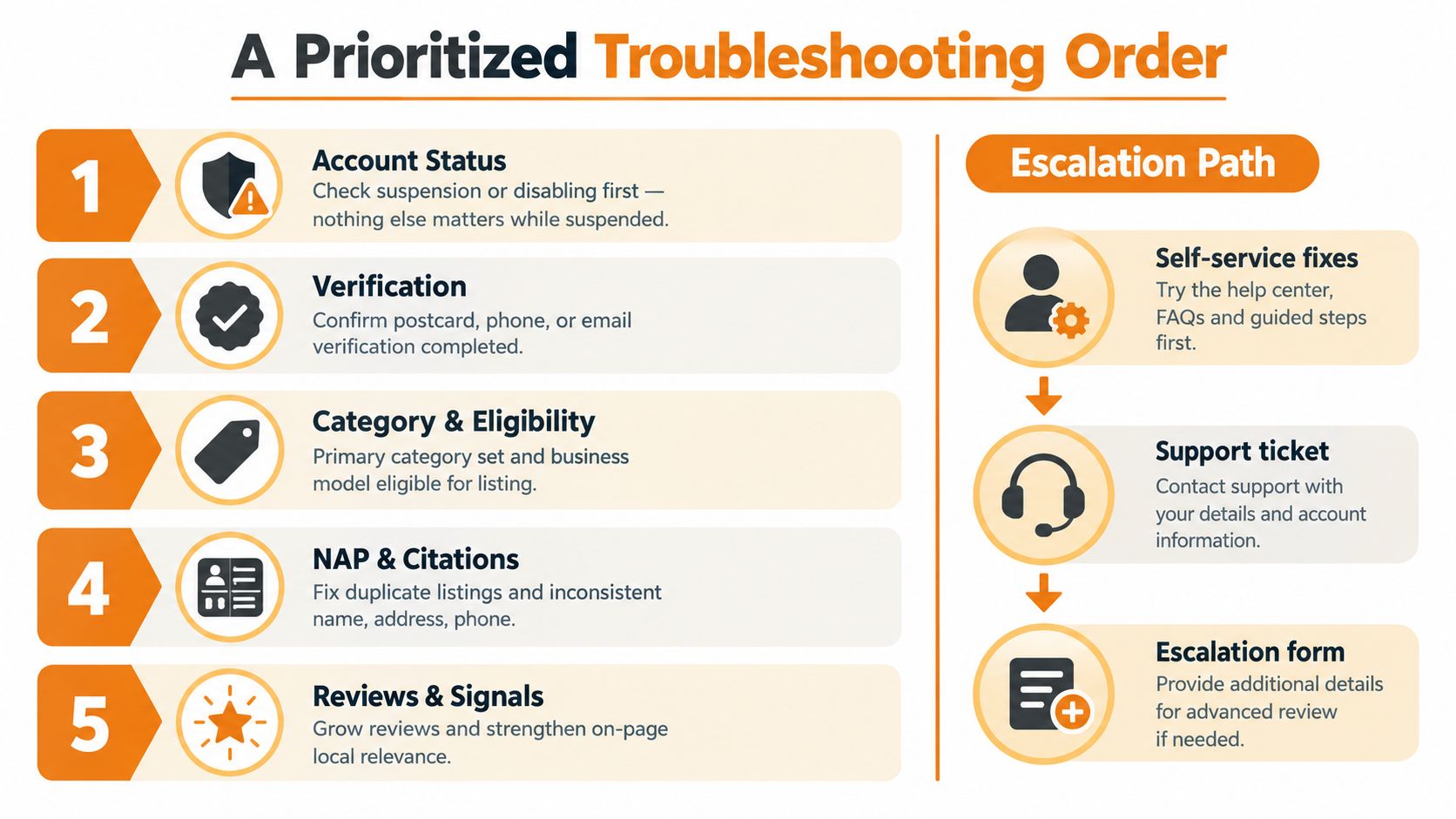
Validate category and eligibility. Confirm the primary category, real-world address, service-area model, hours, phone, and website. Completion means the profile accurately represents how customers interact with the business.
Repair NAP and authority. Correct directories, strengthen relevant website pages, and build genuine reviews. Completion means the core business details match across important platforms and the profile has a coherent local relevance story.
Use the support form for verification, ownership, or policy-specific issues. Use the reinstatement form for a disabled or suspended profile. The Google Business Profile Help Community can expose patterns in complex cases, while Google Ads support chat may provide another route when ordinary support tickets stall, though it doesn't replace the Business Profile appeal process.
When to Escalate and What to Do Next
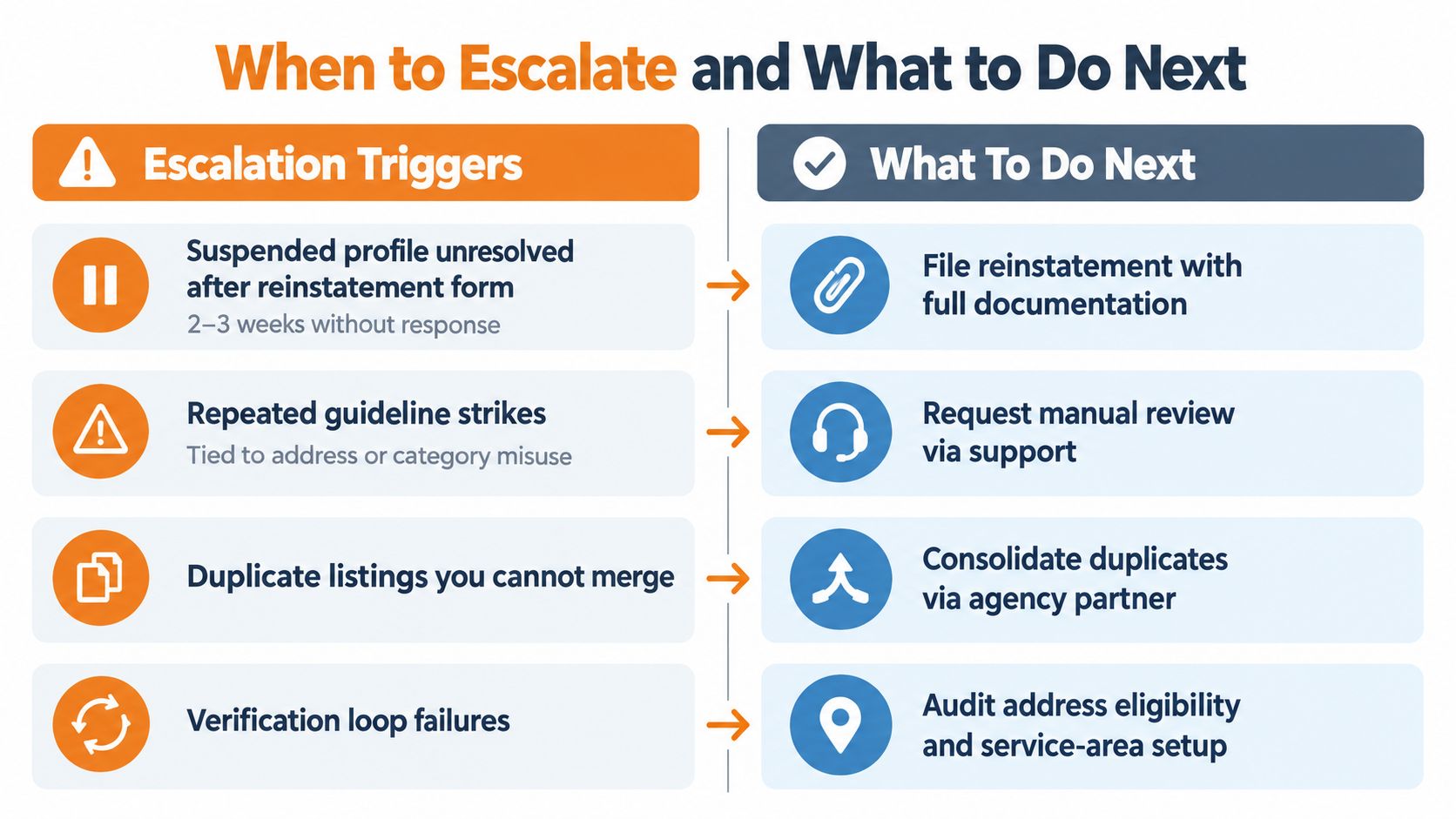
Escalate when the evidence points to an account or eligibility problem that ordinary edits can't solve. That includes a suspended profile that remains unresolved after a reinstatement request, repeated guideline strikes connected to the address or category, duplicates you can't merge, and verification loops that keep returning the same failure.
Prepare documentation before contacting support. Utility bills, business licences, storefront photographs, signage, lease evidence, and a clear explanation of the actual operating model can help establish legitimacy when Google requests proof. Keep the explanation factual. List the issue, the correction made, the evidence attached, and the profile identifier.
A local SEO specialist earns the cost when the case involves multiple locations, regulated services, a disputed address, historic ownership changes, or a soft-suspension pattern that requires comparing old profile states and public records. The value is not another generic optimisation checklist. It's identifying the failure bucket before an unnecessary edit creates a new problem.
Use this decision rule: if you can't identify whether the profile is missing, hidden, suspended, or ineligible within 30 minutes of a structured audit, stop editing and buy a diagnosis. The right next step might be reinstatement, verification, duplicate resolution, or ranking work. Those are different projects.
Juiced Digital helps Vancouver and British Columbia businesses audit Google Business Profile eligibility, repair local signals, and build the citation and website relevance needed for Maps visibility. Visit Juiced Digital to request a focused local SEO audit and turn an unclear “not showing” problem into a documented recovery plan.