
Ever wondered how Google finds a brand-new website just hours after it goes live? The answer is a web crawler.
These automated programs, often called spiders or bots, are the unsung heroes of the internet. They are the digital explorers that search engines send out to discover and understand the content on every corner of the web. Think of them as the engine's reconnaissance team, constantly mapping the digital world so it can be organized and searched.
This whole process is the absolute bedrock of how search engines work. Without it, your site would be invisible.
The Foundation of Search Engine Visibility
Picture the internet as a massive, sprawling library with billions of books but no central filing system. A web crawler is the tireless librarian whose job it is to roam the aisles, read every single book (or webpage), and take detailed notes on what it finds.
Its main task is to follow links—jumping from one page to another, then another, relentlessly charting the connections that make up the World Wide Web.
This is the very first step. If a search engine's crawler can't find your website, then for all intents and purposes, it doesn't exist to the search engine. No crawling means no visibility, no traffic, and no customers finding you online.
The entire system really boils down to three key steps:
- Crawling: The bot first discovers your pages, usually by following a link from a site it already knows about.
- Indexing: After finding a page, it analyzes everything on it—the text, images, videos—and stores that information in a colossal database known as an index.
- Ranking: Finally, when someone searches for something, the engine dives into that index to pull out the most relevant pages and present them as results.
For Canadian businesses, this isn't just a technical curiosity; it's a lifeline. Internet usage here is through the roof, with projections showing 38.2 million users by October 2025—that's a 95.1% penetration rate. Crawlers are working non-stop to keep up with the Canadian corner of the web.
If you run a business in British Columbia, for example, you need Google’s crawler to properly understand your location, your services, and what your customers are saying about you. That's how you show up when someone nearby searches for what you offer. For a deeper dive into these numbers, the latest DataReportal report on Canada is a great resource.
Simply put, how well a crawler can navigate your site directly dictates your online visibility. If a crawler can't find, access, or make sense of your pages, your customers won't find you in search results either.
How a Web Crawler Navigates the Internet
To really get what a web crawler does, think of it as a digital librarian sent to map the biggest library in the universe: the internet. It doesn't see websites the way we do, with cool layouts and colours. Instead, it follows a strict, methodical process to find content, understand it, and file it away in a search engine’s enormous database.
This journey is broken down into three core phases. Each step builds on the one before it, forming the very foundation of how search works today. Without this process, finding anything online would be impossible.
Phase 1: The Discovery Process
Every web crawler's journey starts with a "seed list" of known URLs—basically, its starting point. From these initial pages, the crawler follows every single link it encounters, branching out to discover new pages, entire websites, and corners of the internet it's never seen before.
It’s a never-ending cycle. When a crawler lands on a new page, it immediately scans for more links and adds them to its to-do list. This is how crawlers systematically map out the connections between billions of web pages, creating a constantly updated blueprint of the web.
Phase 2: Fetching and Rendering the Content
Once a crawler finds a page, its next job is to download its contents. It sends a request to the web server and pulls down all the raw code—HTML, CSS, and JavaScript. In the early days of the web, bots only read the initial HTML, but that's ancient history now.
Today’s sophisticated crawlers perform a vital step called rendering. They actually assemble all the code to "see" the page just like a person would in a web browser. This is hugely important because it lets them access content that's loaded dynamically with JavaScript, giving them the full picture instead of just the bare-bones structure.
Key Takeaway: If your site relies heavily on JavaScript to show important content, the rendering phase is everything. If a crawler can't properly render your page, your most important information might as well be invisible.
Phase 3: Organizing for the Index
The final step is indexing. After discovering and rendering a page, the crawler extracts all the crucial information—text, headings, image alt text, links, and more—and sends it back to the search engine. This enormous stream of data is then sorted and stored in a massive database known as an index.
Think of the index like a giant, meticulously organised library. Every webpage is a book, and the index is the card catalogue, containing detailed notes on each page’s content, context, and connections. This is the magic that turns the chaotic mess of the web into a searchable, organised resource. To dive deeper, check out our guide that explains in more detail how search engines work.
This diagram shows the fundamental relationship between crawling, indexing, and ranking.
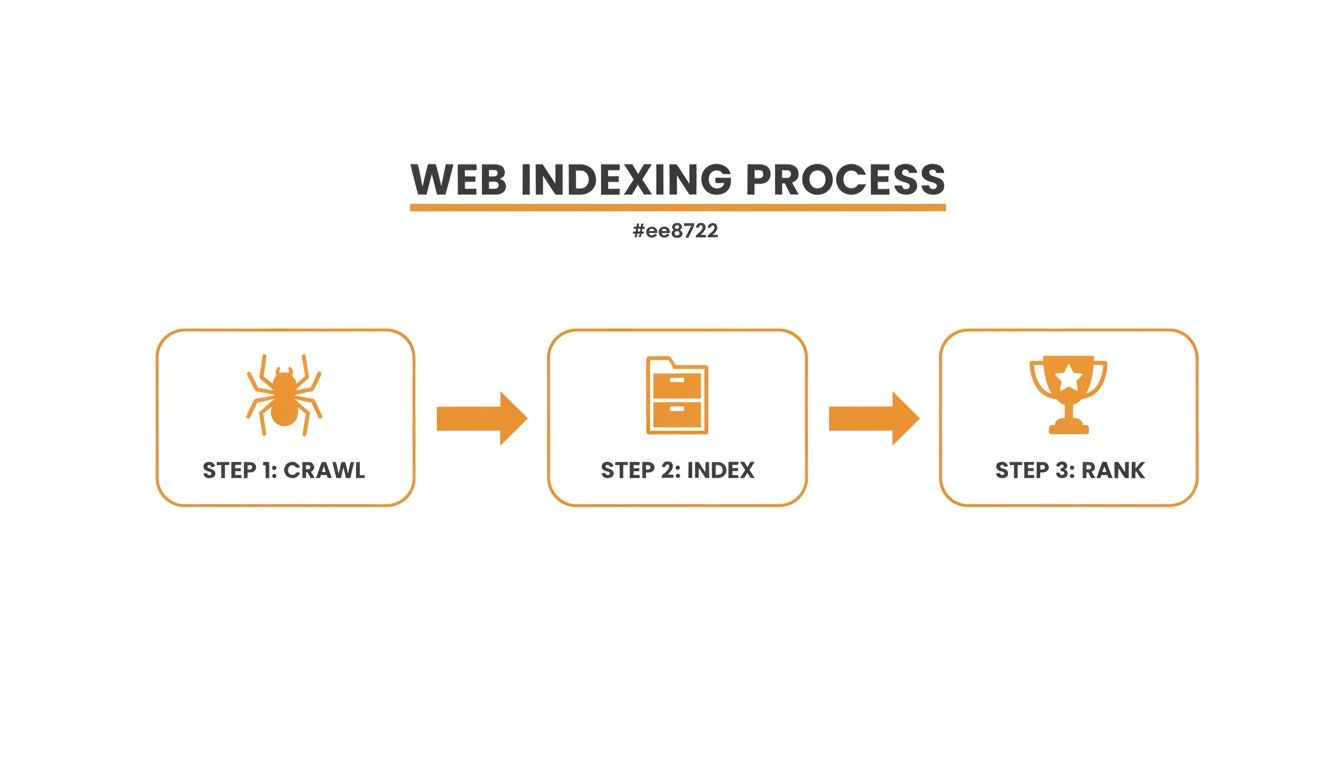
As you can see, crawling is just the first hurdle. If your page isn't indexed properly, it has zero chance of ranking in search results and being found by your audience.
The Most Common Web Crawlers You Should Know
It’s easy to assume all your website traffic comes from people, but that’s rarely the case. A huge chunk of it is actually from automated bots, and knowing who they are is a big deal. Some of these web crawlers are essential for your business’s survival, while others are simply gathering data for their own purposes.
Think of it like this: not every visitor to a physical shop is there to buy something. Some are sent by major search engines and are like personal shoppers for millions of users, while others are more like market researchers just taking notes. Learning to tell them apart helps you understand your analytics and focus your technical SEO work where it really counts.
The Search Engine Giants
First up are the big players—the crawlers that belong to the major search engines. These are the bots you want on your site. Their ability to find and understand your pages directly impacts your visibility and, by extension, your bottom line. You need to roll out the red carpet for them.
-
Googlebot: This is the undisputed king of the crawler world. Google actually runs a few different versions of its bot, but the main ones you’ll see are for desktop and mobile. Since Google now overwhelmingly uses the mobile version to index pages (a practice called mobile-first indexing), making sure your site is flawless on a smartphone isn't just a good idea; it's essential. Every visit from Googlebot is a chance to get your content indexed and ranked.
-
Bingbot: As Microsoft's official crawler, Bingbot is the engine behind the Bing search engine. While it doesn't have Google's massive market share, Bing still sends a lot of valuable traffic, especially in certain regions and demographics. Bingbot is definitely a welcome guest.
-
DuckDuckBot: This is the crawler for DuckDuckGo, the search engine that's built its reputation on protecting user privacy. As more people grow concerned about their data, its slice of the search market is growing, so you’ll want to pay attention to its bot.
When you dig into your server logs, seeing activity from these crawlers is a fantastic sign. It's direct proof that the world's biggest search engines are actively looking at your content to include in their indexes.
Commercial and SEO Tool Crawlers
Beyond the search giants, there's another group of bots that will be frequent visitors: commercial crawlers. These are the workhorses behind popular SEO and marketing tools, constantly scouring the web to build their own enormous databases.
These bots are on a mission to collect information on everything from backlinks and keywords to technical site health. That data is what powers all the reports, dashboards, and features inside their software.
-
AhrefsBot: The crawler for the powerful SEO tool Ahrefs. It's famous for being one of the most active bots out there, maintaining a colossal index of links.
-
SEMrushBot: This bot fuels the SEMrush platform, gathering the data needed for its site audits, position tracking, and backlink analysis tools.
-
Common Crawl: A bit different from the others, this is an open-source project. Its bot crawls the web and makes all the data it collects freely available for anyone to use for research and analysis.
While these commercial bots don't have a direct say in your search engine rankings, their presence shows your site is a recognized part of the wider web. Knowing the difference between a visit from Googlebot and one from AhrefsBot is key to correctly interpreting your traffic data and understanding who—or what—is looking at your site.
How to Guide and Control Web Crawlers on Your Site

You’re not just a passive observer as bots swarm your website. In fact, you have a surprising amount of control over where they go, what they see, and how they interpret your content. By getting familiar with a few key tools, you can actively steer a web crawler to make sure it finds and understands your most important pages.
Think of your website as a massive museum. Without a map or any signs, visitors (the crawlers) might wander aimlessly, miss the main exhibits, and get stuck in the service corridors. Your job is to be the museum curator, providing clear directions and sensible rules to guide them. This strategic direction is what leads to efficient indexing and, ultimately, a much stronger SEO performance.
The Rulebook: Robots.txt
The most direct tool you have for controlling bot traffic is a simple text file: robots.txt. This file sits in the root folder of your website and acts as a set of rules for any well-behaved crawler that comes knocking. It’s the digital equivalent of putting a “Staff Only” sign on certain doors.
You use robots.txt to tell bots which parts of your site you'd rather they avoid. Common examples include:
- Admin login pages: There’s zero reason for a search engine to index your
wp-adminfolder. - Internal search results: Pages generated by your site's own search bar offer no unique value to Google.
- Shopping cart or checkout pages: These are dynamic, user-specific pages that shouldn't be indexed.
It's important to remember that
robots.txtis a directive, not a fortress. Reputable crawlers like Googlebot and Bingbot will always honour your rules. Malicious bots or aggressive data scrapers, however, might completely ignore them.
The Roadmap: Your XML Sitemap
While robots.txt tells crawlers where not to go, an XML sitemap does the exact opposite. It gives them a perfectly drawn map of every important page you want them to discover. Think of it as handing a tourist a map with all the must-see attractions clearly circled.
When you submit a sitemap directly to search engines through a tool like Google Search Console, you’re essentially rolling out the welcome mat. This is especially critical for:
- Large websites with thousands of URLs.
- New websites that don't have many external links yet.
- Sites with a lot of media content or a complex page structure.
A sitemap ensures none of your valuable pages get overlooked, which can dramatically speed up the discovery and indexing process.
Managing Your Crawl Budget
Every website gets a crawl budget—the amount of resources and time a search engine like Google will spend crawling it. For a gigantic site like Wikipedia, this budget is practically unlimited. For a small local business website, it's far more constrained.
If crawlers waste this precious budget on low-value pages, like duplicate content or error pages, your most important content might not get crawled as often as it should. You can protect your crawl budget by:
- Boosting site speed: A faster site lets crawlers access more pages in the same amount of time.
- Fixing broken links (404s): Dead ends waste a crawler's time and energy.
- Using robots.txt smartly: Blocking unimportant areas keeps crawlers focused on what truly matters.
Preventing Confusion with Canonical Tags
It’s surprisingly common for a website to have several URLs leading to the same, or very similar, content. This happens all the time with e-commerce product variants or pages that can be reached through different filters. To a web crawler, this looks like duplicate content, which can split your SEO value and cause confusion.
A canonical tag (rel="canonical") is a simple piece of HTML that points crawlers to the "master copy" of a page. It effectively merges all the SEO signals (like backlinks and authority) from the duplicate versions onto your one preferred URL.
This small tag prevents confusion and makes sure the right page gets ranked. When you pair canonical tags with a solid approach to structured data for SEO, you make your site's content crystal clear, helping crawlers understand and index your pages exactly how you want them to.
Choosing the Right Tool to Steer Web Crawlers
Deciding which directive to use can feel tricky, but each one has a distinct job. This table breaks down when to use robots.txt, XML sitemaps, and canonical tags to manage crawler behaviour effectively.
| Tool | Primary Function | Use This When You Need To |
|---|---|---|
| Robots.txt | Block access to entire sections or specific URLs. | Prevent crawlers from wasting budget on non-essential pages like admin areas, thank you pages, or internal search results. |
| XML Sitemap | Provide a clear list of all important pages to be crawled. | Ensure all your valuable content is discovered, especially on new or very large websites. |
| Canonical Tag | Specify the preferred version of a page with duplicate content. | Consolidate link equity and avoid duplicate content issues for pages with similar content accessible via multiple URLs. |
Ultimately, these tools work best together. Use robots.txt to set the boundaries, the XML sitemap to lay out the main attractions, and canonical tags to clean up any potential confusion along the way.
Solving Common Issues That Block Web Crawlers

Even the most well-built website can run into technical hiccups that stop a web crawler dead in its tracks. These issues, known as crawl errors, are like digital roadblocks. They prevent search engines from finding, indexing, and ultimately ranking your content. Leaving them unfixed is like locking the front door to your business—no one can get in.
Thankfully, finding and fixing these problems is usually more straightforward than it sounds. Your best friend here is Google Search Console, a free tool that offers a direct window into how Google’s crawlers interact with your site. The "Pages" report is your command centre, flagging the exact issues that need your attention.
Making a habit of checking this report is a cornerstone of good website maintenance. Let’s walk through the most common errors you’re likely to find and how to sort them out.
Fixing Page Not Found 404 Errors
When a crawler follows a link to a page that doesn’t exist, it gets a 404 error. Think of it as a dead end. This usually happens when a page is deleted or its URL changes, but the links pointing to it are never updated. While a few 404s are perfectly normal, a sudden spike can signal a sloppy user experience and chew up your crawl budget on non-existent pages.
You have a few ways to handle these:
- Set up a 301 Redirect: If the content from the old page now lives at a new URL, a permanent 301 redirect is the answer. It automatically sends both crawlers and users to the right place while passing along the original page's SEO value.
- Fix the Internal Link: Sometimes, the problem is just a simple typo in a link on one of your other pages. Just find the broken link and edit it to point to the correct URL.
- Leave It Alone (If It's Intentional): If you deleted a page for good and there's no relevant new page to send people to, it's fine to let it stay as a 404. Google will eventually get the message and stop trying to crawl it.
Resolving Server Errors 5xx
A 5xx server error is a much bigger deal. It means your entire website’s server is having problems, making it completely inaccessible to both crawlers and human visitors. Common culprits include server maintenance, overloaded capacity, or a misconfiguration with your hosting.
Key Takeaway: Frequent 5xx errors are a massive red flag for search engines. If a crawler repeatedly can't access your site, it will start visiting less often, which can cause your rankings to plummet over time.
If you spot these errors popping up, get in touch with your hosting provider right away. They can figure out what’s wrong and help you get back online fast.
Correcting Faulty Redirects
Redirects are powerful tools for guiding crawlers, but a bad setup can create a real mess. One of the most common mistakes is a redirect chain, where Page A redirects to Page B, which then redirects to Page C. This forces crawlers to make extra hops, and if the chain is too long, they might just give up.
Even worse is a redirect loop, where a page accidentally redirects back to itself, trapping the crawler in an infinite circle. To fix these, you need to simplify your redirect rules so that the original URL points directly to its final destination. Tools like Screaming Frog are brilliant for mapping out your site’s redirect paths to quickly spot and untangle these chains and loops.
By staying on top of these common errors, you're rolling out the red carpet for every web crawler, making sure your most important content gets found and indexed without a hitch.
Here is the rewritten section, designed to sound completely human-written and natural.
Why Web Crawlers Are a Big Deal in Niche Industries
If you’re in a regulated space like cannabis, CBD, or holistic health, thinking about web crawlers isn't just a technical SEO task—it’s a matter of survival. These industries are a minefield of compliance issues, and a small technical mistake can have massive consequences for your online visibility.
Take a common example: the age gate. You set it up to follow the law, but if it’s not configured correctly, you might be locking out more than just underage users. You could be blocking the very web crawlers that get your site listed on Google in the first place, effectively making you invisible.
Think about it: while you're diligently following local laws, a simple technical error could choke off your main way of finding new customers. The crawler hits a wall it can't get past, gives up, and moves on. Just like that, your products and all your carefully crafted content remain hidden from search.
But it’s not just about getting found on Google. Web crawlers are also powerful tools for gathering market intelligence, and your competitors and even government bodies are using them. These bots can be pointed at your site to systematically scrape data on your pricing, product claims, and what’s trending. In a tightly controlled sector, that kind of information is gold for staying competitive and watching what others are doing.
Crawlers and the Watchful Eye of Regulators
And it’s not a conspiracy theory; government agencies are absolutely using crawlers for data collection. For example, Statistics Canada openly uses web scraping to pull information right off the internet as part of its official work.
For a business like yours, this means the public reports on market trends, price indexes, and product availability are being built with data scraped directly from your website. Knowing this is crucial because these automated reports can shape everything from investor confidence to where regulators decide to focus their attention next.
The Big Picture: In a regulated industry, your website isn't just a storefront. It's a public data source that automated systems are constantly monitoring. The real challenge is making sure crawlers can access the right information to get you ranked, while still respecting the compliance barriers you need to have in place. It’s a delicate balancing act, but getting it right is fundamental to your long-term stability and growth.
Common Questions About Web Crawlers
How Often Do Search Engines Crawl My Site?
That’s the million-dollar question, isn't it? The honest answer is: it depends.
Search engines don't have a fixed schedule. Instead, they prioritise sites that are authoritative, popular, and regularly publish fresh content. A major news site might get crawled multiple times a day, whereas a small business blog that’s updated once a month might only see a crawler every few weeks.
The best way to get a real answer for your own site is to check your Crawl Stats report directly in Google Search Console. It will show you exactly how often Googlebot is stopping by.
Is Web Crawling the Same as Web Scraping?
It’s easy to mix these two up, but they serve very different purposes.
Think of it this way: web crawling is like creating a map of the entire internet. A crawler (like Googlebot) travels from link to link to discover what pages exist and where they are. Its goal is broad discovery for indexing.
Web scraping, on the other hand, is like sending a team to a specific address on that map to collect very specific information—like pulling all the product prices from a competitor's page. It’s a targeted, data-extraction mission.
So, crawling builds the map; scraping pulls specific details from it.