
Meta tags are small, powerful snippets of text in your website's code that tell search engines—and people—what your page is all about. Don't let the technical name fool you; think of them as your first handshake with a potential customer on Google. A good set of meta tags can make all the difference between getting the click or getting ignored.
Why Bother With Meta Tags Anymore?
It’s easy to dismiss meta tags as some old-school SEO tactic, but in reality, they've never been more important. They are the first—and sometimes only—chance you get to make an impression on the search results page.
At their core, meta tags are a direct line of communication with search engines. When a web crawler hits your page, it looks to these tags for a quick summary. This helps it understand what your content is about, who it's for, and why it deserves to rank. Get this right, and you've made the algorithm's job a whole lot easier.
They’re for People, Not Just Robots
Beyond the bots, your meta tags have a huge impact on human behaviour. A compelling title tag and meta description are what convince someone to click on your link instead of the nine others on the page. They set an expectation and make a promise that your page needs to deliver on.
Here’s where you’ll see the real-world impact:
- Better Click-Through Rates (CTR): An interesting title and a helpful description will get you more clicks, even if you're not in the top spot.
- A Stronger First Impression: Professional, clear, and benefit-focused tags build trust before a visitor even gets to your site.
- Signalling E-E-A-T: They help you frame your content's Experience, Expertise, Authoritativeness, and Trustworthiness by clearly stating its purpose and value right from the start.
I see so many people treat meta tags as a last-minute chore. That’s a huge mistake. They are your SERP sales pitch. They turn a passive impression into an active click by answering one simple question for the user: "Is this page going to solve my problem?"
The Bottom-Line Impact
The true value of solid SEO meta tag optimization really stands out in crowded markets. Take the Vancouver SEO scene, for example. We've seen that pages with sharp meta titles kept under 60 characters can earn up to a 20% higher CTR compared to those with sloppy, truncated titles.
It's a simple, proven formula. When local businesses in British Columbia made sure to include key phrases like 'Vancouver SEO agency' in their tags, they saw a tangible bump in their rankings. This isn't just about ticking a box on an SEO checklist; it's about turning your search result into an invitation that drives real traffic and revenue.
For a quick overview of which tags matter most, I've put together this simple table. It breaks down the key players and their roles.
Key Meta Tags and Their Primary Functions
| Meta Tag | Primary Purpose | Direct SEO Impact |
|---|---|---|
| Title Tag | Defines the title of the page shown in SERPs and browser tabs. | High. A major ranking factor. Directly impacts CTR. |
| Meta Description | Summarizes the page's content for users in the SERPs. | Indirect. Not a direct ranking factor, but heavily influences CTR, which can affect rankings. |
| Robots Meta Tag | Instructs search engine crawlers on how to crawl or index a page. | High. Controls whether a page appears in search results at all (noindex) or if links are followed (nofollow). |
| Viewport Tag | Controls how a webpage is displayed on mobile devices. | High. Critical for mobile-friendliness, which is a key ranking signal. |
This table isn't exhaustive, of course, but it covers the non-negotiables. Mastering these four tags is the foundation for a strong on-page SEO strategy and gives you control over how you appear in the digital world.
How to Craft High-Impact Title Tags and Meta Descriptions

This is where the real work begins. Moving past simple character counts is where the art of SEO optimization for meta tags truly comes alive. A technically correct tag gets you into the game, but a persuasive one wins it. The secret is to write for people first, creating search snippets that don't just inform but actively invite a click.
Think of your title tag and meta description as a tiny, powerful advertisement. You have just a few seconds to grab someone's attention and convince them your page has the answer they're searching for. It’s a delicate mix of psychology, sharp copywriting, and smart keyword placement.
Mastering the Title Tag Formula
Your title tag is arguably the most critical on-page element for telling both search engines and users what your page is about. It's that blue link everyone sees and clicks. A truly effective title tag blends a few key ingredients to make a real impact.
- Lead with Your Primary Keyword: Get your main target keyword as close to the beginning as you can. This gives it more SEO weight and makes sure it's seen before Google potentially cuts it off.
- Use Numbers and Brackets: Numbers and symbols like brackets
[]or parentheses()are brilliant for breaking up the monotonous wall of text on a search results page. They just naturally draw the eye. It's why titles like "10 Ways to Improve…" or "[Case Study]" consistently get more clicks. - Ask a Question: Posing a question that mirrors the searcher's own thoughts, like "Struggling with Local SEO?", builds an instant connection. It makes them feel like you understand their problem.
- Promise a Benefit or Result: Don't just say what your page is. Tell them what they'll get from it. "Boost Your Sales by 30%" is far more enticing than a generic "Sales Tips."
Transforming a Generic Title
Let's walk through a real-world scenario. Imagine a holistic health clinic in Vancouver that's written a blog post about natural remedies for anxiety.
Before Optimization:Title: Natural Anxiety Remedies | Vancouver Wellness Clinic
This title isn't wrong. It’s short, has the keyword, and includes the brand. But it’s completely forgettable. It has no spark.
After Optimization:Title: 7 Natural Anxiety Remedies That Work Fast [Science-Backed] | Vancouver Wellness
This new version is worlds better. It uses a number (7), promises a clear benefit (Work Fast), and adds a powerful trust signal ([Science-Backed]), all while keeping the core keyword and brand. It’s not just a title anymore; it's a compelling reason to click.
The goal isn't just to describe your content; it's to sell the click. Every single word in your title and description needs to earn its spot by building curiosity, establishing your authority, or promising a clear benefit.
Writing Meta Descriptions That Convert
While the meta description isn't a direct ranking factor anymore, it's your best tool for winning the click. This is your chance to elaborate on the promise you made in the title tag and close the deal. For a deeper dive, our guide on optimizing meta descriptions for SEO success is a great resource.
Here’s how to write descriptions that actually get results:
- Mirror User Intent: Is the person searching looking to buy, learn, or find something specific? Your description needs to instantly reassure them they've landed in the right place.
- Include a Call to Action (CTA): You have to tell people what to do next. Simple phrases like "Learn more," "Discover how," "Shop now," or "Book a free consultation" can make a huge difference to your click-through rate.
- Weave in Secondary Keywords: Naturally work in related keywords and long-tail phrases. This helps Google match your page to more queries and often results in those terms being bolded in the search results, making your snippet stand out even more.
- Let Your Brand Voice Shine: Are you professional and authoritative? Witty and fun? Supportive and empathetic? Let that personality come through. A consistent brand voice builds familiarity and trust over time.
A Meta Description Makeover
Let’s go back to our Vancouver-based holistic health clinic.
Before Optimization:Meta Description: Our wellness clinic discusses natural remedies for anxiety. We cover various herbs and techniques for managing stress and improving mental health in Vancouver.
It’s informative, sure, but it’s also dry and passive. It describes the content without creating any real desire to read it.
After Optimization:Meta Description: Discover 7 science-backed natural remedies to calm anxiety quickly. Learn simple techniques and herbal solutions to find relief today. Book your consultation with our Vancouver holistic experts.
This rewritten version is active and engaging ("Discover," "Learn," "Book"), it promises an immediate benefit ("calm anxiety quickly"), and it wraps up with a clear CTA. It perfectly follows through on the promise made by the optimized title.
Putting in this level of effort really pays off, especially in competitive local markets. In fact, a recent statistical analysis of Canadian SEO reports found a direct link between detailed meta description optimization and a 28% average improvement in dwell time. What's more, title tags written more like 'human clickbait'—using numbers, questions, and proof points—have driven a 40% CTR uplift in hyper-local Canadian markets.
Ultimately, crafting high-impact tags is all about making a compelling promise on the search results page and then making sure your landing page delivers on it flawlessly. This alignment is what lowers bounce rates and signals to Google that you have a high-quality result worth ranking.
Using Advanced Meta Tags for a Competitive Edge
While title tags and meta descriptions get all the glory, there are a few other players working behind the scenes that can give your website a serious technical boost. Getting a handle on these advanced meta tags is what separates a basic SEO setup from a professional one.
Think of them less as descriptions and more as direct instructions. You’re telling Google precisely how to crawl your content and social media platforms exactly how to display it. This level of control is where the real technical SEO magic happens.
Directing Search Engine Crawlers with the Robots Tag
The robots meta tag is your direct line of communication with search engine crawlers. It’s a deceptively simple command that tells them whether to index a page and whether to follow the links on it.
Now, you might be thinking, "Why would I ever tell Google not to index my content?" It’s actually a vital part of keeping your site clean and focused.
noindex, follow: This is a combination I use all the time. It tells search engines to skip indexing this specific page but to go ahead and follow all the links on it, passing along authority to more important pages. It’s perfect for thin content, internal search result pages, or even "thank you" pages that don't add much value on their own in search results.noindex, nofollow: This one is much more restrictive. It stops a page from being indexed and prevents crawlers from following any of its links. You'll want to use this for things like admin login pages or any other area you need completely walled off from search engines.
Using the robots tag properly is key to preventing "index bloat," where a bunch of low-quality pages water down the authority of your core content. It forces Google's attention onto the pages that really matter. A well-placed 'noindex' tag can be just as powerful as a perfectly crafted title. On a related note, our article on understanding canonical tags in SEO dives deeper into managing duplicate content, another crucial aspect of site hygiene.
Ensuring a Perfect Mobile Experience with the Viewport Tag
In a mobile-first world, the viewport meta tag isn't just nice to have—it's absolutely essential. This little piece of code tells the browser how to control the page’s dimensions and scale, making sure it looks great on any screen, from a tiny smartphone to a huge desktop monitor.
Without it, your mobile visitors would see a shrunken, unreadable version of your desktop site, forcing them to pinch and zoom just to navigate. That’s a terrible user experience, and a huge red flag for Google.
The viewport tag is the foundation of a mobile-friendly website. Google's mobile-first indexing means it primarily ranks your site based on its mobile version. If your site doesn't render properly on a phone, you're fighting an uphill battle from the start.
Simply put, a correct viewport tag is a prerequisite for good mobile rankings. It’s just one line of code, but its impact on user experience and SEO is massive.
Winning on Social Media with Open Graph Tags
Have you ever shared a link on Facebook or LinkedIn and wondered how it magically pulls in a perfect title, description, and image? That’s the work of Open Graph (OG) tags. These meta tags transform a standard webpage into a rich, structured object that social media platforms love.
Optimizing your OG tags is crucial for driving traffic from social media and controlling how your brand is perceived. When a shared link looks professional and inviting, people are far more likely to click through.
Here are the key OG tags you need to get right:
og:title: The title of your content as you want it to appear on social platforms.og:description: A short description tailored for social feeds.og:image: The specific image you want to show up alongside your link. This is hugely important for grabbing attention in a busy feed.og:url: The canonical URL of the page you're sharing.
Imagine an e-commerce brand launching a new product. A well-optimized og:image shows the product in a stunning lifestyle shot, the og:title highlights its biggest benefit, and the og:description includes a clear call to action. This simple setup turns a plain URL into a compelling mini-ad.
Don't just set these and forget them. In fact, Canadian business audits have shown that consistent meta tag updates can lead to a 25-30% increase in the quality of social media previews. For example, some wellness clinics in Vancouver that started using specific transactional phrases like 'Holistic health SEO Vancouver—book now' in their Open Graph tags saw a 45% jump in bookings coming directly from social traffic. This shows a clear line between thoughtful metadata and real business results.
Implementing and Managing Meta Tags at Scale
Optimizing meta tags for a handful of pages is one thing. But what happens when you’re dealing with an e-commerce store with thousands of SKUs or a massive content hub? The challenge explodes. Trying to manually update everything isn't just inefficient—it's a surefire way to end up with duplicate tags, missed opportunities, and a mountain of headaches.
The secret isn't to work harder; it's to work smarter. The goal is to move away from tedious manual entry and embrace automated, rule-based systems. This doesn't mean you lose control. Quite the opposite—you create intelligent templates that handle the heavy lifting, ensuring every single page gets a unique, optimized tag. This approach saves countless hours and dramatically improves your site's overall SEO health.
Using Your CMS and SEO Plugins to Their Full Potential
Most modern content management systems (CMS) come equipped with powerful tools for managing meta tags. If you're on WordPress, plugins like Yoast SEO or Rank Math are absolute must-haves. While they give you fields to manually tweak individual pages, their real power lies in setting up global templates for different post types, categories, or products.
The same goes for e-commerce platforms. Shopify, for instance, has built-in SEO settings that let you define a default structure for product and collection pages. This ensures you never launch a new product with a blank or generic title tag, which is a surprisingly common mistake.
This diagram shows how you can think about the process for some of the more technical tags that are vital for a clean, shareable, and mobile-friendly site at scale.
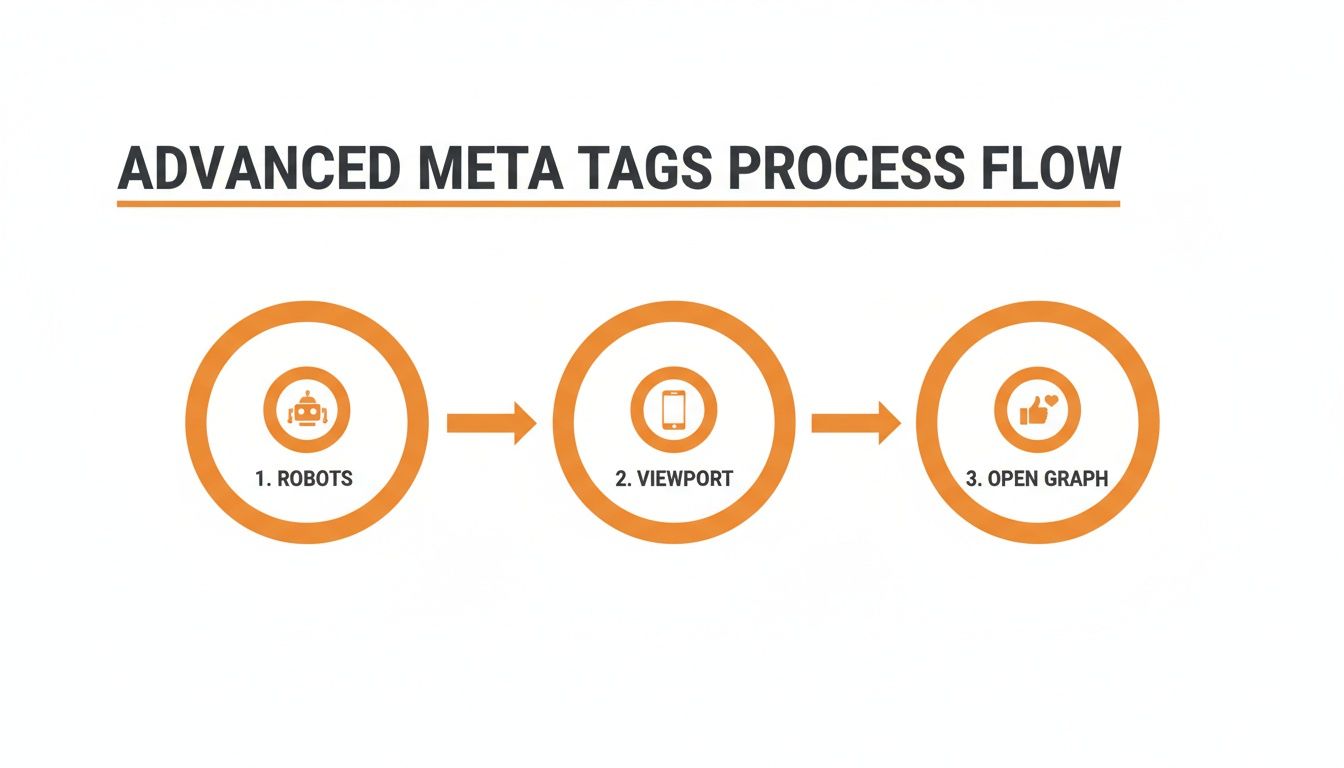
It’s a good reminder that we're not just writing for users. We're also giving clear instructions to search engine robots, mobile devices, and social platforms—all of which are critical when you're operating at scale.
The Power of Dynamic Templating
For large-scale SEO optimization meta tags, dynamic templating is the real game-changer. It’s all about creating formulas or "recipes" that pull data from existing page elements—like the product name, category, or article headline—to automatically build unique meta tags.
This approach is a massive leap forward for both efficiency and consistency. Instead of sitting there writing hundreds of slightly different tags by hand, you define a single rule that can be applied across thousands of pages in an instant.
Building a Dynamic Title Tag Formula
Let's say you run an online store that sells outdoor gear. A product page for a specific hiking boot needs a title that's both descriptive and unique. Here’s a simple dynamic template you could set up:
- Template:
[Product Name] | [Product Category] | [Brand Name] - Data Pulled:
[Product Name]= "Pathfinder All-Terrain Hiking Boot"[Product Category]= "Men's Hiking Boots"[Brand Name]= "Summit Gear"
- Resulting Title Tag:
Pathfinder All-Terrain Hiking Boot | Men's Hiking Boots | Summit Gear
Voilà. The resulting title is perfectly optimized. It's specific, includes relevant keywords, and has the brand name for recognition. Now, imagine that same formula working across your entire inventory, generating a unique and relevant title tag for every single product automatically.
Dynamic templating isn't about being lazy; it's about being smart. It frees up your time to focus on the high-value pages that need a human touch, like your homepage or key service pages, while ensuring baseline optimization across your entire site.
Crafting a Template for Meta Descriptions
You can use the exact same logic for your meta descriptions. While a carefully handwritten description will almost always perform better on your most important pages, a dynamic template provides a solid, optimized foundation for everything else.
- Template:
Shop the [Product Name] from [Brand Name]. Perfect for [Product Category], this item offers [Key Feature 1] and [Key Feature 2]. Order online from our Canadian store today! - Resulting Meta Description:
Shop the Pathfinder All-Terrain Hiking Boot from Summit Gear. Perfect for Men's Hiking Boots, this item offers waterproof lining and superior grip. Order online from our Canadian store today!
This method ensures every product gets a useful, compelling description and helps you sidestep the dreaded duplicate content issue. It cleverly combines specific product attributes with a consistent call to action, creating a valuable snippet for both searchers and search engines.
By putting these scalable strategies to work, you can transform meta tag management from a daunting manual chore into a powerful, automated system that drives consistent SEO results.
How to Test, Measure, and Refine Your Meta Tag Strategy
Writing great meta tags is a solid start, but it's just that—a start. The real magic happens when you get into a rhythm of testing, measuring, and refining what you’ve done. If you're not looking at the data, you’re just guessing what actually makes people click.
Think of it this way: a data-driven strategy turns your SERP snippets from something you "set and forget" into dynamic assets you can constantly improve. This creates a powerful feedback loop, letting you see exactly what’s working, what isn't, and why—so you can drive more of the right kind of traffic over time.
Pinpointing Underperforming Pages in Google Search Console
Your first port of call for this kind of detective work should always be Google Search Console (GSC). This free tool is an absolute goldmine for understanding how your pages are actually performing in the wild. It’s where you stop theorizing and start seeing real-world numbers.
Head over to the 'Performance' report. Here, you can filter down to specific pages and see four crucial metrics: Total Clicks, Total Impressions, Average CTR (Click-Through Rate), and Average Position. Your mission is to find the pages that are getting seen but not getting clicked.
Keep an eye out for pages with these tell-tale signs:
- High Impressions, Low CTR: This is the classic giveaway of a weak title tag or meta description. It means Google is showing your page to lots of people, but your snippet isn't compelling enough to earn their click.
- Good Position, Low CTR: If a page is ranking well—say, anywhere in the top 10 positions—but has a CTR that’s lagging behind what you'd expect, the meta tags are almost certainly the culprit. This is a massive missed opportunity, and thankfully, often a quick fix.
By spotting these underperformers, you can build a priority list for your optimization efforts. A small tweak to a title on a page with thousands of impressions can bring in a surprising amount of new traffic.
Running Simple A/B Tests for Better Results
Once you've flagged a page for improvement, it's time to test your new ideas. A/B testing (or split testing) is hands-down the best way to figure out which version of your meta tags actually performs better.
The concept is simple. You change one thing—either the title or the meta description—and let it run for a while. Then, you circle back to Google Search Console to compare its performance against the original data.
Don’t overcomplicate it. Change one thing at a time. If you change both the title and description at once, you’ll never know which change moved the needle. The key is to isolate the variable.
For instance, you might want to test a question-based title against a more benefit-driven one:
- Version A (Original):
Vancouver SEO Services for Local Businesses | Juiced Digital - Version B (Test):
Need More Local Customers? Our Vancouver SEO Services Deliver
After you push Version B live, give it a few weeks. You need to allow enough time for Google to re-crawl the page and for you to gather enough data to make a confident call. Then, compare the CTR for the new period against the previous one. If Version B shows a clear lift, you've got yourself a winner.
Using SERP Preview Tools to Avoid Mistakes
Before you publish any changes, it’s a smart move to see how your new meta tags will actually look in the search results. Character counts are just a rough guide; Google's display is actually based on pixel width. This means a title full of wide letters like 'W' or 'M' can get cut off much sooner than one with skinny letters like 'I' or 'L'.
This is where SERP preview tools are invaluable. They give you a simulation of how your title and description will appear on both desktop and mobile, helping you catch awkward truncation before it can hurt your click-through rate. Nothing kills curiosity faster than a title that gets cut off mid-thought.
By combining the diagnostic power of GSC, the hard evidence from A/B testing, and the visual gut-check from preview tools, you build a robust system for improving your meta tag strategy. It's a data-first approach that ensures every change is a calculated step toward better performance, not just a shot in the dark.
Got Questions About Meta Tags? We've Got Answers.
Even with a solid plan, it's normal to have a few lingering questions about optimizing your meta tags. They seem simple on the surface, but a few common myths can really trip you up. Let's clear the air on some of the most frequent questions we get from clients so you can move forward with confidence.
Think of this as your quick-fire FAQ for all those "what if" moments. By tackling these common hangups, you’ll be building your strategy on a foundation of what actually works today, not on outdated advice.
How Long Until I See Results from Optimizing Meta Tags?
This is the big one, and the honest answer is: it depends. How quickly you see an impact really hinges on the page's existing authority and how often search engines crawl your site to check for updates.
For a page that already has some clout, you might see its click-through rate (CTR) shift in your Google Search Console 'Performance' report within a few days to a couple of weeks after Google recrawls it.
But if you're optimizing a brand-new page or giving your whole site a meta tag makeover, you're playing a longer game. You can start looking for early signs after about a week, but the full effect on rankings and user behaviour usually becomes clear within one to three months. That's how long it takes for Google to gather enough fresh data to make a judgment call.
Does Google Always Use My Meta Description?
Nope, and this is a key point that confuses a lot of people. Google’s main job is to give the searcher the best possible answer, and sometimes, it decides a snippet pulled directly from your page content does that better than the meta description you wrote.
For instance, if a specific sentence on your page is a perfect match for a super-specific, long-tail query, Google might grab that instead. This isn't a bad thing! It's actually a sign that your content is deep and relevant enough to answer a wide variety of questions.
Google reserves the right to write its own search snippets, but a well-crafted meta description is still non-negotiable. It gets used most of the time, especially for branded searches, giving you critical control over your messaging when it matters most.
Think of your meta description as your preferred summary. It ensures that when Google does use it, your brand looks exactly the way you want it to, with a compelling message that begs to be clicked.
Should I Put My Brand Name in Every Title Tag?
In most cases, yes! It’s a fantastic way to build brand recognition and signal authority. It’s like a consistent signpost in the search results that helps users find you. The real trick is where you put it.
A battle-tested best practice is to structure your title tags like this:
Primary Keyword – Secondary Keyword | Brand Name
Your homepage is the one exception—there, your brand name should be front and centre. But for your blog posts, service pages, and product pages, it’s far more powerful at the end. Putting it last ensures your most important keywords get prime real estate, giving them more SEO weight and keeping them from getting cut off in the search results.
Is the Meta Keywords Tag Still Relevant for SEO?
Let’s make this easy: no. The meta keywords tag is a fossil from a much earlier era of SEO.
Major search engines like Google and Bing stopped using it for ranking years ago. The reason was simple—it was a magnet for abuse. People would "keyword stuff" it with dozens of irrelevant terms trying to game the system, making it a useless signal.
You might still see it lurking in the source code of older websites, but spending any time on it today is a waste of energy. Your efforts are much better spent on the things that actually move the needle.
That means focusing on:
- Crafting compelling title tags that grab attention.
- Writing persuasive meta descriptions that win the click.
- Creating high-quality on-page content that genuinely solves a problem for your audience.
Ignoring the meta keywords tag isn't just a tip; it's a modern best practice that lets you focus your resources on what truly drives results.
Ready to turn your rankings into real revenue? At Juiced Digital, we build data-driven meta tag strategies that boost visibility and drive qualified traffic. Book a free consultation today to discover how our AI-powered approach can help your business grow.
