

At its heart, a web crawler is an automated program—often called a bot or a spider—that search engines like Google deploy to systematically browse the web. Its main job is to read, understand, and organise online content. It then uses this information to build a massive, searchable index, kind of like a colossal library catalogue for the entire internet.
The Digital Librarian of the Internet
Imagine a web crawler as the internet’s most dedicated librarian. Instead of walking through aisles of physical books, it navigates the vast network of websites by following links, jumping from one page to the next. Its goal is to discover new and updated content to add to the search engine’s collection.
Without this constant, tireless exploration, search engines would have a stale and incomplete view of the web. You wouldn’t be able to find the latest news, that new local café that just opened, or a product page that was recently updated. The crawler’s work is the fundamental first step in making any website discoverable online.
The Three Core Functions of a Web Crawler
When you break it down, a web crawler has three main responsibilities that allow it to make sense of the world’s information. Each one builds on the last, creating a seamless flow from discovery to search results.
| Function | What It Means | Why It Matters for Your Business |
|---|---|---|
| Discovery | Finding new web pages (URLs) by following links from pages it already knows about. | This is how your new blog post or product page gets found for the first time. |
| Crawling | Visiting these discovered URLs to “read” the content on each page—text, images, videos, and code. | The crawler needs to access your content to understand what your business is about. |
| Indexing Preparation | Processing the crawled content and sending it to the search engine for analysis and storage. | This makes your pages eligible to appear in search results when a user types in a relevant query. |
This whole automated process is what keeps the digital economy humming. The global market for web crawling services was valued at US $579.72 million in 2023 and is projected to hit US $1,372.34 million by 2030. That growth alone shows just how essential this technology is. You can explore more data on this market expansion and see why it’s so critical for Canadian businesses to get this right.
A web crawler doesn’t just visit pages; it builds the map that allows search engines to guide users to your content. If your site isn’t on that map, for all practical purposes, it doesn’t exist online.
Ultimately, getting a handle on what a web crawler is and how it behaves isn’t just for the tech-savvy. It’s the key to unlocking your website’s potential and making sure your audience can actually find you in a very crowded digital space.
How Web Crawlers Navigate the Internet
Think of a web crawler as a tireless digital explorer, charting the vast expanse of the internet. Its journey starts with a known set of URLs, a sort of “base camp” often called a seed list. From these initial pages, the crawler follows every single hyperlink it finds—the digital pathways connecting one page to another.
Each link is a new trail to follow. This relentless process of following links allows crawlers to discover new websites, new pages, and updated content, building an ever-expanding map of the web. It’s this simple, foundational mechanism that makes the internet searchable.
This entire operation can be broken down into three key steps.
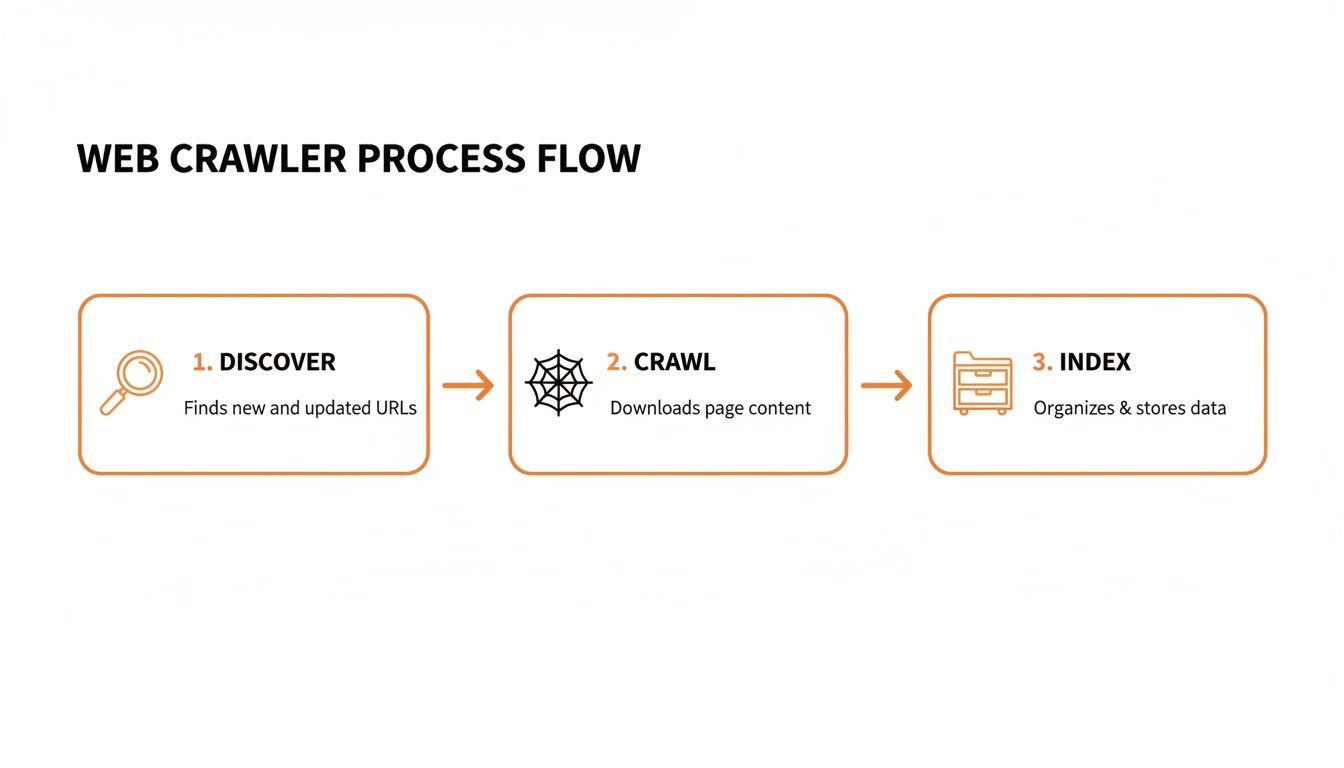
As you can see, the crawler’s job starts with discovery, moves to analyzing the content (crawling), and finishes by sending that information off to be organized for search results (indexing).
Giving Crawlers the Right Directions
Just because crawlers are automated doesn’t mean you have no say in what they do on your site. In fact, you can give them very clear instructions, almost like a traffic controller. Two simple but powerful tools are at your disposal.
- Robots.txt: The ‘No Entry’ Sign: This is a plain text file sitting in your site’s root directory that sets the ground rules. You can use it to block crawlers from specific pages or entire sections—think of it as a digital “Staff Only” sign. It’s perfect for keeping things like admin login pages, internal search results, or thank-you pages out of Google.
- XML Sitemap: The Helpful Tour Guide: A sitemap is the opposite of a
robots.txtfile. Instead of telling crawlers where not to go, you’re handing them a perfectly curated map of your most important pages. This list of URLs ensures your key content doesn’t get overlooked, which is especially important for large websites with deep structures.
Understanding Your Crawl Budget
Search engines have finite resources. They can’t spend all day on one website. The amount of time and resources a crawler like Googlebot allocates to your site is known as the crawl budget. Imagine a building inspector with only an hour to check out a massive skyscraper—they have to be efficient.
Your crawl budget is a finite resource. If a crawler wastes time on low-value pages, broken links, or slow-loading content, it may leave before it finds your most important product or service pages.
This makes managing your crawl budget absolutely critical for SEO. A fast website with a logical structure, a clear sitemap, and a well-defined robots.txt file helps the crawler do its job efficiently. This ensures it spends its limited time finding and indexing the pages that actually matter to your business.
Good Bots vs. Bad Bots on Your Website

It’s easy to think of all automated traffic as the same, but that’s a dangerous oversimplification. When a legitimate web crawler like Googlebot visits, it’s a good thing—it’s the first step to getting your pages indexed and ranked. But a huge chunk of bot traffic is malicious, and telling the difference is absolutely critical for your site’s health and security.
The respectable bots, the ones from search engines and other legitimate services, play by the rules. They’ll check your robots.txt file for instructions and identify themselves clearly in your server logs. In short, their activity helps you. Bad bots, on the other hand, couldn’t care less about your rules.
What Do Bad Bots Do?
Malicious bots are programmed to exploit your website for someone else’s benefit, often at your direct expense. Their activities can tank your performance, compromise your data, and create a whole host of problems. Knowing what you’re up against is the first step in defending your site.
Here’s a look at some of their common tactics:
- Content Scraping: These bots are digital thieves. They systematically copy your original blog posts, unique product descriptions, and pricing data, then republish it elsewhere. This can trigger duplicate content penalties from search engines, directly hurting your SEO.
- Skewing Analytics: Bad bots create phantom traffic, inflating your visitor numbers and bounce rates. This completely pollutes your data, making it impossible to know how real users are actually behaving on your site.
- Security Threats: Some bots are built to sniff out weaknesses. They’ll probe your website for security holes, looking for an opening to steal data, inject malware, or launch larger attacks.
This isn’t just a minor annoyance; it’s a massive and growing problem. In fact, bad bots now account for an incredible 37% of all internet traffic. With the web scraping market projected to hit US $2.7 billion by 2035, it’s clear this is a well-funded, industrial-scale issue. You can explore more web scraping statistics and trends to grasp just how big this is.
A sudden spike in website traffic might feel like a win, but if it’s from bad bots, you’re just getting a distorted view of your performance while your valuable content is being stolen.
Protecting Your Website
Learning to separate the helpful visitors from the harmful ones is non-negotiable. Good bots follow your directions and help your online visibility. Bad bots ignore your rules, eat up your server resources, and can cause real damage.
By keeping a close eye on your website traffic and server logs, you can start to spot suspicious patterns. This allows you to take action, block malicious crawlers, and ensure your site stays secure and your analytics stay accurate.
How to Monitor and Analyze Crawler Activity
Figuring out how web crawlers see your website isn’t just some abstract technical exercise—it’s a hands-on skill that can make or break your SEO efforts. Instead of guessing what bots are up to, you can play detective and look at their activity directly. This is how you catch problems before they do real damage to your rankings.
Your most valuable tool for this is Google Search Console (GSC), a free service from Google that gives you an incredible behind-the-scenes look at your site’s health. Think of it as a direct line to Google, showing you exactly how its bots are interacting with your content.
The goldmine within GSC is the Crawl Stats report. This report is your window into Googlebot’s behaviour, showing you a log of what it’s been doing on your site.
Using the Crawl Stats Report
The Crawl Stats report answers some of the most critical questions you can ask about your site’s relationship with Google. It provides a clear, data-driven picture that takes all the guesswork out of the equation. Honestly, it’s the first place I look when diagnosing almost any technical SEO issue.
You can use the report to find out:
- Crawl Frequency: How many requests is Googlebot making to your site daily? A sudden nosedive can be a red flag for a technical problem.
- Data Downloaded: How much data (in kilobytes) is Googlebot pulling down during its visits? A big spike might mean you’ve successfully launched a bunch of new content.
- Server Response Times: How fast is your server getting back to Googlebot? Slow-as-molasses response times will burn through your crawl budget and frustrate real users, too.
The report lays all this out in easy-to-read charts, so you can spot trends or weird anomalies at a glance.
This dashboard gives you a quick health check, showing total crawl requests, total download size, and the average response time.
Identifying and Fixing Crawl Errors
Beyond the top-line numbers, the real magic of the Crawl Stats report is its knack for showing you exactly what’s broken. It details crawl requests by response code, purpose, and file type, helping you pinpoint where crawlers are hitting dead ends. For a business owner, this is where you find the real, actionable stuff.
A classic problem this report uncovers is a high number of 404 “Not Found” errors. This means Googlebot is wasting its valuable time trying to find pages that don’t exist anymore, usually because it followed a broken internal link. Hunting down and fixing those links is a quick win for your site’s crawl efficiency.
By keeping an eye on this data, you can make sure Google’s web crawler is spending its limited time on your most important pages—not getting lost in a maze of broken links or waiting around for a slow server. This proactive approach is a cornerstone of solid SEO. You can learn more about how this connects to overall search performance by understanding Google Search Essentials in our guide.
Common Crawling Problems and How They Hurt SEO
When a web crawler hits a snag on your site, it’s not just a minor technical hiccup. Think of it as a direct threat to your traffic and, ultimately, your bottom line. These problems are like roadblocks on a highway, stopping search engines from finding, understanding, and ranking the very content you want customers to see.
Pinpointing these common culprits is the first step. Many of them are sneaky, causing serious damage without being obvious. For example, slow page load times don’t just annoy visitors; they actively burn through your crawl budget. If a crawler has to wait too long for a page to load, it might just give up and leave before it ever gets to your key service pages.
Key Issues That Block Crawlers
A few core problems consistently trip up even the most advanced crawlers. Each one creates a specific challenge that can quietly undermine your SEO, making your site harder for potential customers to find.
Here are the usual suspects:
- Slow Page Speed: A sluggish site makes crawlers spend too much of their limited time and resources on just a few pages. This means other important content might not get seen at all.
- Duplicate Content: When crawlers find the same content on multiple URLs, they get confused. They don’t know which version is the “right” one to index, which can split your ranking power and sometimes lead to the wrong page showing up in search. We dive deep into this in our guide to understanding canonical tags in SEO, which is the go-to solution for this exact problem.
- Orphan Pages: These pages are digital islands with no internal links pointing to them. If there’s no path, a crawler can’t discover them, rendering them invisible. An orphaned product page is like a shelf in a stockroom with no doors—customers will never find it.
The Business Cost of Crawl Errors
These technical issues quickly become real-world business problems. A page that isn’t crawled can’t be indexed. A page that isn’t indexed will never rank in search results. That translates directly into missed opportunities, lost traffic, and less revenue.
Every crawl error represents a potential customer who couldn’t find your solution. A broken link isn’t just a 404 error; it’s a dead end for both the web crawler and a user ready to convert.
Getting a handle on these issues changes how you think about web crawlers. They stop being some abstract technical concept and become a critical piece of your business’s success. By making sure crawlers can move through your site smoothly, you’re basically ensuring your digital storefront is open, accessible, and ready for business.
How to Optimize Your Website for Web Crawlers
Knowing how a web crawler works is one thing. Actually building a site that rolls out the welcome mat for them? That’s how you win at SEO.
When you optimize your website for crawlers, you’re essentially creating a clean, logical, and efficient pathway for bots to find, understand, and index your most important content. This isn’t just a backend technical chore; it has a direct line to user experience and, ultimately, your bottom line.
Think of it like setting up a physical shop. If the aisles are clear, the signs are helpful, and the layout makes sense, customers can find what they need in no time. A crawler-friendly site does the same thing for search engine spiders exploring your digital space.
Build a Logical Internal Linking Structure
Internal links are the roadways that guide both users and web crawlers through your website. A solid internal linking strategy builds a connected web that spreads authority and helps crawlers discover every last page. Without it, you risk leaving important content “orphaned” and completely invisible to search engines.
A straightforward but incredibly effective method is the topic cluster model. You have a central “pillar” page on a broad topic, which then links out to more specific, in-depth articles. This not only makes your site a breeze to crawl but also signals your expertise on a subject. Every new blog post or product page should always link to and from other relevant pages, reinforcing your site’s overall architecture.
Prioritize Mobile Performance and Speed
Let’s be clear: mobile-friendliness is no longer optional. Google’s mobile-first indexing means its crawlers primarily look at the mobile version of your site to figure out rankings. A slow, clunky mobile experience will tank your visibility, no matter how beautiful your desktop site is.
In Canada, where 95.1% of the population is online and median download speeds are a zippy 235.44 Mbps, users have high expectations for performance. Crawlers take notice of this, too. A site that loads fast respects both your visitor’s time and the crawler’s limited crawl budget. You can dig deeper into how Canada’s digital landscape impacts online business.
A one-second delay in mobile load times can impact conversion rates by up to 20%. Optimizing for speed isn’t just for SEO; it’s a direct investment in your sales funnel.
Resolve Content and Technical Issues
Finally, get into the habit of running regular technical audits to find and squash any issues that might be blocking crawlers. These check-ups are crucial for maintaining a clean, efficient site that search engines can process without a hitch.
Here are a few key things to keep an eye on:
- Canonical Tags: Use these to tell crawlers which version of a page is the “master” copy. This is absolutely vital for e-commerce sites where product variations often create tons of duplicate URLs.
- Structured Data: Add schema markup to give crawlers explicit context about what your content is. Our guide on structured data for SEO has practical steps for both local and e-commerce businesses.
- Redirects: Hunt down and fix broken links (404 errors). Make sure you use proper 301 redirects to guide crawlers from old URLs to new ones, preserving that hard-earned link equity.
Got Questions About Web Crawlers? We’ve Got Answers
We’ve walked through the ins and outs of web crawlers, but a few questions always pop up. Let’s tackle some of the most common ones to round out your understanding.
How Often Will a Crawler Visit My Website?
There’s no single answer here—the frequency, often called the crawl rate, really depends. A massive news site publishing articles every minute might see a crawler show up constantly. On the other hand, a small local business blog that updates once a week might only get a visit every few days.
Several factors influence this: your site’s overall authority, how often you’re putting out new content, and its technical performance. You can encourage more frequent visits by consistently publishing fresh, valuable content and making sure your server can handle crawler requests without slowing down. For a direct look, check out the Crawl Stats report in Google Search Console—it tells you exactly how often Googlebot is stopping by.
Can I Stop a Web Crawler From Accessing My Site?
Absolutely. You can control crawler access using a simple text file in your site’s main directory called robots.txt. Think of it as a set of instructions for visiting bots. By adding “disallow” rules, you can tell crawlers to stay away from certain pages or entire sections, which is perfect for keeping private admin areas or test pages out of the public index.
A word of caution: Be incredibly careful when you edit this file. One small mistake, like a misplaced character, could accidentally block your entire website from search engines. If that happens, your rankings and traffic could vanish almost instantly.
Is “Crawling” Just Another Word for “Scraping”?
They’re related, but their intentions are worlds apart. It helps to think of it like this:
- Web Crawling is the process search engines use to discover and index the internet. Their goal is to create a massive, searchable map for everyone’s benefit. It’s about discovery and organization.
- Web Scraping, however, is about targeted data extraction. A scraper is sent to pull specific pieces of information from a site, like product prices from a competitor or a list of email addresses.
While scraping can be used for legitimate reasons, it’s often used maliciously to steal content or data without permission. That’s why it’s something site owners often need to monitor and block.
At Juiced Digital, we build websites that don’t just look great to your customers—they’re also perfectly structured for search engine crawlers. Ready to make your website a true engine for growth? Find out how we can help at https://juiceddigital.com.
