

When it comes to Google Display ads, not all sizes are created equal. If you want to maximize your reach and performance right out of the gate, your best bet is to focus on a few key dimensions: the Medium Rectangle (300 x 250), the Large Rectangle (336 x 280), the Leaderboard (728 x 90), and the Half Page (300 x 600).
Nailing these core sizes from the start means you’re tapping into the largest available ad inventory, which is a massive shortcut to better campaign performance.
Your Quick Reference for Top Google Display Ad Sizes
Kicking off a new display campaign can feel overwhelming with all the creative variations you could build. But here’s a pro tip: instead of making dozens of ad sizes, concentrate your efforts on the most popular and effective ones. This simple strategy ensures your ads are eligible to show up on the widest possible range of websites and apps, giving you a much better shot at connecting with your audience.
For Canadian digital marketers, especially those in regulated industries like cannabis or wellness, standardizing on these proven dimensions is crucial. Google itself recognizes four top-performers that consistently drive results. By prioritizing these, you’re not just saving time; you’re aligning your strategy with what the Google Display Network inventory supports best.
This infographic gives you a quick visual rundown of the most important ad sizes to have in your toolkit.
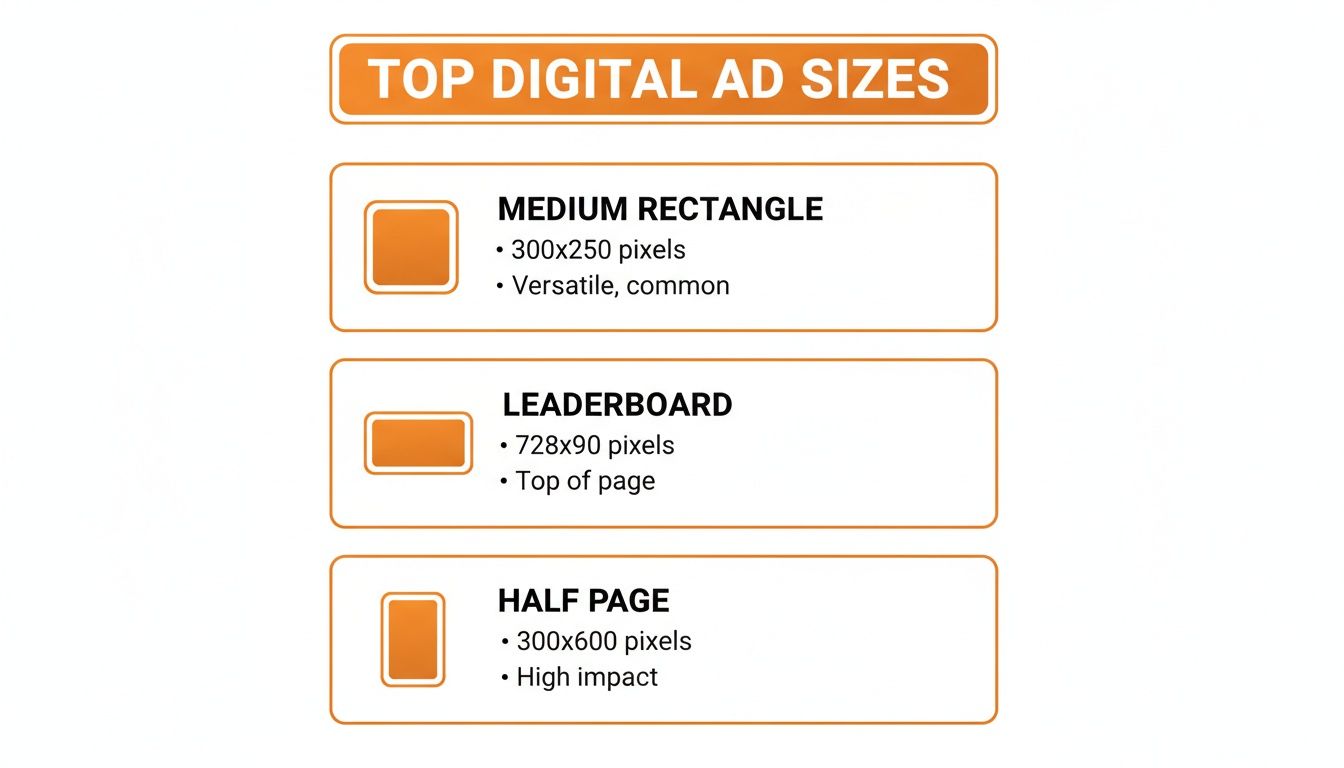
As you can see, a handful of formats like the Medium Rectangle and Leaderboard really dominate the ad space.
For a quick summary, this table breaks down the most valuable ad sizes you should be creating for your campaigns.
Top-Performing Google Display Ad Sizes at a Glance
| Ad Name | Dimensions (Pixels) | Best Use Case | Device |
|---|---|---|---|
| Medium Rectangle | 300 x 250 | High-impression campaigns; fits well within content | Desktop & Mobile |
| Large Rectangle | 336 x 280 | Similar to Medium Rectangle, but offers more space | Desktop & Mobile |
| Leaderboard | 728 x 90 | Brand awareness; high visibility “above the fold” | Desktop |
| Half Page | 300 x 600 | High-impact storytelling; grabs attention | Desktop & Tablet |
Focusing your design resources on these four dimensions is a smart, efficient way to get your campaigns live and performing well.
Key Dimensions for Maximum Impact
To keep your creative process efficient, start with these formats. They give you the best balance of performance and reach because they’re supported by the vast majority of publishers on the Google Display Network.
- Medium Rectangle (300 x 250 px): This is the true workhorse of display advertising. It fits seamlessly into content on both desktop and mobile, which is why it commands a huge share of available ad impressions.
- Leaderboard (728 x 90 px): Usually placed right at the top of a page, this format is brilliant for brand awareness. Its high visibility means it’s one of the first things people see when a page loads.
- Half Page (300 x 600 px): With its large vertical canvas, this ad size is perfect for telling a more visual story. It really captures attention as users scroll down a page, making it a high-impact choice.
Choosing Between Static and Responsive Display Ads
When you’re mapping out a new campaign, one of the first forks in the road is deciding between traditional static image ads and Google’s dynamic Responsive Display Ads (RDAs). They each have their place, and the best choice really comes down to your campaign goals, how much creative firepower you have, and the level of control you need.
Static ads are straightforward. They’re single-image files—think JPG, PNG, or GIF—that you create for very specific google display ads sizes. This route gives your design team total, pixel-perfect control over the final look, which is great for ensuring your brand and message appear exactly as you envisioned. The trade-off, however, is reach. To cover more ground, you need to create a unique file for every single ad dimension you want to run.
The Power of Responsive Display Ads
On the other side of the coin, you have Responsive Display Ads. These are now the default and recommended ad type on the Google Display Network, and for good reason. Instead of uploading a finished ad, you feed Google a collection of creative assets, and its machine learning does the heavy lifting.
You provide the building blocks, and Google’s algorithm will mix and match them to find the winning combinations. Here’s what you typically supply:
- Images: Up to 15 different visuals, ideally a mix of landscape and square formats.
- Logos: Up to 5 different logos.
- Headlines: Multiple short headlines (30 characters) and one long headline (90 characters).
- Descriptions: Several text descriptions to give your visuals context.
Google then takes these components and automatically assembles them into ads that perfectly fit nearly any ad space available across the web, from websites and apps to its own platforms like YouTube and Gmail.
This automated process is all about maximizing your reach and efficiency. By letting the algorithm do the work, a single RDA can adapt to fill almost every ad slot out there—a task that would be incredibly tedious and time-consuming with static ads.
Making the Right Strategic Choice
So, which one makes sense for your business? The decision really boils down to balancing your need for creative precision against your campaign’s scale and optimization goals.
Choose Static Ads When:
- Brand Integrity is Paramount: You have strict brand guidelines and need absolute control over the layout, typography, and visual hierarchy.
- You Have a Singular Message: Your campaign centres on a specific, carefully crafted visual that can’t be deconstructed into separate parts.
- Targeting Premium Placements: You’re buying space on a particular high-profile site that demands exact ad dimensions.
Choose Responsive Display Ads When:
- Maximizing Reach is the Goal: You want your ads to show up in as many places as possible across the entire display network.
- Performance Optimization is Key: You’re happy to let Google’s AI test different creative combinations to find and serve the best-performing variations automatically.
- Resources are Limited: You simply don’t have the design capacity to produce dozens of individual static ad files.
For most advertisers in Canada, the sweet spot is often a hybrid approach. Use RDAs to cast a wide net and let Google optimize for performance, then supplement those campaigns with a few polished static ads for critical retargeting efforts or high-value placements where that pixel-perfect brand control really matters.
A Detailed Breakdown of Every Key Image Ad Size
While Responsive Display Ads are fantastic for maximizing reach, sometimes you just need the pixel-perfect control that only a static image ad can provide. Knowing the specific dimensions and where they work best is crucial for briefing your creative team and planning an effective media buy.
Think of this as your go-to reference for all the important google display ads sizes. I’ve broken them down by their common placements and shapes, covering the heavy hitters you’ll use constantly, along with other common formats you’ll definitely run into.
Top Performing Rectangle and Square Ad Sizes
Let’s start with the workhorses of the Google Display Network. Rectangles and squares are so popular because they’re incredibly versatile and fit naturally into website content on both desktop and mobile, feeling less like a disruptive ad.
- 300 x 250 Medium Rectangle: If you only make one size, make this one. It’s arguably the most important ad size, with a massive amount of inventory available. It performs brilliantly when embedded within articles, making it less intrusive and far more likely to get noticed.
- 336 x 280 Large Rectangle: Think of this as the slightly bigger cousin to the Medium Rectangle. That extra space gives your message more room to breathe. It’s another top performer that shines when placed inside content like blog posts.
- 250 x 250 Square: A nice, compact size that’s perfect for sidebars or fitting into smaller content areas. Its balanced canvas is great for simple, bold visuals and a punchy call-to-action.
- 200 x 200 Small Square: You won’t see this one as often, but the Small Square can be a smart, budget-friendly choice for filling niche inventory spots. Just be sure your message is tight and concise, because you don’t have much space to work with.
These sizes, especially the 300 x 250, are absolutely non-negotiable for any serious display campaign. The sheer impression volume and consistent performance across all devices make them essential.
Essential Skyscraper Ad Sizes
Skyscrapers are the tall, slender ads you typically see running down the sidebars of webpages. Their vertical shape is a huge advantage because they stay in view as users scroll down the page. This makes them absolute gold for brand awareness and retargeting campaigns.
- 300 x 600 Half Page: This is one of the most impactful display sizes out there, period. The huge canvas gives you plenty of real estate for compelling visuals and storytelling, which almost always leads to higher engagement.
- 160 x 600 Wide Skyscraper: A true sidebar standard. It offers fantastic visibility without completely taking over the page. It’s a top-performing format with tons of inventory on desktop sites.
- 120 x 600 Skyscraper: This is the original skyscraper format. It’s narrower and not quite as popular as its wider sibling, but it still finds a home in certain website layouts.
Brands looking to make a big visual splash often favour the 300 x 600 Half Page. While it can come with a higher CPM (cost-per-mille), its impact often justifies the cost, especially for campaigns focused on brand lift. For more detail on how different formats stack up, our guide on banner ads dimensions offers some great additional insights.
Leaderboard and Banner Ad Sizes
Leaderboards are the wide, rectangular ads that usually sit right at the top of a webpage, often “above the fold.” That premium placement means they’re one of the very first things a visitor lays eyes on.
- 728 x 90 Leaderboard: The classic banner ad. This is a must-have for any campaign where brand awareness is a key goal. Its prominent position guarantees high visibility on desktops and tablets.
- 970 x 90 Large Leaderboard: A wider, more premium take on the standard Leaderboard. It provides a massive canvas for high-impact branding and is frequently found on major publisher websites.
- 468 x 60 Banner: This is a smaller, older banner format. It’s less common these days, but you’ll still spot it on forums and smaller sites.
Mobile-Specific Ad Sizes
With most web traffic now coming from mobile, designing ads specifically for smaller screens isn’t just a good idea—it’s critical. These formats are built from the ground up to provide a great user experience on smartphones.
- 320 x 50 Mobile Leaderboard: This is the undisputed standard for mobile advertising. You’ll usually see it as a “sticky” banner at the top or bottom of the screen, keeping your brand visible without getting in the way of the content.
- 320 x 100 Large Mobile Banner: Offering double the height of the standard mobile leaderboard, this format gives you more space for creative impact and clearer messaging on mobile devices.
- 300 x 50 Mobile Banner: A slightly smaller variation that fits well into all sorts of mobile ad placements.
Getting the Technical Specs and Asset Requirements Right
Nailing the pixel dimensions for your Google display ads sizes is a solid first step, but it’s really only half the job. If you want your ads to run without a hitch and dodge those frustrating disapprovals, you have to get a handle on Google’s technical specifications. These rules cover everything from file formats to animation lengths and are all about keeping a quality user experience across the network.
Think of these specs as the official rulebook for getting your creative approved. If you ignore them, you’re just setting yourself up for rejected ads, which means campaign delays and wasted time. Following the rules, on the other hand, ensures your visuals look sharp and perform their best, no matter where they show up.
Core Technical Specs for Static Image Ads
For your standard, static image ads, the technical side of things is pretty straightforward. The main hurdle you’ll run into is the file size limit, which is a big deal for keeping page load times snappy for users.
- Accepted File Formats: The usual suspects are all here: JPG, PNG, and GIF. Just pick the format that makes the most sense for your design. JPGs are perfect for photographs, while PNGs are your go-to for graphics needing a transparent background.
- Maximum File Size: This one’s a biggie. All image ads must be under 150KB. It’s a hard limit, so make sure you’re optimizing your images before you try to upload them into Google Ads.
- Animation Rules (for GIFs): If you’re working with an animated GIF, the animation can’t run longer than 30 seconds. They can loop, sure, but they absolutely must stop after that 30-second mark. Also, keep the frame rate below 5 frames per second (FPS) so it doesn’t feel too frantic or distracting.
Pro Tip: That 150KB file size limit isn’t a suggestion. It’s a rule. I always use tools like TinyPNG or Google’s own Squoosh to shrink file sizes down without trashing the image quality. A well-optimized ad is good for everyone—it respects the user’s data and plays by Google’s rules.
Asset Requirements for Responsive Display Ads
Responsive Display Ads (RDAs) are a completely different animal. You aren’t just uploading one finished ad; you’re handing Google a whole toolkit of assets. The key here is to provide a diverse, high-quality set of components. This gives Google’s algorithm the creative freedom it needs to piece together the best-performing ad combinations for different placements.
Here’s a full rundown of what you’ll need to have ready for a successful RDA campaign.
Image Asset Checklist:
- Landscape Images (1.91:1): You can upload up to 15 of these. Aim for 1200 x 628 pixels. The absolute minimum is 600 x 314 pixels, but bigger is better.
- Square Images (1:1): You can also provide up to 15 square images. The recommended size is 1200 x 1200 pixels, with the minimum being 300 x 300 pixels.
Logo Asset Checklist:
- Square Logo (1:1): You can have up to 5 logos. The sweet spot is 1200 x 1200 pixels, though the minimum accepted is 128 x 128.
- Landscape Logo (4:1): It’s a very good idea to also include a landscape version of your logo so it fits nicely into certain ad layouts. The recommended size is 1200 x 300 pixels (minimum 512 x 128).
Text Asset Checklist:
- Short Headlines: You get up to 5 of these, and each one can be a maximum of 30 characters.
- Long Headline: You get one long headline, which can be up to 90 characters.
- Descriptions: You can write up to 5 different descriptions, each with a 90-character limit.
- Business Name: Simply your business name, with a cap of 25 characters.
When you give Google a rich library of assets to work with, you’re basically letting its machine learning run wild to test countless combinations. This is how you uncover the ads that truly connect with your audience.
Best Practices for High-Converting Display Ad Creatives

Nailing the right google display ads sizes is a crucial first step, but let’s be honest—it’s the creative that does the heavy lifting. A technically perfect ad that doesn’t resonate with its audience is just digital noise. To build display ads that actually convert, you need a smart mix of proven design principles and a deep understanding of who you’re talking to.
The best ads get their point across in a flash. You only have a fraction of a second to grab someone’s attention, so your message has to be crystal clear. Good design isn’t just about looking nice; it’s about leading the viewer’s eye on a specific path, from your main image to your headline and right to the call-to-action.
Craft a Clear Value Proposition
At its heart, your ad is a promise. Your value proposition needs to immediately answer the viewer’s silent question: “What’s in it for me?” This core message has to shine through in both your visuals and your text.
Cut the fluff and industry jargon. Focus on a real benefit or a solution to a problem your audience actually has. For instance, instead of a vague headline like “Innovative Software Solutions,” try something direct like, “Save 10 Hours a Week on Admin Tasks.” That kind of specificity is far more persuasive and gives people a tangible reason to click.
A strong value proposition doesn’t just list features; it shows how your product or service improves the customer’s life. That’s the connection that turns a passive glance into an active click.
Design with a Strong Visual Hierarchy
Visual hierarchy is simply about arranging elements to show what’s most important. A well-structured ad guides the user’s eye exactly where you want it to go, making it a cornerstone of conversion rate optimization.
Think of it in three distinct parts:
- A Compelling Image: The visual is what people see first. Use high-quality, relevant images or graphics that stop the scroll and reinforce your message.
- A Punchy Headline: This is where you state your value proposition. Make it the most prominent piece of text by using a bold, easy-to-read font.
- A Clear Call-to-Action (CTA): This is your closing argument. Your CTA button needs to pop. Use a contrasting colour and action-focused text like “Get Your Free Trial” or “Shop Now” to make it obvious what to do next.
Don’t forget your branding. Your logo should be visible enough for recognition but shouldn’t dominate the ad. Tucking it into a corner usually works best. For advertisers wanting to take their campaigns to the next level, understanding the mechanics of programmatic display advertising can help get these meticulously designed creatives in front of the right eyeballs at the right time.
Finally, and this is critical, make sure your ad creative and your landing page are a perfect match. The messaging, imagery, and overall vibe must be consistent. A smooth transition from the ad to the page builds trust and dramatically boosts your chances of turning that click into a meaningful conversion.
Understanding Performance Benchmarks in Canada
Before you can know if your display campaign is a winner, you need to set realistic expectations. This is where a lot of people go wrong—they judge their display ads using search campaign numbers. That’s a surefire way to misread your results, because the two couldn’t be more different.
Think of it this way: search ads catch people who are actively hunting for something specific. Display ads, on the other hand, are all about getting in front of people while they’re browsing their favourite sites. It’s an interruption, but a powerful one for building brand awareness and staying top-of-mind. This fundamental difference in user intent is exactly why their performance metrics look so unalike.
Click-Through Rate And Cost Per Click Averages
Across all Canadian industries, the average click-through rate (CTR) for a Google Display Ad is around 0.46%. Now, compare that to the average Search Ad CTR of 3.17%, and you might think something is broken. It isn’t. It just reflects the passive way people interact with display ads.
Of course, these numbers aren’t set in stone; they move around depending on the industry. E-commerce brands, for instance, might see a slightly higher average CTR of 0.51%, while the technology sector tends to hover around 0.39%.
The same goes for what you’ll pay per click. The average cost-per-click (CPC) on the display network is $0.63, but this figure can swing wildly.
- E-Commerce: Often gets a break with one of the lowest CPCs at just $0.45.
- Dating & Personals: This competitive space sees the highest average CPC, coming in at $1.49.
These benchmarks prove that a one-size-fits-all approach to your KPIs just won’t work. A B2B tech company in Toronto might find a $0.63 CPC perfectly reasonable, but an online clothing shop should be aiming for something much closer to that $0.45 mark.
Here’s a quick look at how these metrics stack up across a few key sectors in Canada.
Average Google Display Ad Metrics by Industry in Canada
| Industry | Average CTR | Average CPC | Average Conversion Rate |
|---|---|---|---|
| Technology | 0.39% | $0.58 | 0.86% |
| E-Commerce | 0.51% | $0.45 | 1.91% |
| B2B | 0.47% | $0.79 | 1.77% |
| Travel & Hospitality | 0.49% | $0.44 | 1.12% |
This table shows just how much performance can vary. While e-commerce might have a higher CTR, its conversion rate is what really stands out, highlighting the direct-response nature of the industry.
Setting Meaningful KPIs For Your Campaigns
Knowing these industry averages helps you set Key Performance Indicators (KPIs) that actually make sense for your business and goals. If you’re running a campaign purely for brand awareness, you’ll care more about impressions and view-through conversions than you will about a raw CTR.
For campaigns designed to get an immediate action, like those in e-commerce, your focus has to be on conversion rates and Return On Ad Spend (ROAS). Having a solid grasp of average costs and click rates lets you build a smarter budget and forecast your results with more confidence. When you align your expectations with real-world data, you’re in a much better position to judge what’s working and make optimizations that count.
If you want to get a handle on measuring the true financial impact of your campaigns, a good place to start is our guide that answers the common question, what is ROAS?
Frequently Asked Questions About Google Display Ad Sizes
Getting your head around Google Display Ad sizes can feel like a lot, especially when you’re trying to nail the creative while still hitting your performance targets. I get these questions all the time, so I’ve put together some quick, no-nonsense answers to the most common ones. Think of this as your go-to cheat sheet for solving those everyday headaches.
This isn’t just a list; it’s a rapid-fire resource for the practical stuff that pops up right when you’re about to launch a campaign.
Which Google Display Ad Sizes Are Most Important to Start With?
If you’re working with limited time or a tight budget, don’t try to build every single ad size. You’ll spread yourself too thin. Instead, focus on the handful that Google consistently reports as top performers. These are the ad dimensions that will get you in front of the most eyeballs, hands down.
To get the best bang for your buck, start with these four workhorses:
- Medium Rectangle (300 x 250): This is the bread and butter of display advertising. It performs well everywhere—desktop, mobile, you name it.
- Large Rectangle (336 x 280): A slightly bigger version of the Medium Rectangle. That extra real estate gives your creative a bit more room to breathe without sacrificing placement opportunities.
- Leaderboard (728 x 90): This one is all about visibility. It sits right at the top of the page, making it a fantastic choice for brand awareness campaigns.
- Half Page (300 x 600): A personal favourite. Its large format makes a huge visual impact, and it often stays on screen as users scroll, which is great for keeping your brand top-of-mind.
Honestly, though, if you want maximum efficiency and the widest possible reach, your number one priority should be a Responsive Display Ad. You just feed Google a bunch of assets, and its system automatically builds ads that fit just about any slot available. It’s the ultimate way to cover all your bases with one setup.
What Assets Are Needed for Responsive Display Ads?
Responsive Display Ads (RDAs) aren’t your typical static image ads. They’re more like a creative toolkit that Google’s algorithm uses to build the perfect ad on the fly. To make them work, you need to give the system enough high-quality ingredients to play with.
Here’s exactly what you need to have ready:
- Images: You can supply up to 15 images. It’s absolutely crucial to provide both landscape (1.91:1 aspect ratio) and square (1:1) options. Don’t skip one or the other.
- Logos: Upload up to 5 logos. Make sure you include a primary square (1:1) version and a landscape (4:1) one for wider, shorter ad slots.
- Headlines: You’ll need up to 5 short headlines (max 30 characters each) and one long headline (up to 90 characters).
- Descriptions: Write up to 5 different descriptions, keeping each under 90 characters.
The more variety you provide, the better. You’re essentially giving Google’s machine learning more data to test, which helps it find the combinations that resonate most with your audience.
What Are the Most Common Reasons My Display Ads Get Disapproved?
Getting an ad disapproved is always a pain, but the reasons usually fall into two buckets: simple technical mistakes or policy violations. Knowing what to look out for can save you a ton of time and keep your campaigns on track.
Technical issues are typically the easiest to sort out. By far the most common mistake is going over the 150KB file size limit for image ads. Other frequent slip-ups include using an unsupported file format (just stick to JPG, PNG, or GIF) or creating a GIF animation that’s too long or flashy.
Policy disapprovals can be a bit trickier. These often come from using blurry or low-quality images, designing misleading ads (like a CTA button that looks like a system warning), or making claims that go against Google’s rules. If you’re in a regulated industry like health, wellness, or cannabis, you absolutely have to read Google’s latest advertising policies inside and out to stay compliant.
At Juiced Digital, we build performance-focused campaigns that turn traffic into revenue. Our AI-powered approach to paid advertising and SEO helps businesses in Vancouver and across North America achieve measurable growth. Find out how we can help you scale by visiting us at https://juiceddigital.com.
