
So, you’re wondering, “how much are ads on Google?” The honest answer is: it depends. There’s no simple price tag, but we can definitely give you a solid starting point.
On average, you can expect to pay somewhere between $2 and $4 for each click on the Google Search Network. If you’re running ads on the Display Network, that cost often drops to under $1.00. But think of these numbers as the very beginning of the story.
Your Quick Answer to Google Ads Pricing
Think of it like buying a car. There’s a base price, but the final cost changes once you start adding features. A more powerful engine (like targeting highly competitive keywords) or a premium paint job (aiming for that coveted top ad spot) will naturally increase the price. Your Google Ads budget isn’t a fixed number; it’s a dynamic figure that shifts based on the choices you make.
To get a real handle on your potential ad spend, you first need to understand the three main ways Google will charge you. Each pricing model is built for a different goal, whether that’s getting immediate clicks to your website or just making sure as many people as possible see your brand name.
For a side-by-side look at how Google’s approach stacks up against other platforms, check out our deep dive into Facebook Ads versus Google Ads.
The Core Pricing Models
How you pay is directly tied to what you want to achieve. Let’s break down the three fundamental models you’ll encounter.
- Cost-Per-Click (CPC): This is the most common setup by far. You pay Google a small fee every single time someone clicks on your ad. It doesn’t matter if they buy something or leave right away—the click is what you pay for. It’s perfect for campaigns focused on driving traffic and generating leads.
- Cost-Per-Mille (CPM): “Mille” is Latin for a thousand. With this model, you pay a set price for every 1,000 times your ad is shown on a screen (an “impression”). This is the go-to choice for brand awareness campaigns where getting eyes on your ad is the primary goal.
- Cost-Per-Action (CPA): This one is all about results. You only pay when someone completes a specific goal you’ve defined, like making a purchase, signing up for a newsletter, or downloading your app. It directly ties your ad budget to tangible outcomes.
Getting to know these models is the first real step in building a campaign that works with your budget, not against it. When you pick the right one, you stop just spending money and start investing it where it will generate the most value for your business.
We’ll dig deeper into each of these later, but this gives you a solid foundation before we explore all the other factors that will shape your final ad spend.
So, how does Google actually take your money? This is the first question everyone asks, and the answer isn’t a simple flat rate. It all comes down to what you want to achieve.
Google gives you three main ways to pay, and each one is built for a different goal. Getting this right from the start is the difference between a campaign that feels like a money pit and one that actually makes you money.
Think about it like this: if you’re a plumber in downtown Toronto, your main goal is probably to get your phone ringing with emergency calls. You need action, and you need it now. Your payment model should reflect that.
Cost-Per-Click (CPC)
This is the classic, the one most people start with. Cost-Per-Click (CPC) is exactly what it sounds like: you only pay Google when someone actually clicks on your ad.
You’re not paying for your ad to just sit there on the search results page; you’re paying for a potential customer to land on your website. For that Toronto plumber, this is perfect. They only spend money when a homeowner with a burst pipe clicks their ad for “24/7 emergency plumbing.” The cost is tied directly to a real person showing interest.
Cost-Per-Mille (CPM)
Now, let’s switch gears. Imagine a new craft brewery in Montreal. Before they can worry about selling cases of beer online, they just need people to know they exist. They want their name and logo plastered everywhere. That’s where Cost-Per-Mille (CPM) comes into play.
“Mille” is just a fancy Latin word for a thousand. With CPM, you pay a flat fee for every 1,000 times your ad is shown to someone. These views are called “impressions.”
CPM is all about eyeballs. It’s the digital version of buying a billboard on the Gardiner Expressway. You’re paying for brand awareness and recognition, not immediate clicks. It’s the go-to strategy when you just need to get your name out there.
Cost-Per-Action (CPA)
Finally, we have the model that really gets experienced marketers excited: Cost-Per-Action (CPA), which you’ll also hear called Cost-Per-Acquisition. This is where you tell Google what a customer is actually worth to you.
Instead of paying for clicks or views, you only pay when someone completes a specific goal you’ve defined. This could be anything from a completed purchase on your e-commerce site to someone filling out a contact form or signing up for your newsletter.
Google’s system then gets to work, using all its data to find people who are most likely to take that specific action. For an online clothing boutique, this is the holy grail—they only pay when an ad directly leads to a sale. It takes the guesswork out of the equation because your ad spend is directly locked to your most important business outcomes.
What Really Determines Your Google Ad Costs?
Ever wonder why one business pays $2 per click while their direct competitor pays $50 for the very same keyword? It all comes down to the real-time auction that fires up every single time someone searches on Google. This isn’t a simple “highest bidder wins” scenario; it’s a dynamic system where several key factors collide to decide who gets the ad spot and exactly what they’ll pay for it.
The good news is you’re not just along for the ride. Understanding these moving parts gives you a surprising amount of control over your ad costs. By focusing on the right elements, you can make your budget work a whole lot smarter.
Let’s start by looking at the fundamental ways you can pay for ads, which sets the stage for everything else.
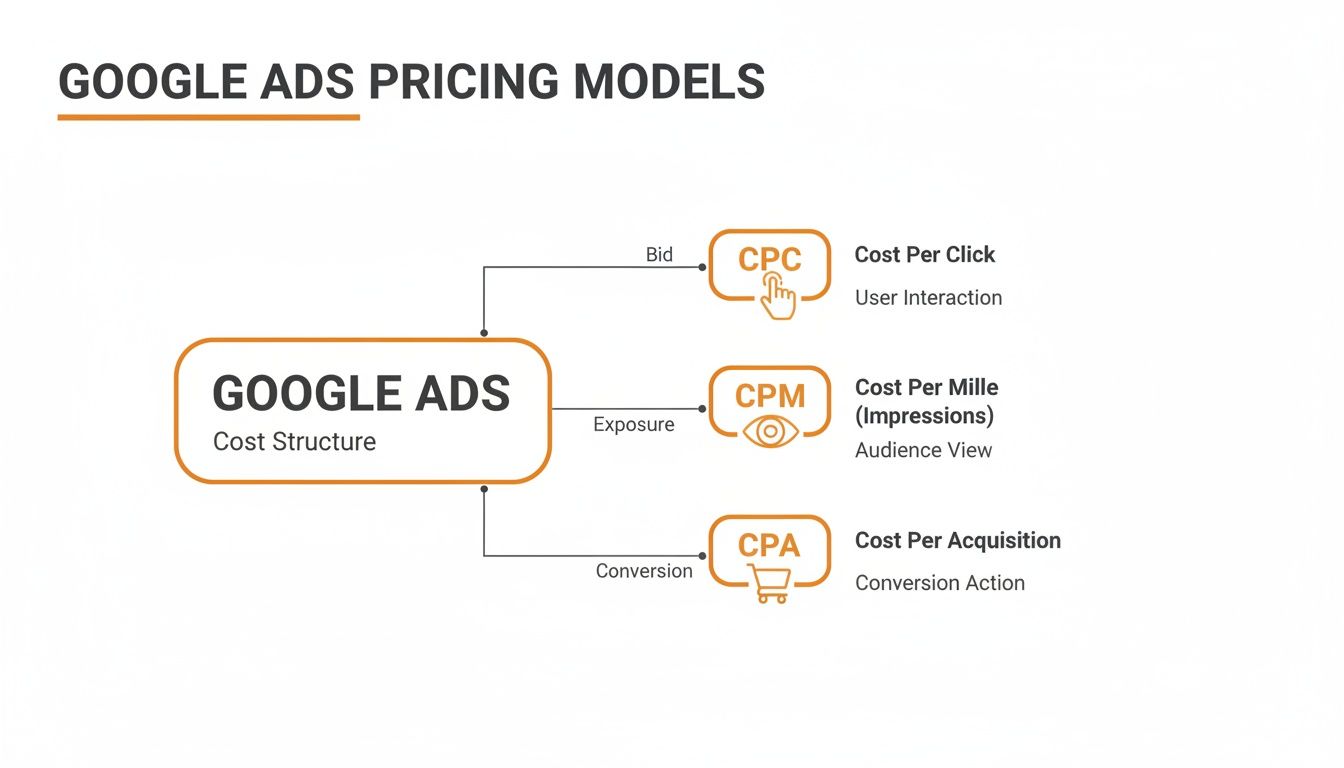
Each of these pricing models—CPC, CPM, and CPA—is built for a different goal, whether that’s getting people to your website, making sure your brand is seen, or driving a specific action like a sale.
Your Ad’s Reputation: Quality Score
Think of Quality Score as your ad’s reputation in Google’s eyes. It’s a simple 1 to 10 rating that Google assigns to your ads, keywords, and landing pages. A high score is Google’s way of saying, “Hey, this ad is genuinely helpful and relevant to our users.” As a reward, they’ll give you a discount on your cost per click and a better ad position.
A high Quality Score is the single most powerful tool you have for cutting down your ad costs. Google actively rewards advertisers who deliver a great user experience.
So, how is this score calculated? It boils down to three core pieces:
- Expected Click-Through Rate (CTR): Based on past performance, how likely are people to actually click on your ad when they see it?
- Ad Relevance: Does your ad’s message directly answer the question or need behind a person’s search?
- Landing Page Experience: Once someone clicks, does your website deliver on the ad’s promise? Is it easy to use, relevant, and trustworthy?
Working to improve these three areas will give your Quality Score a boost, which in turn lowers what you have to pay.
The Bidding Wars: Competition and Industry
Your industry and location play a massive role in what your ads on Google will cost. If you’re in a competitive market chasing high-value keywords, get ready for a bidding war. This is especially true for local service businesses in major Canadian cities.
Take a keyword like “plumber near me” in a city like Vancouver. It’s not unusual to see costs climb as high as $55-$60 per click. Why so much? Because a single click can lead to a job worth thousands of dollars, so businesses are willing to bid aggressively. This is precisely why a smart, well-optimized strategy is non-negotiable in high-stakes local markets. You can dig into more insights about Google Ads costs to see just how much these benchmarks can vary.
Ad Rank and Your Final Bill
Your Ad Rank is what determines where your ad shows up on the page. It’s a simple formula: your maximum bid multiplied by your Quality Score. A higher Ad Rank means a better ad position.
But here’s the critical part: you don’t actually pay your maximum bid. You only pay the minimum amount needed to outrank the advertiser directly below you. This is why improving your Quality Score is your secret weapon—it lifts your Ad Rank without you having to spend more money, directly lowering your actual cost per click.
How to Set a Realistic Monthly Ad Budget
Diving into Google Ads without a budget is like setting off on a road trip with no idea how much gas costs or how far you need to go. You’ll start, sure, but you’ll probably run out of fuel long before you reach your destination. Instead of picking a number out of thin air, let’s work backwards from your actual business goals.
The whole process boils down to one simple question: how many new customers do you want this month?
Let’s say you’re aiming for 10 new customers. That number becomes the bedrock of our entire calculation.
Next, we need a handle on how well your website performs. For every 100 people who click your ad and land on your site, how many actually buy something or fill out a form? This is your conversion rate. If you land two customers from 100 clicks, your conversion rate is 2%—a perfectly reasonable starting point for many businesses.
Calculating Your Required Clicks
Armed with those two numbers, we can figure out exactly how many clicks you need to buy. If your goal is 10 customers and your website converts visitors at a 2% rate, the math is straightforward: you’ll need 500 clicks to hit your target (10 customers / 0.02 conversion rate).
Now we can finally connect this to the real-world cost of Google Ads. Let’s imagine your research shows the average Cost-Per-Click (CPC) for your industry is about $3.00.
To get the 500 clicks you need, your starting monthly budget would look like this:
- 500 Clicks x $3.00 Average CPC = $1,500 Monthly Budget
Just like that, you’ve turned a business goal into a tangible, actionable ad budget. It’s no longer a guess; it’s a data-informed starting line for your first campaign, ensuring your ad spend is directly tied to measurable growth.
Choosing Your Budgeting Philosophy
Okay, so you have your baseline number. But that doesn’t mean you should throw the entire amount at Google on day one. There are a couple of different ways to approach this, and the right one depends on your comfort level with risk.
A calculated budget gives you confidence. It means you’re not just spending money on ads; you’re investing in a predictable system for generating new business and revenue.
One strategy is to start small and test the waters. You could take that calculated $1,500 budget and decide to only spend $500 in the first month. The objective here isn’t to hit your customer goal right away. Instead, you’re buying precious data. You’re learning which keywords drive sales, which ad copy resonates, and which landing pages convert. This approach keeps your initial risk low.
The other strategy is to invest aggressively to learn faster. With this approach, you’d commit the full $1,500 (or maybe even more) from the get-go. The big advantage here is speed. You collect performance data much more quickly, which lets you find what’s working and scale it up sooner. This is a great fit for businesses that have the cash flow and are hungry for rapid growth.
Which path is right for you? It really comes down to your financial situation and business objectives. If you need help structuring your campaigns and managing your spend, getting expert guidance from a professional paid traffic from Google Ads service can provide the clarity and experience needed to get the most out of every dollar.
Navigating Ads for Local and Regulated Industries
Not every industry can use the same Google Ads playbook. If you’re running a local service business or a company in a highly regulated field, you need to know the specific rules of the game. Getting this right is the key to making your budget work and ensuring the right people actually see your ads.
The cost of your ads can swing wildly depending on these unique situations.
Winning the Local Search Game in Vancouver
Let’s say you’re a plumber or a holistic health clinic in Vancouver. Your goal isn’t to reach everyone in Canada; it’s to be the top choice in your own backyard. This is where geo-targeting becomes your secret weapon. Instead of throwing money at broad keywords, you can zero in on users searching within just a few kilometres of your shop.
This one move makes your budget instantly more effective. You’re no longer paying for clicks from someone in Calgary who has no way of using your service. When you combine tight geo-targeting with location-specific keywords—think “best massage therapist Kitsilano”—you’re spending every dollar connecting with high-intent customers ready to book an appointment today.
For a local business, hyper-focused targeting is everything. It turns a massive, expensive advertising platform into a precision tool for generating qualified local leads who are looking for exactly what you offer.
Advertising in Regulated Sectors like Cannabis and CBD
Trying to advertise products like cannabis, CBD, or functional mushrooms on Google is a whole different ball game. Google has very strict policies for these industries and will often flat-out reject ads that directly promote selling these products. If you try to run a standard product ad, you’ll likely just get disapproved and waste a lot of time.
So, what’s the workaround? The trick is to pivot from direct sales to a content-led strategy. Instead of an ad screaming “Buy CBD Oil,” you create one that links to an educational blog post, like “Understanding the Benefits of Hemp Extracts.” This move positions your brand as a credible authority and keeps you on the right side of Google’s rules.
Your entire strategy needs to revolve around:
- Educational Content: Create landing pages and blog posts that inform and educate, not just sell.
- Compliant Keywords: Focus on informational searches (e.g., “how does mushroom coffee work”) instead of transactional ones.
- Brand Building: Use your ads to pull traffic to your content, capture emails, and build an audience you can market to directly later on.
It’s a long game that requires patience, but it’s a smart and compliant way to build a loyal customer base in a tricky advertising space. This ensures your ad spend is an investment in sustainable, long-term growth.
Taking Control of Your Ad Spend

Knowing what influences your Google Ads cost is one thing, but actively managing those factors is how you start seeing real results. To get a firm handle on your campaigns, you need to zero in on the right metrics—the Key Performance Indicators (KPIs) that actually tell you if you’re winning or losing.
It’s easy to get sidetracked by vanity metrics that look good on paper but don’t impact your bottom line. Instead, you need a laser focus on the numbers that directly link your ad spend to actual business outcomes. These are the true vital signs of your campaign’s health.
Track What Truly Matters
Your Google Ads dashboard is flooded with data, but only a handful of metrics really drive decision-making. If you want to make smarter choices with your budget, start by mastering these KPIs.
- Click-Through Rate (CTR): This is the percentage of people who see your ad and are compelled enough to click it. A high CTR is a fantastic indicator that your ad copy and targeting are hitting the mark with your audience.
- Cost Per Acquisition (CPA): This is your ultimate truth-teller. CPA shows you exactly how much it costs to land a new customer, a lead, or a sale from your ads. If your CPA is higher than what a customer is worth to you, something needs to change—fast.
Your Optimization Checklist
Watching your KPIs is great, but optimization is where the magic happens. Think of it as active management. Use this checklist to regularly tune up your campaigns and make sure every dollar is pulling its weight.
- Refine with Negative Keywords: This is a game-changer. Continuously add irrelevant search terms to your negative keyword list. This simple act stops your ads from showing up for searches that will never convert, saving you from wasting money on worthless clicks.
- Optimize Your Ad Schedule: Dig into your performance data and find out which days of the week or times of day your customers are most active and converting. Why run ads at 3 a.m. on a Tuesday if your best leads come in on Friday afternoons? Schedule your ads for these peak times to maximize impact.
- Improve Your Landing Pages: Getting the click is only half the battle. Your landing page has to seal the deal. Make sure it loads quickly, looks great on mobile, and delivers exactly what your ad promised. A clear call-to-action is non-negotiable. Also, for display campaigns, using the right Google Display Ad sizes ensures a smooth and professional user experience.
When you consistently optimize, you’re not just cutting costs. You’re strategically reinvesting your budget into the parts of your campaign that are proven to work, generating a stronger return over time.
This kind of hands-on approach puts you squarely in the driver’s seat, transforming your ad spend from a line-item expense into a powerful engine for business growth.
Have More Questions About Google Ads Costs?
Even with a solid plan, a few questions always pop up. Let’s tackle some of the most common ones we hear from business owners so you can get your campaigns running with confidence.
Do I Have to Spend a Minimum Amount on Google Ads?
Nope. There’s no official minimum spend to get started with Google Ads. You could technically set your daily budget to just a few dollars.
The real question is, should you? A tiny budget in a competitive industry will struggle to get off the ground. It won’t gather enough data for you to make smart decisions, and it definitely won’t produce meaningful results. Your budget should be driven by your goals, not just the lowest possible number.
How Long Before My Ads Actually Start Working?
You’ll see traffic and clicks almost as soon as your campaign is approved and running. But seeing a real return on investment (ROI)—that’s a different story.
- The First Few Weeks: Think of this as the “learning phase.” Your goal is to collect data. You’re figuring out which keywords are duds and which ones are winners.
- 1-3 Months In: After making some tweaks based on that early data, you should start seeing a steady stream of leads or sales. Things begin to feel more predictable.
- Beyond 3 Months: This is where a well-managed campaign really finds its groove. You’ve ironed out the kinks, and your results should be consistent and, most importantly, profitable.
The biggest mistake you can make is pulling the plug too early. Judging a campaign after just a few days is like giving up on a cake before it’s had time to bake. Patience is essential.
Should I Do Google Ads or SEO?
Ah, the classic question. But it’s not really an “either/or” situation. The smartest approach is to use both, because they accomplish different things and actually help each other.
- Google Ads (PPC): This is your tool for immediate results. Need to test a new offer, launch a product, or get the phone ringing right now? PPC puts you right at the top of the page, instantly. You’re paying for speed and prime placement.
- Search Engine Optimization (SEO): This is your long game. SEO is about building a foundation of organic (unpaid) traffic that grows in value over time. It establishes your brand as an authority and creates a sustainable source of leads.
A simple analogy? PPC is like renting a fantastic apartment in the best part of town—you get a great spot immediately. SEO is like buying the property and building equity for the future. You really need both.
Ready to stop guessing and start getting real results from your advertising budget? Juiced Digital uses AI-powered strategies to optimize your ad spend and maximize ROI. Book your free consultation with us today.
