

You've got traffic coming in, orders going out, and a list of SEO tasks nobody has finished. A new blog post sits half written, a developer asks which filter URLs to block, and Search Console shows thousands of excluded pages you didn't know existed. Meanwhile the products that sell best still carry supplier descriptions and titles written for a catalogue, not a searcher.
That's the usual starting point for SEO for e-commerce, and the order you fix things matters more than how many you fix. Statistics Canada reported total Canadian retail spending of $865.2 billion in 2024, up 3.0%, while e-commerce revenue reached $73.7 billion and grew 9.0% year over year, about 8.5% of total retail spending. Online demand is growing faster than retail overall, so the pages closest to a purchase deserve your first hour.
Which E-Commerce SEO Fixes Pay Off First
Fix category architecture and product pages before you publish new content. Those pages already sit closest to buyer searches, they're usually indexed, and you know exactly what to change. A new article has to earn attention from zero. A weak category title only has to be rewritten.
Think of the store as a physical shop. Categories are the aisles, product titles are the shelf labels, and technical health decides whether search engines can walk every aisle without hitting a locked door. Structured data is the price tag a shopper can read from across the room, clear enough that nobody has to guess.
The Ranking By First-Pass Payoff
| Layer | What It Fixes | First Action | Typical Payoff |
|---|---|---|---|
| Category architecture | Crawl paths and category relevance | Map the top 20 categories to buyer searches | Fewer wasted crawls, clearer rankings within weeks |
| Product pages | Relevance and clicks for pages already indexed | Rewrite titles, specs and FAQs on the top 50 sellers | Quick wins within weeks |
| Technical health | Crawl waste, duplicate URLs and page speed | Run a desktop crawl and fix duplicates and error URLs | Protects every other layer |
| Structured data and feeds | Eligibility for rich product results | Add Product markup to canonical URLs and sync the feed | Improves eligibility, not guaranteed |
| Content and links | Pre-purchase questions and authority | Answer the top shipping, sizing and comparison questions | Slower, compounds over months |
| Measurement | Organic revenue by page type | Set up GA4 segments and Search Console query groups | Decides where the next hour of work goes |
Read the table with one rule. A weak layer that blocks others goes first, even when its direct payoff looks smaller. If half your product URLs return errors, rewriting titles won't help, because search engines can't reliably reach those pages to rank them.
Practical rule: Don't publish new pages into a structure that can't support the pages you already have.
Say an outdoor gear store carries 3,000 SKUs across forty categories. Twelve category pages duplicate each other under slightly different names and draw almost no clicks. Rewriting and consolidating those twelve before touching a single blog post produces the largest early gain, because you're repairing pages shoppers already search for.
Score your own store from 1 to 5 on each layer. Start with the lowest score that opens up another row, and I would resist moving down the list until that blocker is cleared.
Category Pages and Filters Search Engines Can Crawl
Category pages are aisle signs. Filters are sticky notes stuck to shelves. A sign tells everyone where running shoes belong. A note changes what you see for a moment, and it shouldn't get its own sign.
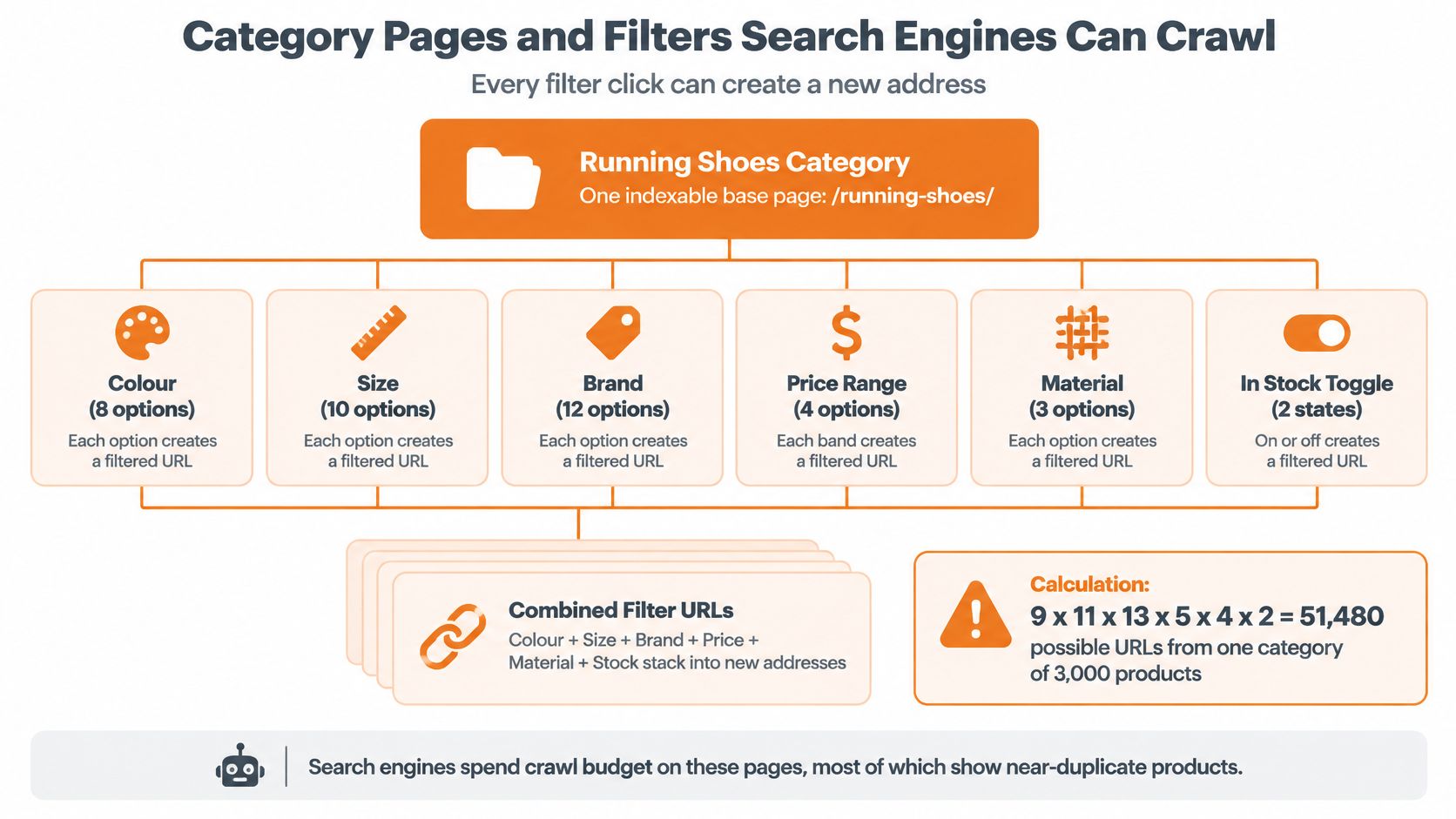
Every filter combination a shopper can click can create a new address. A store with 3,000 products and six filters can generate tens of thousands of URLs, most showing near-duplicate product sets.
The diagram below shows how quickly those combinations multiply.
Set The Hierarchy First
Keep every product within three clicks of the homepage. Give each product one primary category, name categories with the words buyers use, and make breadcrumbs match the navigation so shoppers and crawlers read the same structure.
Map keywords before you touch URLs. Export top queries from Search Console, group them by shared intent, and assign one primary query per category, such as leather boots for the boots category. Filters take no keyword of their own. Keep that mapping beside your crawl export, and use a guide to e-commerce category page SEO when you need the detailed checks for titles and internal links.
Decide Each Filter Combination
| Filter Type | Example URL Pattern | Index It? | Handling |
|---|---|---|---|
| Brand, one per page | /shoes/brand-nike | Yes, when brand searches have demand | Keep crawlable, add unique intro copy |
| Colour | /shoes?colour=red | Usually no | Canonical to the base category; filter stays on the page |
| Size | /shoes?size=10 | No | Canonical or noindex; do not link from navigation |
| Price range | /shoes?price=50-100 | No | Canonical; keep out of crawlable menus |
| Sort order | /shoes?sort=price | No | Canonical; block sort parameters in crawl settings |
| Brand plus material with search demand | /shoes/leather-boots | Yes | Build a curated landing page with unique copy and products |
Index a combination only when three conditions hold. People search for it, it carries a unique intro paragraph, and it returns real products. If any one fails, it stays a filter, not a page.
A filter that helps a shopper narrow a list isn't automatically a page that deserves to rank.
Pagination needs plain crawlable links to every page of a list. Google no longer uses rel=next and rel=prev, so a load-more button with no underlying links can hide deep products from crawlers entirely.
Finish with a checklist pass. Export the category list, mark each combination as index, canonical or block, and confirm internal links point only to the indexed version. That single export prevents most faceted crawl problems before they start.
Product Pages That Earn Clicks and Trust
Start at the top, where a shopper starts. The page title is the first thing read in results, so build it from product type, key attribute and model, kept under 60 characters. Merino Base Layer Top, Women, 200 g, Medium Weight tells a searcher more in one line than a supplier code ever will.
Your meta description has one job. State the one reason to click, such as a free shipping threshold or current stock status, in your own words. Don't copy the manufacturer's text, because every other retailer selling that product already has.
Build The Body Around Use
Write a unique description of 150 to 250 words organised around use cases, not features listed in catalogue order. Follow it with a specification table that includes units, size and fit notes written for your customers, and three to five questions pulled from support tickets. Those tickets are the cheapest keyword research you'll get, because shoppers phrase problems exactly as they search them. A fuller walkthrough of how to optimise product pages for SEO covers the template level detail if you're rebuilding pages in bulk.
Images need the same care. Use descriptive file names, alt text naming the product and colour, and at least one shot that shows scale against a hand, a doorway or a worn outfit. A beautiful packshot that leaves size ambiguous still creates returns.
Reviews Belong Near The Title
Show the star rating and review count near the title, and mark up only reviews that appear on the page. The 2025 national consumer study of more than 2,000 shoppers across all Canadian provinces found that 80% read ratings and reviews at least occasionally when buying online, while 86% considered reviews an essential decision-making resource and 83% specifically seek websites containing reviews before purchasing.
That matters for rankings and for what happens after the click. Search engines were cited as a place where 45% of Canadian shoppers read review content, so a technically tidy page without credible customer evidence can still lose the sale to a less visible competitor shoppers trust more.
Keep most colour variants on one canonical product page. Give a variant its own URL only when it has separate search demand, its own photography and enough stock to justify the split.
For out-of-stock items, keep the page live with a back-in-stock option and links to close alternatives. Permanently redirect removed items to the nearest live category instead of deleting them.
If you sell in Quebec, publish French titles, specifications and reviews on their own URLs with hreflang pairs, and keep the price identical in both languages. A translated title over English specs reads as half finished to French-speaking shoppers.
Technical Fixes That Protect Crawling and Speed
Large catalogues punish small technical faults. Search engines allocate limited crawling, so every duplicate, error and slow template spends attention you can't recover. A fault on one product template isn't one broken page. It's thousands.
Diagnose with three tools before you change anything. Use the Page indexing report in Search Console for excluded URLs, the crawl stats report for where bots spend requests, and a desktop crawler such as Screaming Frog across the whole catalogue for duplicates, redirect chains and broken links.
Match The Symptom To The Fix
| Symptom | Likely Cause | Fix |
|---|---|---|
| Thousands of pages marked discovered but not indexed | Filter and sort URLs flooding the crawl | Canonicalise or noindex the filter combinations and trim internal links to them |
| Crawl stats show most bot requests on old parameter URLs | Tracking parameters in internal links | Remove parameters from internal links and set canonical URLs |
| One product reachable at three URLs | Trailing slashes, HTTP and HTTPS versions, or case variants | Pick one canonical URL and 301 redirect the rest |
| Sold-out products returning 404 errors | Deleted SKUs without redirects | 301 to the closest live category, or 410 when permanently gone |
| Mobile LCP above 2.5 seconds on product templates | Oversized images and third-party scripts | Responsive WebP or AVIF, lazy-loading, and removing unused apps |
| Content jumps while the page loads | Images and embeds without reserved space | Set width and height on all media |
| Cart or checkout steps appearing in search | Checkout URLs not blocked | Noindex or robots-block cart and checkout pages |
| Search shows a different price from the page | Stale feed or cached template | Sync price, stock and currency across the page, markup and feed |
Work the table as a checklist, one row at a time. Each row names one symptom, one cause and one fix, so you can assign it and verify it without a meeting.
Measure Mobile Templates, Not The Homepage
Canadian industry reporting on mobile e-commerce indicates that more than 60% of e-commerce traffic comes through mobile devices, and Google's performance target is a Largest Contentful Paint of 2.5 seconds or less. A one-second delay has been associated with conversion losses of up to 20% in the performance research cited there.
Measure mobile product and category templates with field data and PageSpeed Insights. Your homepage score tells you almost nothing about the page that takes payment. The usual causes are oversized product images, third-party apps, heavy JavaScript and multi-step checkout.
The controls are unglamorous and effective. Serve responsive WebP or AVIF images, reserve image dimensions to prevent layout shifts, lazy-load below-the-fold media, remove unused scripts and apps, and cut checkout fields. Test over Canadian mobile networks, not office Wi-Fi.
Fix first whichever template shows the worst mobile LCP. I would not spread a small speed budget thinly across every template when one of them carries most paid and organic landings.
Product Markup and Merchant Feeds That Qualify
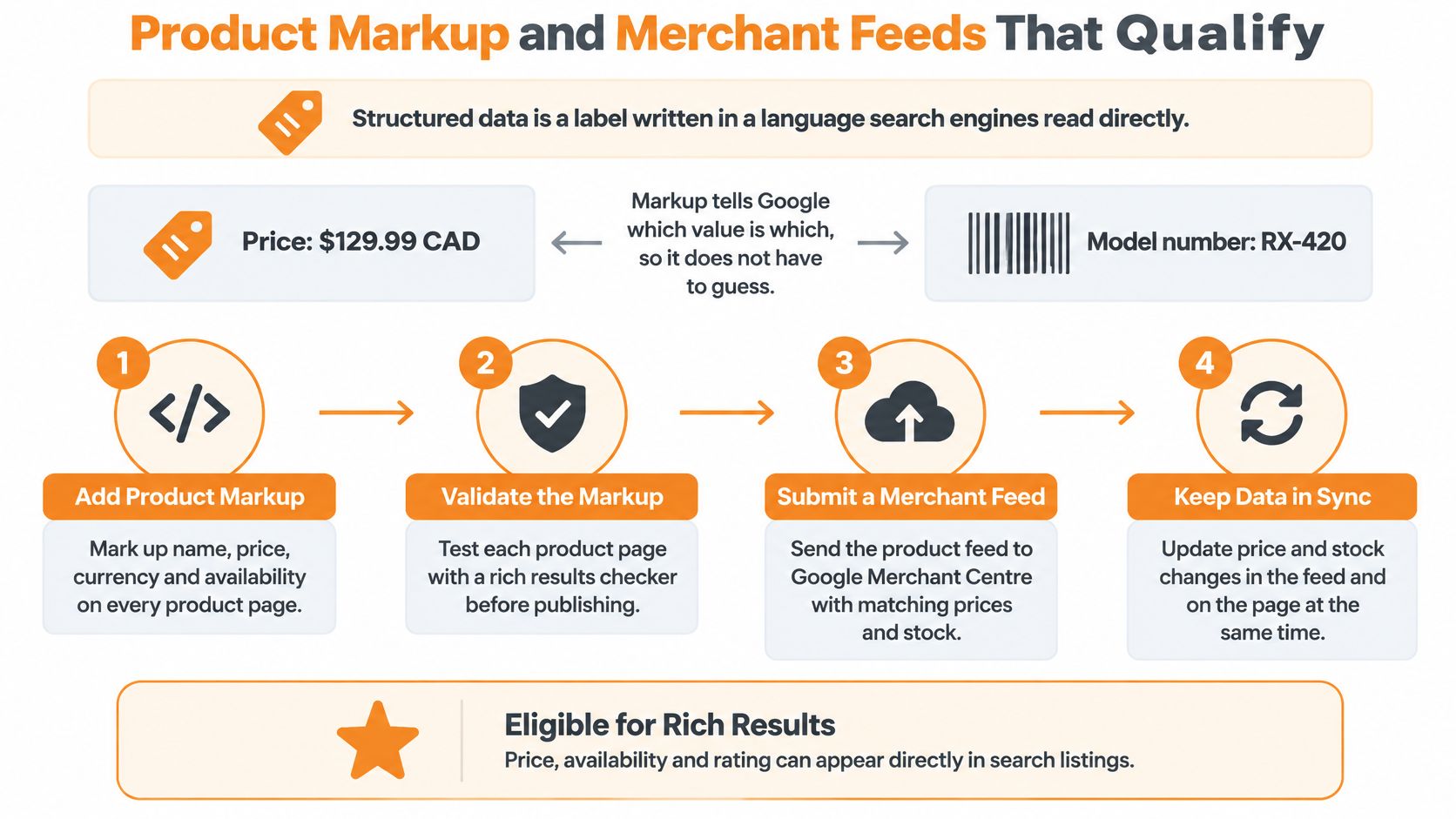
Structured data is a label written in a language search engines read directly. Without it, Google has to guess whether 129.99 is a price or part of a model number. With it, you've said which value is which.
The illustration below sets out how markup and a feed work together.
The Fields That Do The Work
Google's e-commerce structured data documentation states that Product markup can make pages eligible for richer results showing price, availability, ratings, shipping, and product variants. Include name, image, description, sku, gtin and brand, plus an offers block with price, priceCurrency set to CAD, availability, url and shipping details.
Those explicit fields reduce the ambiguity Google must resolve when matching a Canadian product page to shopping queries. Use explicit CAD rather than an ambiguous dollar sign, because cross-border shoppers and crawlers both need to know which currency they're looking at.
Add aggregateRating and review only when ratings are genuine and visible on the page. Markup that describes content a shopper can't see invites manual actions and loses eligibility. Google also guarantees neither rankings nor rich results, so treat markup as qualifying for consideration, not buying placement.
For variant families, use ProductGroup and point each variant to its own offer. One parent with clean child offers beats dozens of loosely connected pages restating the same product.
The short walkthrough below shows the validation step in practice before you roll markup across a catalogue.
Run The Sequence In Order
- Deploy markup on canonical product and variant URLs.
- Validate it against Google's Product and ProductGroup specifications.
- Connect the Merchant Center feed with matching id, GTIN, price and availability.
- Monitor Search Console enhancement reports for errors and warnings.
- Retest price, stock and shipping after every catalogue or platform release.
The mismatch that breaks eligibility most often is simple. A price in the markup or feed differs from the checkout price. Keep page, markup, checkout and feed synchronised, because Google compares them even when your team doesn't.
Shipping, Returns and Buying Questions as Content
Shipping and returns pages can capture demand. Most stores still treat them as support documents hidden in a footer, which wastes queries that carry clear purchase intent.
Shoppers search questions such as Does this ship to northern BC, Will I pay duties in Canada, How fast is delivery to Vancouver, Can I return opened wellness products and Are prices in CAD. Each one can be answered on a crawlable page instead of inside a checkout widget that search engines never see and shoppers find too late.
DHL's 2025 Canada report found that 82% of Canadian shoppers may abandon a basket without preferred delivery options, 78% without preferred returns options, and 47% have abandoned a purchase because of unexpected customs charges. Those aren't post-click logistics details. They're reasons people don't buy.
Build A Hub, Then Connect It
Create one shipping and returns hub covering zones, delivery times, duties, taxes and return windows. Link it from every category and product template, then add product-level eligibility lines where restrictions apply, such as province-limited or regulated items. Cross-border brands need this most, because U.S. centred copy routinely omits bilingual requirements, provincial restrictions, taxes, customs and remote-area delivery.
Apply the same thinking to buying guides. Write sizing charts as text rather than images so crawlers can read them, and build comparison pages that answer compound questions with use case, budget and climate. A sizing guide thorough enough that forums and blogs link to it unprompted earns more authority than a dozen thin posts. Say a boot retailer publishes measured foot-length data by brand. That page answers a real question and becomes the reference other sites cite.
Logistics answers remove the objection at the moment a shopper searches for it, not after they've reached checkout.
For links, publish original data such as a sizing survey, earn coverage through digital PR, pitch product reviewers and local publications, and claim manufacturer and retailer listings. Avoid paid links and reciprocal exchanges, which cost money and create risk without building anything durable.
Keep claims accurate in regulated categories such as cannabis, CBD, supplements and functional mushrooms. SEO copy can't promise prohibited outcomes, and shipping eligibility has to reflect where a product may legally be sent. Precision here isn't caution for its own sake. It's what lets the content stay published.
Measuring Organic Revenue and Scaling With AI
Measure revenue by template, not sessions across the whole store. Segment GA4 by device, landing page template, province and new versus returning users, and track organic revenue and conversion rate for each. A practical approach to tracking SEO conversions helps you tie those segments to orders rather than visits.
In Search Console, group queries by page type to see which categories earn non-brand clicks. Compare indexed product counts with sitemap counts monthly, because drift between them is an early warning that new SKUs aren't being picked up or old ones aren't being dropped.
Review These Numbers Monthly
- Organic revenue: total sales from organic sessions, trended against last period.
- Conversion rate by template: product, category and guide pages judged separately.
- Non-brand clicks: growth that isn't just people searching your name.
- Indexed versus submitted URLs: gaps point to crawl or quality problems.
- Mobile LCP on key templates: checked against the target you set for them.
- Attribute completeness: the share of product pages with full specs, sizing and shipping data.
That last metric matters more each year. Google's guidance for Canadian marketers says AI Mode launched in Canada in 2025, early users submit queries two to three times longer than traditional searches, and Google reports more than 25 billion Google Lens searches monthly, with one in five having commercial intent.
Long, conversational comparisons reward complete product evidence. A page targeting only winter jacket Canada can't answer which jacket suits wet Vancouver commuting under a set budget. Attributes, use cases, compatibility, materials, sizing, shipping constraints, Canadian pricing and French equivalents can. Being selected as a source in an AI comparison may soon matter more than ranking for the short term alone.
Three AI uses scale well here. Cluster search queries into category groups, draft attribute fields from supplier data, and turn support tickets into FAQ candidates. All three organise material humans already produced.
The limit is verification. People check specifications, prices, claims and compliance before publishing, because unchecked AI product copy at scale creates thin, duplicate pages that look complete and say little. For wellness and regulated products, ingredients and intended use decide whether a recommendation is even appropriate, so that check isn't optional.
Confirm Your First Three SEO Fixes This Month
Choose three fixes for the next 30 days and finish them. Use the priority layers to filter candidates, then let your store profile decide the order.
If you carry over 5,000 SKUs or generate large numbers of filter URLs, start with category architecture and filter rules. If mobile LCP misses the target on your main templates, start with technical speed. If product data is thin or missing, start with product pages and the feed. Most stores have one obvious answer once they look at the crawl.
A Four-Week Sequence
- Week one: export Search Console and crawl data, and list excluded and duplicate URLs.
- Week two: rewrite titles and meta descriptions for the top 50 products by revenue.
- Week three: deploy Product markup and sync the Merchant Center feed.
- Week four: publish or update the shipping and returns hub, then measure organic revenue by template.
That sequence repairs discovery first, improves the pages earning money second, and adds eligibility and trust content after. It also gives you a clean before-and-after window, because each week changes a different layer.
Three finished fixes measured properly beat twelve started fixes nobody can attribute.
If your team has no spare capacity, an outside audit is one option. An agency such as Juiced Digital runs e-commerce and local SEO for North American brands, including regulated categories, and offers free audits and consultations. Whoever runs it, insist the first audit confirms which three items your own data supports, rather than handing you a generic hundred-point checklist.
I would start this week, with the crawl export. It costs nothing, takes an afternoon, and usually settles the argument about where revenue is leaking.
Juiced Digital offers e-commerce SEO, AI search optimisation and conversion rate optimisation for Canadian and North American brands, including product, category and technical work of the kind covered here. If you'd like a free audit that ranks your store's fixes by revenue exposure and confirms your first three priorities, visit Juiced Digital to book a consultation.