
You've published a service page for your Vancouver business. The photos look good, the booking button works, and you've mentioned your services, but the page still sits well below the results your customers are likely to click. Someone tells you to fix your on-page SEO, and you're left wondering whether that means rewriting everything or changing a few settings.
The useful answer starts with the page itself. On-page SEO means making a page's purpose clear, its information useful, and its experience dependable, rather than finding more places to repeat a keyword.
The Page You Can Actually Control
A poorly performing page can make SEO feel like a problem you can't influence. You can't edit a competitor's website, decide who links to your business, or choose where a search engine places you. You can, however, change what a visitor encounters at your own URL.
That's the practical boundary of on-page work. Your copy, headings, images, links, page settings, and booking experience are decisions you can examine directly. Backlinks from other websites sit outside that boundary, even though they belong to the broader SEO conversation.
The familiar laptop-side question is whether the page explains the business as clearly as its owner can.

Treat the page as a self-contained product
A potential customer might arrive directly from search without visiting your homepage. Evaluate the page accordingly: can someone understand what you offer, whether it applies to them, and how to proceed without searching through the rest of your website?
For a Vancouver retailer, that might mean explaining product options and delivery conditions beside the purchase decision. For a local service business, it might mean putting service availability and a clear enquiry route near the main explanation.
Use these lenses when reviewing the page:
- Content: Does the page answer the customer's actual question?
- HTML signals: Do its labels and structure describe that answer accurately?
- User experience: Can someone read and act without unnecessary friction?
- Technical setup: Can search systems access and interpret the information?
These categories overlap. An oversized image is a design choice with performance consequences, while a vague heading is both a writing problem and a structural problem.
Practical rule: Review the page as though the visitor knows nothing about your business and won't open another tab to fill in the gaps.
This approach also helps you prioritise. If the service description is unclear, adjusting metadata alone won't resolve the underlying problem. Start with the customer's unanswered question, then make the supporting elements consistent with the answer.
What On-Page SEO Actually Means
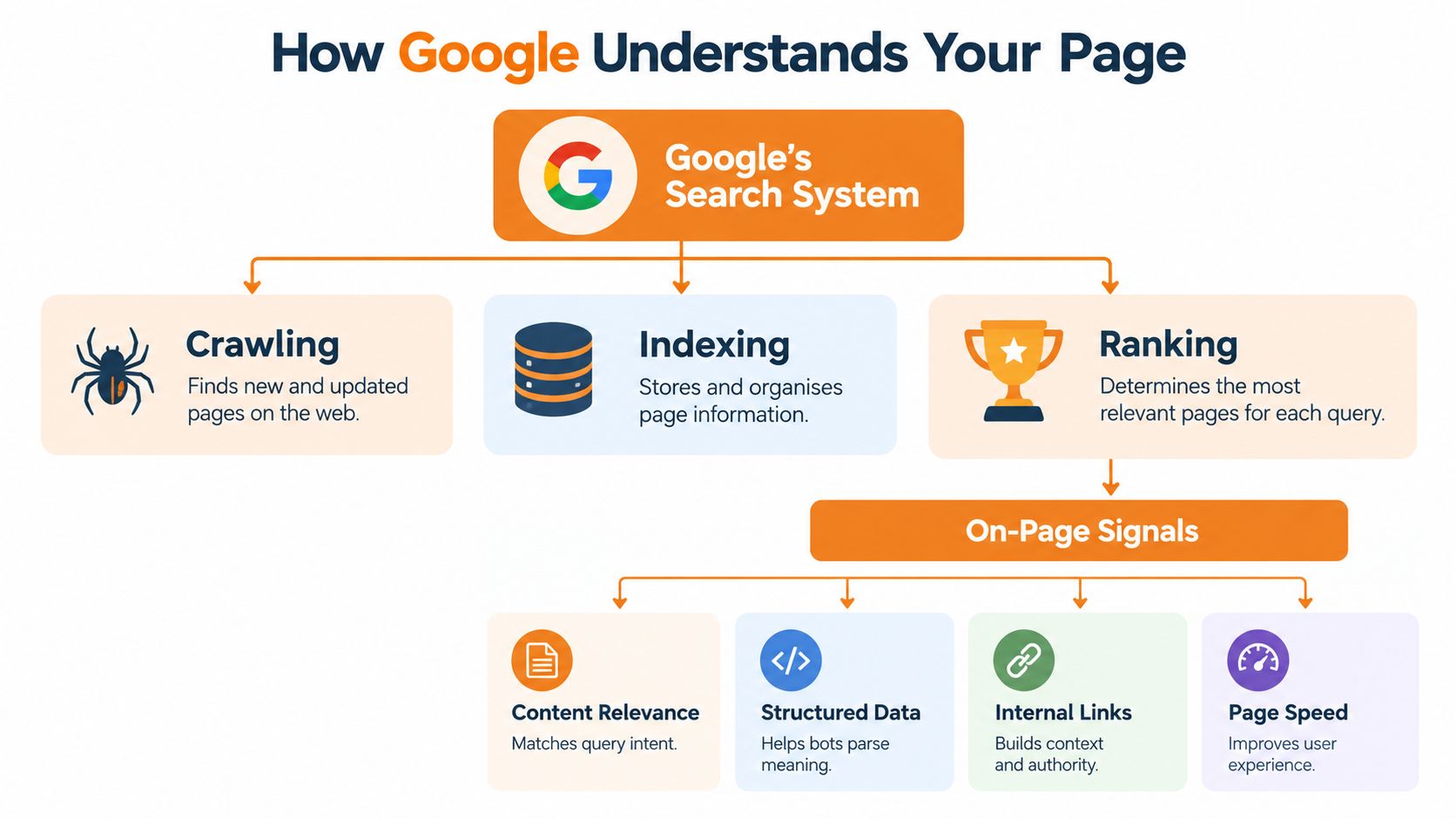
On-page SEO is the practice of improving an individual webpage's content and HTML elements so search engines can crawl, understand, and match it with relevant queries. Google's SEO documentation and Starter Guide frame SEO around visibility and making content easier to crawl, index, and understand, with an emphasis on helpful, reliable, people-first information.
That definition matters because it describes a communication task, not a keyword quota. A page needs to communicate what it covers, who it serves, and why its answer is useful.
The search process provides a helpful mental model, although it shouldn't be mistaken for a complete ranking formula.
Understanding is more than matching words
Consider the search phrase emergency plumbing Vancouver. A page that repeats those words but never explains the services available leaves important questions unanswered. Can the business handle an active leak? Does it serve the customer's area? What should the customer do before contacting the team?
A useful page answers those questions in ordinary language. The phrase establishes the topic; the explanation makes the page relevant to the situation.
Conventional keyword-density advice falls short. Repetition isn't a substitute for accurate service descriptions, useful answers, or documented business information.
Put the framework onto a single page
Apply the categories from the previous section to a plumbing service page:
- Content includes the answer: Describe the work available, its boundaries, and the information needed when requesting help.
- HTML provides the structure: Give the page a descriptive title, a clear main heading, and logically organised sections.
- Experience supports the decision: Keep the explanation readable and the contact route easy to use.
- Technical implementation supports access: Present important information in text, use crawlable links, and add appropriate machine-readable details.
Google's guidance favours placing important information in text rather than relying only on graphics. A promotional image can support an explanation, but it shouldn't be the only place where you state essential service conditions.
If you're asking what is on-page SEO, think of it as reducing the distance between the customer's question and a dependable answer. The same principle applies whether you're editing a service page, a product description, or an educational resource. What changes is the information someone needs before they can make a decision.
The Elements That Move Rankings and Conversions
A title tag and a booking button serve different purposes. Don't evaluate every on-page element as though it were an interchangeable ranking lever.
Some elements describe the page, some organise its information, and others help visitors choose their next action. Canada.ca's content-design guidance identifies organised content, keyword use, metadata, and structured data as techniques for improving search visibility, alongside practical mobile and navigation considerations.
On-Page Elements at a Glance
| Element | What Google reads | What the user sees | Signal it is done well |
|---|---|---|---|
| Title tag | A descriptive page title | The page's title in relevant interfaces | Distinct topic and accurate service or product |
| H1 | The main content heading | The page's visible subject | Clear agreement with the page's purpose |
| URL | A readable page address | An address that identifies the destination | Recognisable topic without unnecessary clutter |
| Meta description | A concise page summary | A potential summary of the page | Accurate expectations and a relevant reason to visit |
| Body content | The substantive explanation | Answers, details, and decision support | The visitor's main questions are resolved |
| Internal links | Connections to related pages | Relevant routes to more information | Descriptive text and useful destinations |
| Image alternative text | A meaningful text alternative | An alternative when needed | An accurate description of informative imagery |
| Structured data | Machine-readable page information | Usually no separate visible element | Details match the visible content |
Accuracy and intent match are more useful criteria than arbitrary length targets. A concise title that identifies the service and location is preferable to a longer title packed with unrelated offerings.
For example, Physiotherapy in Burnaby gives a visitor a more definite expectation than Services. Its corresponding page should explain the actual Burnaby offering, not present generic copy with a different city name.
Separate description from evidence
The title and main heading establish the subject. The body must substantiate it with treatment details, location information, practitioner context, and an appropriate enquiry route.
A meta description summarises that value; it doesn't replace the explanation. For a closer look at the distinction between page-level labels, use this guide to meta tags for SEO optimization.
Internal links should support the same decision. A physiotherapy page might direct readers to relevant treatment information or another clinic location, rather than scattering unrelated links throughout the copy.
Structured data requires a different standard: factual agreement with the page. Treat it as clarification, not persuasive writing, and validate it against the information customers can read.
Don't put a claim in markup that you wouldn't be comfortable explaining plainly to a customer.
Distinct location pages make sense when the offerings differ. If the only difference is the city name, improve the underlying information before multiplying URLs.
Page Experience and Core Web Vitals
A page can look polished on your office computer and still be awkward for a customer using a mobile connection. Compare the page under different conditions, not just against your own first impression.
Google identifies Core Web Vitals as signals used by its ranking systems, while explaining that there's no single page-experience signal. Its page-experience guidance also recommends HTTPS, mobile-friendly presentation, avoidance of intrusive interstitials, and a clear separation between main content and distractions.
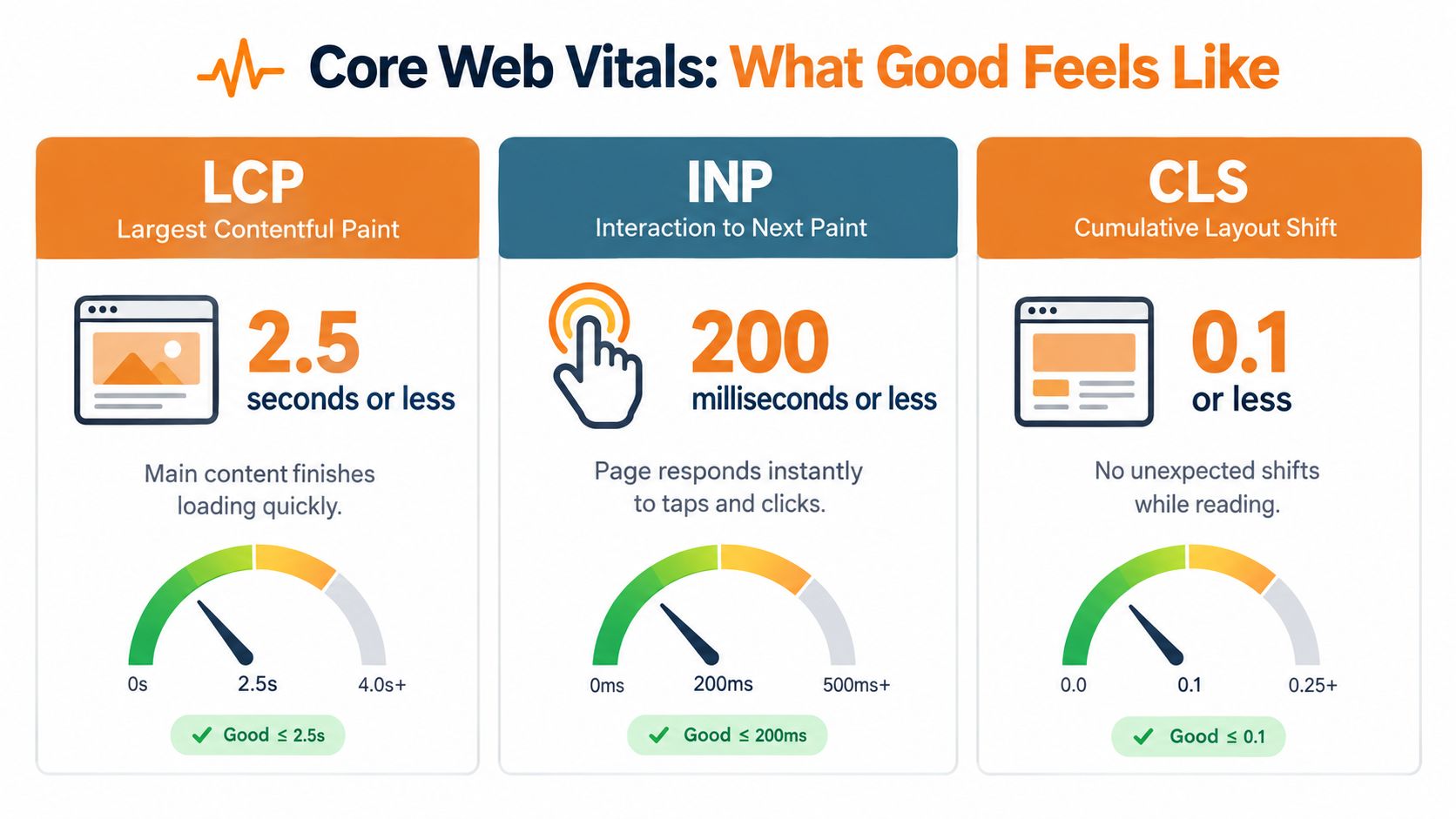
The metrics below describe different kinds of friction.
Compare what visitors actually experience
Google defines these metrics using real-user data and recommends LCP within 2.5 seconds, INP below 200 milliseconds, and CLS below 0.1 in its Core Web Vitals documentation.
- Largest Contentful Paint measures loading performance. A delayed hero image can leave someone waiting for the main visual content. Compress and correctly size that asset, and examine resources that block rendering.
- Interaction to Next Paint measures responsiveness. A customer taps a product option or booking control but doesn't see a prompt response. Investigate large JavaScript tasks and unnecessary third-party scripts.
- Cumulative Layout Shift measures visual stability. Content unexpectedly moves while someone reads or tries to act. Reserving space for images, advertisements, and other inserted elements helps address that problem.
The difference between “it loads fine” and a dependable experience is often the testing context. Consider a hypothetical shopper browsing on a ferry connection, or someone completing checkout on a mid-range Android device.
Review performance by device and page template, and examine geographic differences where data is available. A site-wide average can conceal a troublesome product or booking experience.
Speed doesn't replace usability
A fast page can still have unreadable text, an obstructive pop-up, or a form that's difficult to complete. Use this explanation of page experience signals alongside performance testing to keep the whole interaction in view.
The following video offers an additional visual resource for examining page performance.
Passing Core Web Vitals doesn't guarantee strong rankings. As Google cautions in the documentation cited above, relevance, content quality, and other considerations still matter. Connect technical improvements to the customer action you're trying to support, whether that's a call, booking, enquiry, or purchase.
A Step-by-Step Optimization Checklist
Open the page you want to improve alongside its editing interface and available performance reports. Before changing anything, write down the intended customer action and the main question the page should answer.
Use the elements table above as your reference for what each component does. This checklist is the working sequence, not a requirement to rewrite every component regardless of its condition.
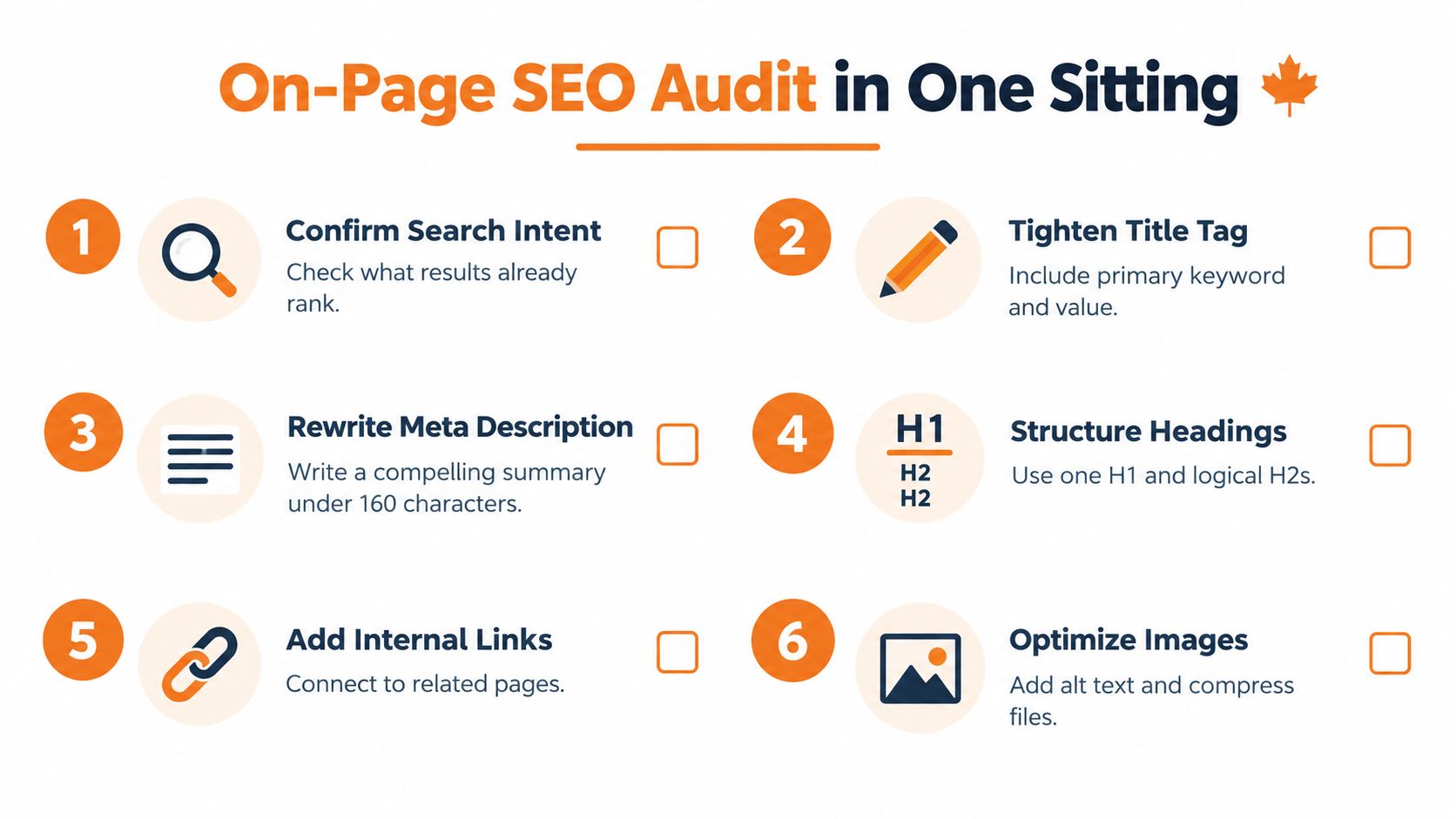
The visual provides a compact reminder of common editing tasks; use the fuller checks below to include content accuracy, markup, and mobile behaviour.
Copyable page review
- Confirm search intent. Examine the results for the target query and ask what kind of answer the searcher expects. Don't force an educational question onto a sales page if the visitor needs an explanation first.
- Align the title and H1. Check that both describe the same offering and audience. Remove broad claims or unrelated locations that the page doesn't substantiate.
- Rewrite the opening where needed. State the answer or offering before introducing the company's background. A visitor should understand why they've arrived at the right page.
- Review the meta description. Summarise the actual value and relevant conditions. Prioritise clarity rather than treating a character target as a universal rule.
- Scan headings and internal links. Read the headings without the paragraphs beneath them. Then check that each link takes the visitor to a relevant, functioning destination.
- Audit images and alternatives. Compress oversized assets and describe informative images accurately. Keep essential business details available as text.
- Validate structured data. Compare the markup with visible services, business details, and other claims. Correct mismatches before publishing.
- Check mobile rendering and performance. Test the main action, inspect layout stability, and review the relevant Core Web Vitals findings.
Make the edit traceable
Save the previous copy and record what you changed. If you update a shared template, check other affected pages rather than assuming the improvement applies equally everywhere.
For pages that need substantial rewriting, this guide to writing SEO-friendly content offers a useful companion to the review. Keep the scope tied to the visitor's needs instead of expanding the page just to make it longer.
Audit note: Mark an item complete only after checking the published page. An editor preview doesn't establish that the live experience works.
Some findings will need a developer, particularly script or template problems. Separate those tasks from copy edits so the work can move forward without losing the technical issues.
Before and After of a Real Page
No documented client page or measured result is available for this example. The following illustrative before-and-after shows how the framework would apply to a Vancouver plumbing business, without presenting it as a real case study.
Suppose its page is titled Our Services. It contains competing main headings, a long list of neighbourhoods, vague promises about quality, and a large hero image above the useful information. A visitor with a leak has to work out whether the business handles that problem.
Before the edit
The owner wants the page to cover every service and location. As a result, the emergency plumbing offering receives the same vague treatment as unrelated work.
The problem is not that a keyword is missing. The page gives the visitor no clear priority and provides little information to support a decision.
| Component | Before | Illustrative after |
|---|---|---|
| Title | Our Services | Emergency Plumbing in Vancouver |
| Main heading | Several competing service headings | Emergency Plumbing Services in Vancouver |
| Opening | General company praise | Available emergency work and how to request help |
| Location information | A neighbourhood list | Confirmed service coverage and relevant conditions |
| Hero image | Oversized decorative asset | Compressed, correctly sized image |
After the edit
The revised page focuses on emergency plumbing. Its proposed meta description could read: Explore emergency plumbing services in Vancouver, check service coverage, and contact the team about your plumbing problem.
That wording deliberately avoids inventing response times or round-the-clock availability. The owner would need to confirm those details before including them.
Supporting sections could explain burst pipes, active leaks, shut-off guidance, and the information required for an enquiry, provided those topics match the business's actual services. The page could also include appropriate LocalBusiness structured data representing verified business information.
The editor then checks the compressed hero image and tests the contact action on mobile. These changes address the content, structural, and experience problems together rather than treating them as isolated settings.
The expected outcome is a clearer route to qualified enquiries, not a promised ranking increase. Measure whether relevant visitors find the page and complete the intended action. Until there's evidence, any claim of a performance lift would be speculation.
Where Most On-Page Advice Falls Short
The outdated playbook asks where to place another keyword. A more useful question is what ambiguity you can remove.
Google's AI search guidance addresses more complex questions in AI Overviews and AI Mode. The practical implication for a business page is to make complete answers clear and verifiable, without treating schema as a shortcut to AI visibility.
Write facts that stand on their own
A service-area answer should identify the service and its geographic boundaries, rather than depend on vague wording such as available throughout the region. Pricing conditions, credentials, and availability should be equally explicit.
- AI extractability: Write self-contained explanations that preserve important qualifications when read separately.
- Canadian localization: Reflect the customer's province, language, delivery conditions, and terminology.
- Regulated-category clarity: Distinguish documented information from promotional promises, and keep limitations beside the claims they qualify.
Canadian localization also requires more than replacing a country name in a template. Delante's discussion of SEO in Canada provides context for language and regional strategy; the page-level decision is whether customers face meaningfully different offerings or conditions.
Build regional pages for real differences
A national product page may be appropriate when the offering is consistent. Separate regional pages become more useful when inventory, service availability, legal conditions, or customer language changes.
A Vancouver service area isn't automatically interchangeable with the Lower Mainland or all of British Columbia. Name only the coverage the business can support, and consider a French-language experience when it serves the intended audience.
For cannabis, CBD, functional mushroom, and wellness pages, editorial precision deserves particular attention. State applicable availability, practitioner credentials, pricing conditions, and limitations plainly, and seek appropriate compliance review rather than assuming SEO editing establishes legal compliance.
Removing ambiguity is the stronger objective. Customers should be able to understand the claim, its evidence, and its boundaries without decoding promotional language or text embedded in an image.
Measuring Impact and What to Do Next
Judge on-page work against the business action the page supports. Qualified leads, calls, bookings, purchases, and assisted conversions are more useful outcomes than a ranking position viewed in isolation.
Choose a commercially important page, record its current performance, complete the review, and publish the changes. During the following month, examine query performance, Core Web Vitals, and conversion data together.
- Check relevance: Are visitors arriving through queries that match the offering?
- Check completion: Are those visitors taking the intended action?
- Check wider discovery: Monitor branded searches and observable appearances in AI answers, while keeping those observations separate from confirmed conversions.
Record the publication date and other marketing changes that could affect results. An improvement after an edit is encouraging, but it isn't automatically proof that the edit caused it.
Keep what helps customers move forward. Investigate what doesn't, and use that evidence to choose the next page.
Juiced Digital offers on-page optimization, local SEO, AI search SEO, and conversion optimization for businesses that want to connect visibility with qualified enquiries and sales. Visit Juiced Digital to request a free audit of your priority page and identify the content, technical, and conversion improvements worth tackling first.