

A lot of store teams are in the same spot right now. Organic traffic looks steady enough at a glance, but the index is full of filter URLs nobody meant to rank, product pages rely on scripts that search engines don't always render cleanly, and a redesign removed high-intent out-of-stock pages that used to capture demand. Nobody sees the full damage in one report, so revenue leaks for months.
That matters more in Canada than many teams assume. Statistics Canada's 2024 retail data shows $865.2 billion in retail spending, with $73.7 billion in ecommerce revenue. Online sales grew 9.0% in 2024, while total retail spending grew 3.0%, which is why an ecommerce SEO audit checklist can't stop at rankings. It has to protect indexation, product discovery, and organic revenue paths.
I've seen the same pattern repeatedly. Teams spend weeks rewriting titles while critical collection pages sit blocked, duplicate facet URLs absorb crawl activity, and broken redirects keep product equity from flowing to the pages that convert best. The fixes that move the needle usually aren't glamorous, but they are very clear once you audit the store in the right order.
These ten checks are the ones that matter most. They're arranged in the order I'd run them on a real catalogue, with priority levels, compliance guardrails for cannabis, CBD, and functional mushroom brands, and remedies pulled from the way real store templates work.
1. Crawlability and Indexation Health
Priority: Critical. If search engines can't reach the right URLs, everything after this is a cleanup exercise on pages that won't perform.
Start with four things in one pass: robots.txt, XML sitemaps, noindex directives, and status codes on your primary category and product templates. Then compare what your sitemap submits against what Google indexes in Search Console. Large gaps usually mean one of three problems, blocked pages, bad canonicals, or utility URLs polluting discovery.

A common real-world fix is boring and high impact. A Shopify store exports its sitemap and finds thousands of parameter URLs or retired product paths included by mistake. Remove them, resubmit the clean sitemap, and test a sample of money pages in URL Inspection. Another classic one is a legacy robots rule blocking collection pages after a theme change. That single line can suppress your best commercial URLs.
What to fix first
- Check submitted versus indexable URLs: Compare sitemap counts to live, canonical, indexable URLs. If the sitemap includes filters, tracking URLs, staging paths, or redirects, clean that first.
- Test key templates manually: Inspect five top categories, five best-selling products, and a few out-of-stock products. Don't trust a sitewide setting without URL-level checks.
- Review indexing policy for restricted products: Cannabis, CBD, and functional mushroom stores often mix age gates, legal notices, and stock messaging into crawl-blocking patterns. Keep the legal layer compliant, but don't hide the actual product content from crawlers unless policy or law requires it.
Practical rule: Block only true utility pages. Blocking commercial categories or products by mistake is one of the costliest errors on any store.
If Search Console shows crawl anomalies, fix them before title tags, content, or link building. Juiced Digital's guide on how to fix crawl errors is a useful companion when you need a remediation workflow instead of a diagnosis list.
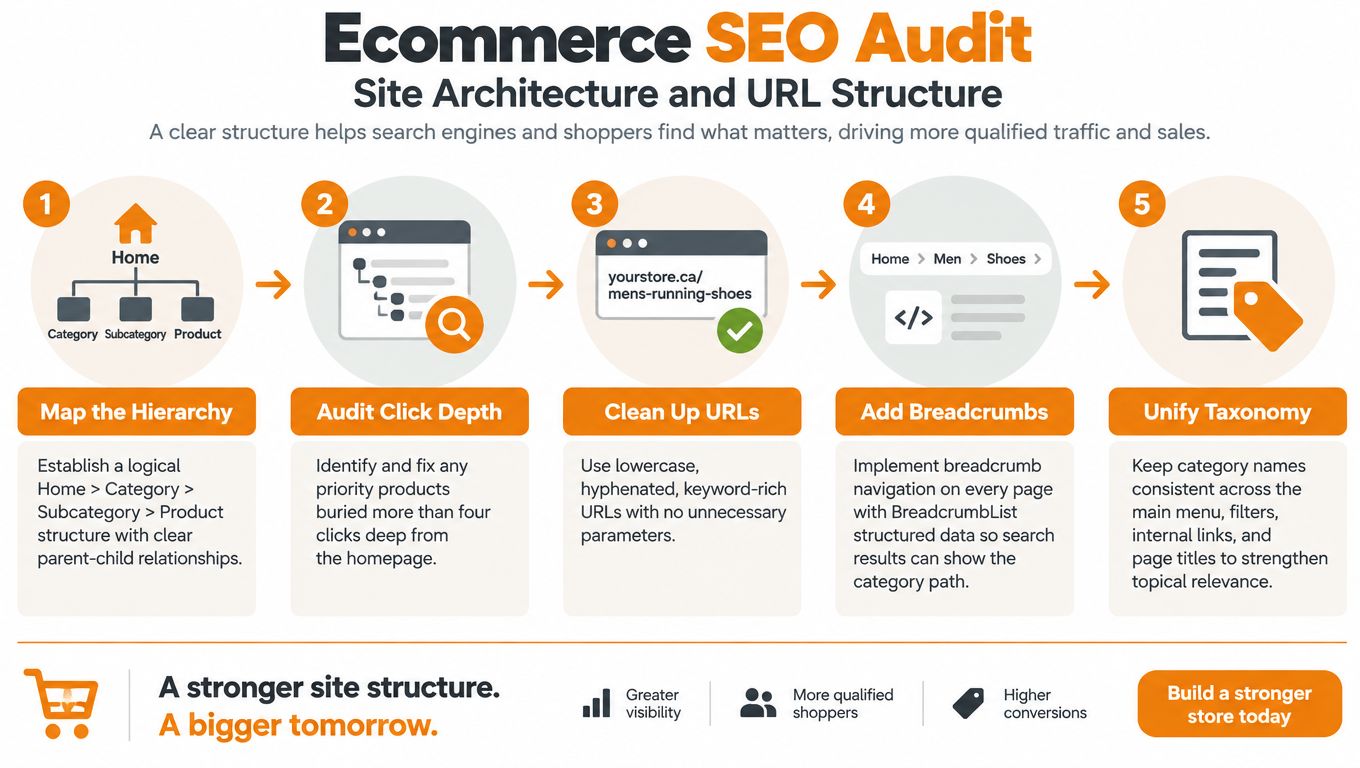
2. Site Architecture and URL Structure
Priority: High. A clear catalogue structure helps crawlers understand the site and helps shoppers reach the right category without detours. A messy structure forces every important page to earn relevance the hard way.
Start with a crawl and check click depth from the homepage to your top categories, subcategories, and priority products. If the strongest commercial pages sit too deep, they usually miss the internal authority they need. I have seen shallow category trees outperform clever navigation that hides value behind oversized mega menus or JavaScript-heavy faceting.
The category tree should match how people shop, not how inventory was imported. A supplement catalogue that splits similar products across “mushroom-supplements” and “functional-mushrooms” often dilutes relevance across two thin hubs. One stronger category usually beats two overlapping ones with mixed internal anchors. The same issue shows up in apparel stores that build collections around internal naming instead of search demand.
A simple template check catches a lot:
- Readable URLs: Keep category and product slugs descriptive and stable. Rebuilding URLs only makes sense when the SEO gain clearly outweighs migration risk.
- Consistent naming: Navigation labels, page titles, breadcrumbs, and headings should point to the same entity.
- Template support: Breadcrumbs should render in HTML and reflect the actual hierarchy, not a generic “home > shop > product” fallback.
For regulated categories, add a compliance guardrail. Cannabis, CBD, and functional mushroom stores often need age gates, legal notices, and stock messaging, but those elements should not replace the commercial page in search. Keep the product or category page as the canonical destination, and let compliance copy support it without taking over the indexed route.
A furniture store usually gets this right by keeping “Living Room Furniture” as the main hub, then linking to “Sectionals,” “Coffee Tables,” and “TV Stands” in navigation and breadcrumbs. That structure is easier to crawl, easier to rank, and easier to buy from than a menu built around internal SKU families.
3. Faceted Navigation and URL Parameter Management
Priority: Critical for large catalogues. Filtered pages are where ecommerce SEO teams usually lose the most crawl budget and internal signal. Shoppers need filters. Search engines do not need every combination indexed.
Start with a hard decision on which parameter URLs deserve indexation. Size, sort order, price range, session IDs, and stacked filters usually generate near-duplicates that add noise instead of value. A small set of facet pages can still earn indexable status if the page has clear demand, a stable template, and unique copy that matches search intent.
Here is the fix-first sequence I use on store audits.
- Priority 1, stop index bloat: Block or noindex disposable parameter URLs that only sort, paginate, or reshuffle the same products.
- Priority 2, protect revenue pages: Keep one clean, indexable URL for filter combinations that map to real demand.
- Priority 3, control internal paths: Make sure category menus, filter modules, and product grids do not send crawlers into low-value parameter strings.
A CBD store is a good example. A filter like “broad-spectrum CBD oil” may deserve a dedicated landing page if buyers search that way and the page can hold unique, compliant copy. A URL like sort=price-ascending should stay out of the index. For cannabis, CBD, and functional mushroom categories, the compliance guardrail is simple. Keep claims factual, keep age-gate or legal copy from replacing the main page content, and make sure the canonical destination remains the commercial page, not a utility URL.
For teams building or cleaning up these templates, ecommerce category page SEO is the right reference point for turning a high-value filtered result into a proper landing page.
What usually works in practice is a template split. One template handles indexable category and facet landing pages with self-referencing canonicals and unique copy. Another template handles disposable filters with noindex or parent-category canonicals, depending on how the site is built. That keeps the search index focused while still giving shoppers the filters they need.
4. Duplicate Content and Canonicalization
Priority: High. Start with the URLs competing for the same product or category intent. Ecommerce duplication usually comes from templates, variant handling, migrations, and utility routes rather than one isolated publishing error.
Check product variants first. An apparel store may create a separate URL for every colour, even though each page uses the same title, description, and internal anchor text. Keep selectable variants on one primary product URL when shoppers do not need separate search landing pages. Point duplicate variant URLs to that product with canonicals, and update internal links so the primary URL receives the signals.
Run the same check across HTTP and HTTPS versions, trailing-slash variations, duplicate collection paths, and printer-friendly pages left behind after a migration. A canonical does not fix every conflict. Review whether it points to a live, indexable preferred URL, not a redirect, noindexed page, or unsuitable category.
Use this audit order:
- Confirm one preferred host and protocol across redirects, canonicals, and internal links.
- Trace every canonical target through its final response. Remove chains and replace redirected destinations with the final URL.
- Compare duplicate pages by revenue and search value. Rewrite high-value product copy before tackling the full catalogue. A best-selling item using the manufacturer description shared by other resellers needs distinct specifications, buying guidance, and merchandising copy.
Do not assume Google will select the version you want. Compare the declared canonical with the selected canonical for the live URL.
For cannabis, CBD, and functional mushroom stores, add a compliance guardrail: claims must remain consistent across variant URLs, archived product pages, and collection snippets. Keep approved wording on the primary page, prevent old routes from presenting conflicting benefits, and retire duplicate URLs through the correct redirect or canonical setup.
A fix-first template is practical. One supplement brand can rewrite its highest-revenue product pages, consolidate duplicate variant URLs into each primary product, then remove internal links to retired pages. That sequence improves the pages most likely to affect revenue without requiring a catalogue-wide rewrite.
5. Product and Category Page On-Page Optimization
Priority: High. After crawlable pages and clean canonicals are in place, product and category templates need to do the work of ranking and converting.
Start with the category page. If it only says “Products” or “Shop All,” it wastes one of the few pages that can rank for a real commercial theme. A functional mushroom store needs category copy that matches how buyers compare strains, formats, and intended use. An electronics store needs categories that surface specs, compatibility, and use case. Product pages need the same clarity, but the copy has to separate one item from the rest of the range.

Canadian stores also need a market-specific edit. The U.S. International Trade Administration's Canada ecommerce overview reported that ecommerce represented 6.1% of total Canadian retail sales in December 2024, and it identified fashion at 23.3%, hobby and leisure at 20.7%, and electronics at 20.6% of Canadian ecommerce activity. Those differences matter on the page. Fashion collections need stronger variant handling and seasonal sorting. Electronics pages usually need tighter specifications and comparison paths. Hobby and leisure pages often need discovery-led copy that helps shoppers choose.
What to change on live templates this week
- Category titles and intros: Replace generic labels with commercial, descriptive headings that match the navigation.
- Product copy: Add the details that help a buyer decide, such as benefits, specifications, use cases, compatibility notes, and concise FAQs.
- Compliance review: Cannabis, CBD, and functional mushroom pages should keep titles and descriptions within approved claims, even if competitors use looser wording.
A practical fix starts with the highest-value collection. Rewrite the title into the phrase a buyer would search, add a short intro that explains the range, then support it with subcategory links and clear image alt text. On product pages, remove filler and add only the information that reduces hesitation. If a template cannot answer the basic buying questions, it is not doing its job.
6. Product Structured Data
Priority: High. Structured data only helps when it mirrors the page customers can see. An app snippet in the theme is not enough if the page shows different price, availability, brand, variant, or review details.
Treat this as a template audit, not a one-off fix. Start with your highest-revenue product template, then compare the visible fields against the schema output line by line. If the markup claims an in-stock item, but the page shows low stock or backorder messaging, search systems get mixed signals. The same problem shows up when variant selectors, shipping notes, or ratings are hidden in the schema but obvious on the page.
Cannabis, CBD, and functional mushroom stores need an extra guardrail here. Keep product facts inside approved claims, and do not mark up anything the page itself does not support. Merchant environments are less forgiving than on-site product pages, so policy-sensitive feeds need a separate review before they go live.
Retail data makes the risk clearer. Retail Insider's coverage of Salesforce research and Shopify Canada data reported that 39% of Canadian shoppers had used AI for shopping in the previous year, around 11 to 12% started their shopping journey with AI, and 89% of Canadian commerce professionals expected AI and large language models to become important to product discovery within a year. It also noted that Shopify storefronts saw AI-chatbot referral sessions grow more than eightfold year over year in Q1 2026, while AI-referred orders grew nearly 13 times, and product-detail-page visitors from AI referrals converted at nearly 50% higher rates than organic-search visitors.
A practical remedy is straightforward. Add missing brand and product attributes, align variant markup with the selectors on the page, keep price and shipping details in sync, and remove review schema if the page does not visibly show those reviews. One clean template beats a pile of inconsistent snippets every time.
7. Core Web Vitals and Page Speed
A familiar audit pattern goes like this. Rankings hold, pages get indexed, product data is clean, then revenue pages still feel slow because the store is carrying too much front-end weight. On ecommerce builds, that usually means template debt. A bloated product page script, oversized hero media, tag-manager clutter, or an age gate that fires too early can drag down every key path at once.
Priority: Medium to High. Start with the templates that drive money, not isolated assets. Product pages, collection pages, and shared theme files usually deserve the first pass because one bad dependency there affects the whole catalog. I usually treat this as a fix-first audit. Find what blocks rendering, what shifts the layout, and what delays interaction on high-value templates, then cut or replace those items before touching minor image tweaks.

Use a simple triage order:
- P1, remove script weight: Review installed apps, tag-manager entries, chat tools, review widgets, and leftover test scripts. If a script does not support a measured business job, remove it.
- P1, fix above-the-fold media: Optimise the main category banner, featured collection imagery, and primary product gallery asset first. These shape both perceived speed and actual rendering.
- P2, set a release guardrail: Theme changes and new app installs should pass a speed check before launch.
- P2, prefer native components: Platform-native galleries, search, and review features often load with less overhead than layered app stacks.
Cannabis, CBD, and functional mushroom stores need one extra compliance guardrail. Age gates, consent banners, and policy messaging are required, but they should not block meaningful content from rendering or trigger avoidable layout shifts. The practical fix is usually a lighter script, delayed non-critical assets, and one approved template used consistently across category and product pages.
8. Mobile Experience and Usability
A mobile audit gets real fast when you try to buy from the store with one hand, on patchy signal, with an age gate, a filter drawer, and a sticky add-to-cart bar all competing for the same screen. That is where weak templates show up. On audited stores, the failures are usually practical, not subtle: hidden spec tabs, ingredient details buried behind accordions no one opens, close buttons that sit under sticky banners, and product options partially covered by compliance UI.
For this check, treat mobile usability as a fix-first template review, not a design critique.
Start with category pages and PDPs that drive revenue. On mobile, those templates need to surface price, stock, shipping, returns, and marketplace-consistent product details without forcing extra taps. The DHL Canada ecommerce country report found that 80% of Canadian shoppers browse online at least weekly, 46% purchase online at least weekly, 98% buy through online marketplaces, 51% purchase from retailers in other countries, and 94% say delivery options influence where they shop. Buyers compare quickly. If the mobile template hides basic purchase details, the page creates doubt before SEO gains can pay off.
Use a simple mobile pass this week:
P1: Check content parity between desktop and mobile. Keep key specs, ingredient details, usage information, and other structured-data-supported facts visible on smaller screens.
P1: Test every regulated flow on a real phone. For cannabis, CBD, and functional mushroom stores, age verification and policy messaging are required, but they cannot trap crawlers, block meaningful content, or make product selection harder than it needs to be. One compact, approved pattern across category and product templates usually works better than custom variants by collection.
P2: Move shipping and returns closer to the buy zone. If users need multiple taps to confirm delivery terms, hesitation goes up at the worst moment.
Strong mobile pages reduce uncertainty first. That is the usability standard that holds up in search and in conversion.
9. Internal Linking and Category Content
Priority: Medium to High. A common audit finding is a store with solid category templates, decent copy, and plenty of products, yet revenue pages are still hard to reach in a few clicks. Usually the issue is not volume. It is weak paths.
Start with your money pages. Pick the category, subcategory, and product URLs that matter most this quarter, then trace how a crawler and a shopper reach them from the homepage, top navigation, related modules, and editorial content. If a priority SKU only appears through search, filters, or an isolated collection, fix that first. Sitemap discovery is not enough for products you expect to rank and convert.
I usually split this check into three practical fixes.
First, tighten hierarchy signals. Categories should pass context to subcategories and featured products with plain HTML links, descriptive anchors, and breadcrumbs that reflect the actual structure. If key links sit inside JavaScript-heavy menus or carousels, add crawlable links on the page itself.
Second, make category content earn its space. A functional mushroom collection page can answer the actual comparison a shopper has, such as choosing between lion's mane, reishi, and cordyceps, then link to the right subcategories or featured products. A furniture store can use room-based category intros to connect discovery intent with collections that are in stock and commercially important. Thin copy that never routes users anywhere wastes indexable space.
Third, apply compliance guardrails to every internal link in regulated categories. For cannabis, CBD, and functional mushroom stores, anchors should stay factual and aligned with what the destination page can legally say. Do not push pages with disease-style claims, exaggerated benefit language, or mismatched intent. One approved anchor pattern across blog, collection, and PDP templates is easier to scale and easier to review.
If your store has content but no clear authority flow, Juiced Digital's guide to internal linking strategy is a useful reference.
10. Out-of-Stock Products, Redirects, and Broken Links
A store redesign goes live on Friday. By Monday, strong PDPs that used to pull search traffic return 404s, old collection links break, and discontinued SKUs point to the homepage. This is the kind of loss that wipes out revenue before anyone opens Search Console.
Priority: Critical. Treat this as a fix-first audit, not a cleanup task for later.
Start with product state, because template logic usually causes the biggest mistakes. If a product is temporarily out of stock, keep the URL live, keep the content indexable, show clear availability status, and add a back-in-stock flow or near-match alternatives from the same category template. That preserves rankings, links, and user intent. If the item is gone for good, redirect to the closest equivalent product or the most relevant collection page. Homepage redirects blur relevance and frustrate shoppers.
Then check what changed at the platform level. Migrations, app removals, theme rebuilds, and bulk catalog edits often leave behind redirect chains, linked-but-missing URLs, and PDPs that render like soft 404s even though they still exist. I usually pull three exports first: 404 URLs, redirect maps, and internal links to missing pages. Sort them by traffic and external links, then repair the pages that still have demand.
For cannabis, CBD, and functional mushroom catalogs, add a compliance guardrail before any redirect goes live. A discontinued SKU should not forward users to a page with different potency, formulation, pack size, or legal status. The redirect needs to be commercially relevant and factually safe.
Use a simple handling standard across store templates:
- Temporary stockout: keep live, label clearly, offer alerts or substitutes.
- Permanent discontinuation: redirect to the closest valid replacement or category.
- Post-migration cleanup: remove chains, fix broken links, and review soft 404 behavior.
10-Point Ecommerce SEO Audit Comparison
| Checkpoint | 🔄 Implementation Complexity | 💡 Resource Requirements | ⚡ Speed / Efficiency | 📊 Expected Outcomes | ⭐ Key advantages & ideal use cases |
|---|---|---|---|---|---|
| Crawlability and Indexation Health | Medium–High, needs server access, log analysis | GSC, server logs, crawling tools, dev time | Moderate, indexing improvements appear in weeks | Better index coverage, reduced crawl waste, faster product discovery | Fixes SEO foundation; ideal for large catalogs and sites with index gaps |
| Site Architecture and URL Structure | High, may require URL changes and redirects | IA planning, dev for redirects, crawl tools, SEO strategy | Slow, structural gains are long-term | Improved crawl flow, link equity distribution, clearer UX | Strengthens topical relevance; ideal for complex catalogs and category consolidations |
| Faceted Navigation & URL Parameter Management | High, complex rules per platform | Dev, SEO research, Search Console, crawling/analysis tools | Moderate, policy changes immediate; ranking effects vary | Reduced index bloat, consolidated ranking signals, selective long-tail visibility | Critical for stores with many attributes (filters, marketplaces) |
| Duplicate Content & Canonicalization | Medium, tagging and consolidation work | Crawlers, GSC, dev, content writers | Moderate, canonical signals take weeks to settle | Consolidated link equity, less cannibalization, cleaner index | Important for variant-heavy retailers and resellers using shared descriptions |
| Product & Category Page On‑Page Optimization | Low–Medium, scalable with templates or automation | Copywriters, SEO tools, CMS access, editorial review | Fast, CTR and relevance gains often seen quickly | Higher SERP relevance, improved CTR and conversions | Quick wins for product-driven SEO; useful across most ecommerce sites |
| Product Structured Data (Schema Markup) | Medium, JSON‑LD templates and validation | Dev, schema validators, inventory sync, Merchant Center checks | Moderate, rich result eligibility is variable | Eligible rich snippets, clearer product metadata for SERPs/AI | Helpful for merchants targeting rich results and shopping feeds |
| Core Web Vitals & Page Speed | Medium–High, can require engineering changes | Devs, CDN, image tooling, performance monitoring | Variable, some fixes quick, others require major work | Better UX, mobile performance, potential conversion lifts | Crucial for mobile-first stores and conversion-focused sites |
| Mobile Experience & Usability | Medium, UX and QA across devices required | UX designers, QA on real devices, dev, mobile audits | Moderate, usability fixes can improve conversions quickly | Improved mobile indexing parity and lower abandonment | Essential for mobile-heavy audiences, local services and wellness brands |
| Internal Linking & Category Content | Low–Medium, content and link updates | Content team, crawl tools, CMS edits | Moderate, authority changes over time | Better discovery, topical authority, increased average order value | Useful for building category authority and fixing orphaned products |
| Out‑of‑Stock, Redirects & Broken Links | Medium, policy + technical redirect work | Server logs, redirect management, dev, monitoring tools | Moderate, redirects help immediately; SEO effects take time | Preserved link equity, fewer dead ends, improved UX | Important for seasonal, limited-batch, or frequently changing inventories |
Turn the Audit Into a Repeatable Routine
The best ecommerce SEO audit checklist isn't a one-time project. It's an operating routine. Stores change too often for a single audit to stay accurate, products go out of stock, apps get installed, templates get edited, and migration shortcuts pile up faster than teams notice.
Start with crawlability and indexation every time. That's the dependency layer for everything else. If the right category and product pages aren't accessible, architecture work, on-page improvements, schema, and internal linking won't deliver their full value. After that, move through site structure, faceted navigation, and duplicate control, because those are the systems that decide which URLs absorb crawl attention and authority.
Then tighten the commercial layer. Improve category pages, rewrite weak PDPs, validate structured data, and clean internal links so your strongest templates support actual discovery and conversion. Keep mobile and page-speed reviews in that same cycle, especially when a theme update, app install, or compliance script changes template behaviour.
Privacy and measurement belong in that routine too, particularly for Canadian stores. The Canadian Marketing Association's 2025 consumer privacy research found that 90% of Canadians were at least somewhat concerned about online privacy, 77% were at least somewhat likely to switch brands that failed to protect their data, 59% felt more comfortable sharing data when they understood its use, controlled preferences, and could opt out, and 73% preferred relevant advertising over generic advertising. That's why a good audit doesn't just check whether tags fire. It checks whether consent, reporting, and trust still hold together after implementation.
If you run a large catalogue, sell across provinces, or operate in a regulated category, schedule a quarterly full review and a short re-check after every theme, app, or platform migration. That habit catches the issues that hurt revenue most, before they sit unnoticed for another season.
Juiced Digital is one relevant outside option if you want a second set of eyes on a complex or regulated ecommerce catalogue. They offer consultations and audits for teams that need help sorting technical fixes, compliance guardrails, and revenue impact into the right order.
If your store has index bloat, weak category pages, or compliance-sensitive product templates, Juiced Digital can audit the catalogue, prioritise the fixes, and help your team implement the changes that affect discovery and revenue first. They work with ecommerce brands, including regulated sectors like cannabis, CBD, and functional mushrooms, and you can review their services or request a consultation at Juiced Digital.