
Meta tags are your digital handshake. They’re the first thing people and search engines see on a search results page, and they’re what convince someone to click on your link instead of the one right above or below it. For anyone serious about meta tags for seo optimization, getting this right is non-negotiable.
What Are Meta Tags and Why Do They Matter

Think of your website as a book on a sprawling library shelf. If that book has a generic title on its spine and a bland, unhelpful summary on the back cover, it’s going to be ignored. Meta tags are that title and summary, making your content stand out in the endless library of the internet.
These little bits of HTML code live in the <head> section of your page. While your visitors won’t see them directly on the page, they are absolutely essential for search engines and social media platforms. They provide crucial context, essentially acting as a direct line of communication to the bots that crawl and index your site.
The Bridge Between Your Content and Your Audience
At their heart, meta tags are simply data about your data. But their job is far from simple. They have to package and present your content’s value to two very different audiences: Google’s algorithms and the actual people doing the searching. This dual purpose makes them a fundamental part of on-page SEO.
For search engines, meta tags offer clues about your page’s topic, how relevant it is to certain searches, and who it’s meant for. For people scrolling through search results, they act as a mini-advertisement, a quick pitch for why your page is the answer to their question.
A well-written set of meta tags can seriously boost your click-through rate (CTR). This sends a strong signal to search engines that users find your result highly relevant, which can indirectly help your rankings over time.
Getting your meta tags right helps your website in a few critical ways:
- They Improve Visibility: When you tell search engines exactly what your page is about, you stand a much better chance of showing up for the right keywords.
- They Drive Clicks: A compelling title and description are your best chance to grab a searcher’s attention and earn their click. It’s a direct call to action.
- They Enhance User Experience: They set clear expectations. When a user clicks your link and finds exactly what they were promised, they’re less likely to bounce back to the search results.
- They Control Your Brand Message: Meta tags let you decide how your content is presented on search pages and social media feeds, ensuring your messaging is consistent everywhere.
Setting the Stage for Success
Ultimately, taking the time to master your meta tags means you’re seizing control of your digital first impression. It’s the difference between a book that gets passed over and one that practically leaps off the shelf. By optimising these small but mighty elements, you’re building a much stronger foundation for your entire SEO strategy. This guide will walk you through which tags matter most and how to use them effectively to get more traffic and better rankings.
Mastering the Essential Meta Tags for SEO
Alright, let’s move past the theory and get our hands dirty with the meta tags for SEO optimization that really move the needle. These are the absolute must-haves for any solid on-page SEO strategy.
Think of them as a specialist team, where each tag has a distinct role. When they work together, they present your webpage perfectly to both search engines and the people you want to reach. Getting these core tags right is the first real step to turning search visibility into actual traffic.
Let’s meet the most critical players on the team.
The Title Tag: Your Digital Headline
If you only have time to focus on one thing, make it the title tag. This is the clickable blue link everyone sees in the search results and the text that shows up in a browser tab. It’s your page’s official headline and its primary identity for both people and search algorithms.
A well-written title tag is your single best chance to grab someone’s attention in a crowded search results page. It needs to be short, descriptive, and, of course, include your main keyword. Its impact on rankings is direct and significant—it’s the clearest signal you can send Google about your page’s topic.
The Meta Description: Your Compelling Ad Copy
So, if the title is the headline, the meta description is the punchy ad copy right underneath it. This little snippet gives searchers a sneak peek of what your page is all about, helping them decide whether to click.
While Google confirmed back in 2009 that meta descriptions aren’t a direct ranking factor, their influence is undeniable. A great description convinces someone to click your link instead of the one above or below it. This directly boosts your click-through rate (CTR), and that user engagement is a powerful signal to search engines. In fact, pages with well-optimized meta titles have an 8.9% higher CTR than those that are not optimized.
Your meta description is your one-shot elevator pitch in the search results. Fail to make it compelling, and you’ve lost the click before the user even reaches your site. It must answer the searcher’s question: “Is this page for me?”
For anyone wanting to really nail this, we’ve put together a guide on optimizing meta descriptions for SEO success.
The Robots Tag: Your Digital Bouncer
Here’s a pro tip: not every page on your site should be indexed by search engines. Things like internal admin logins, thank-you pages, or thin, low-value content can clutter your search presence and water down your site’s authority.
This is where the robots meta tag steps in. Think of it as a digital bouncer, giving search engine crawlers clear instructions for a specific page.
You can tell them things like:
- “index, follow”: “Come on in, add this page to your results, and check out the links here.”
- “noindex, nofollow”: “Nothing to see here. Please ignore this page and all the links on it.”
- “noindex, follow”: “Don’t list this page, but feel free to follow the links to discover other good stuff.”
Using the robots tag smartly ensures that only your best, most valuable pages show up in search results, presenting a much stronger and more focused website to Google.
The Viewport Tag: Your Key to Mobile Success
We live in a mobile-first world, and that makes the viewport meta tag non-negotiable. This tag tells a web browser how to control the page’s size and scale, making sure it looks fantastic on any device—from a huge desktop monitor to a tiny smartphone screen.
Without a properly set up viewport tag, mobile users might get a shrunken, unreadable desktop version of your site, forcing them to pinch and zoom just to navigate. That’s a terrible user experience, which leads to high bounce rates and tanks your mobile search rankings.
Including this simple line of code is a basic requirement for any modern website and a huge checkmark for mobile-friendliness in Google’s eyes. It makes a world of difference for the majority of your audience.
Using Advanced Meta Tags to Gain a Real Edge
Once you’ve nailed the basics like titles and descriptions, it’s time to dig into the advanced meta tags that can give you a serious competitive advantage. These aren’t just for search engines; they’re about taking control of your brand’s appearance everywhere online, from social media feeds to international search results.
Think of it this way: the essential tags build a solid, reliable car. The advanced tags are the custom paint job, the premium sound system, and the high-performance engine. They elevate the experience and make sure you turn heads. By using these tags, you’re not just creating a search listing—you’re crafting a rich, engaging, and highly clickable asset.
Stand Out on Social Media with Open Graph and Twitter Cards
Ever shared a link on Facebook or LinkedIn and watched a beautiful image, headline, and short description pop up automatically? That’s not a happy accident; that’s the magic of Open Graph (OG) tags. These little snippets of code tell social platforms exactly how to preview your content, turning a plain old URL into an eye-catching, shareable card.
If you skip the OG tags, social media sites are left to guess which image and text to pull from your page, and the results are often… less than ideal. When you set them yourself, you control the story and guarantee your content looks sharp and professional every single time it’s shared.
Twitter Cards work the same way, but they’re built specifically for X (formerly Twitter). They let you attach rich photos, videos, and other media to your Tweets, which is fantastic for driving more traffic back to your website.
Here are the key tags you’ll want to use for social sharing:
og:title: The headline for your content.og:description: A short summary, much like a meta description.og:image: The exact image you want people to see.og:url: The main URL of the page.twitter:card: The type of card to show (e.g.,summary_large_image).
Earn Rich Snippets with Schema Markup
Schema Markup, also known as structured data, is like a secret language you can use to talk directly to search engines. It’s a specific vocabulary of code that adds context to your content, helping Google understand not just what your page says, but what it is.
For instance, instead of Google just seeing a piece of text that says “5 stars, 120 reviews,” schema tells it, “Heads up, this is a product, and it has an average rating of 5 stars based on 120 user reviews.”
This deeper level of understanding is what allows Google to grant your page rich snippets—those souped-up search results with star ratings, product prices, event dates, or even FAQ dropdowns. These snippets make your listing pop on the results page and can seriously boost your click-through rate.
By providing explicit context through Schema, you’re not just hoping Google figures your page out—you’re handing it a perfectly organised blueprint. This clarity is often rewarded with valuable SERP real estate.
Go Global with the Hreflang Tag
If your business serves an international audience, the hreflang tag is absolutely essential. This tag solves a common but tricky SEO problem: making sure the right language or regional version of a page gets to the right user.
Let’s say you have a Canadian website with pages in both English (en-ca) and French (fr-ca). Without the hreflang tag, Google might get confused and see these as duplicate content, which could hurt your rankings. Worse, it might serve the English page to a user in Quebec who’s searching in French.
The hreflang tag clarifies the relationship between these pages. It tells Google, “Hey, these pages cover the same topic, but they’re aimed at different linguistic or regional audiences.” This heads off duplicate content issues and ensures a much better user experience by delivering the most relevant version of your content to everyone, everywhere. For more on avoiding content duplication, it’s worth taking a moment to read up on understanding canonical tags in SEO.
The need for precise meta tag optimization is only growing, especially in crowded markets. In Canada, the SEO and Digital Marketing Agencies market is on track to hit CAD 3.2 billion by 2026. And yet, a mind-boggling 72.9% of websites have missing or empty meta description tags. This highlights a huge opportunity for any business willing to put in the work to get an edge through careful optimization. You can discover more insights about the Canadian SEO market and its growth.
How to Implement and Audit Your Meta Tags
Knowing what meta tags are is one thing; actually putting that knowledge to work is what gets you results. Let’s move from theory to practice. This section is your hands-on guide to implementing meta tags on your site and, just as importantly, auditing them to make sure they’re doing their job.
When you get this right, you take direct control over your on-page SEO. You’ll learn to spot and fix those common—and costly—mistakes like duplicate titles, missing descriptions, or incorrect robots instructions. Think of it as turning your website into a much more effective tool for bringing in organic traffic.
Quick Start Implementation on Popular Platforms
Good news: you don’t need to be a coding whiz to add or edit the most important meta tags for SEO optimization. Most modern content management systems (CMS) make this surprisingly simple.
For WordPress Users:
If your site runs on WordPress, an SEO plugin is your best friend. Tools like Yoast SEO or Rank Math add simple fields right inside the page or post editor. This is where you can type in your title tag and meta description and even see a preview of how it will look on Google. It’s incredibly intuitive.
For Shopify Store Owners:
Shopify has these features built right in. When you’re editing a product, collection, or page, just scroll down to the “Search engine listing” section. Click “Edit,” and you’ll see fields to customise the “Page title” and “Description.” It’s a quick and easy way to make updates on the fly.
The key takeaway here is that you rarely need to touch your site’s code directly for the most common tags. Your CMS or a dedicated plugin handles the technical stuff, freeing you up to focus on writing compelling copy that earns clicks.
Your Essential Meta Tag Audit Checklist
Setting up your meta tags once isn’t enough. Regular audits are absolutely crucial for keeping your on-page SEO in top shape. A technical audit basically means using a tool to crawl your website and systematically check for issues.
This process flow shows how different meta tags work together to sharpen your presence across social media, search results, and even global platforms.
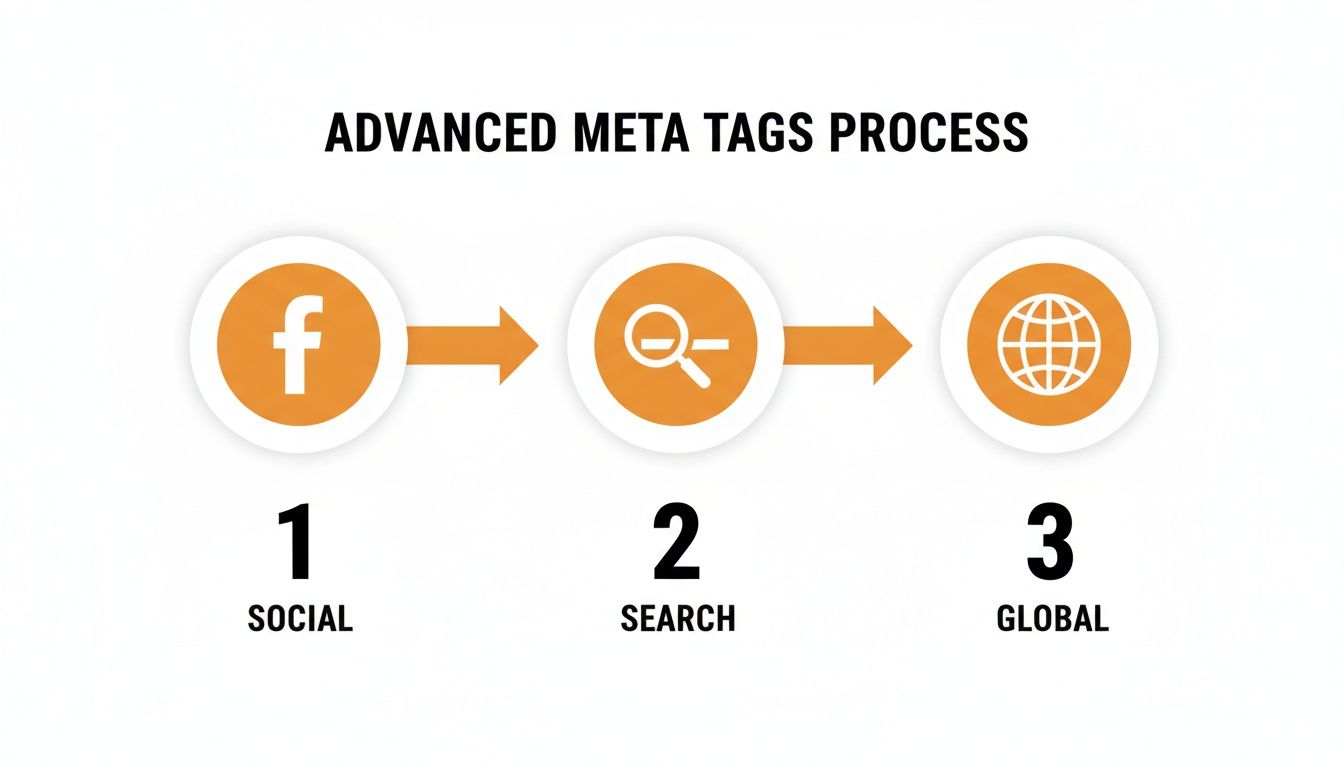
As you can see, a solid strategy considers every single channel where your audience might find you.
Use this checklist as your guide for your next audit:
- Crawl Your Entire Site: First, you need a complete picture. Use a tool like Screaming Frog or Ahrefs’ Site Audit. These tools act like a search engine bot, crawling every page and reporting back on its meta tags. To get a better handle on how they operate, you can learn more about what a web crawler is and how it actually works in our detailed guide.
- Hunt for Missing Tags: The easiest win is finding pages that have no title tag or meta description at all. Start with your most important pages—the homepage, service pages, and top blog posts—and write unique, compelling tags for them right away.
- Eliminate Duplicate Content: Your crawl report will flag duplicate title tags and meta descriptions. When multiple pages share the same tags, it confuses search engines. They’re forced to guess which page is more relevant, which often waters down the ranking potential of both. Every important page deserves its own unique identity.
- Check for Length Issues: The crawler will also flag titles over 60 characters and descriptions over 160 characters. These aren’t hard-and-fast rules, but they are strong guidelines to stop your message from getting awkwardly cut off in the search results. Trim them down to make sure your full pitch is visible.
- Review Your Robots Directives: This one is critical. Look for any pages that have been mistakenly set to
noindex. It’s a surprisingly common mistake where important pages get accidentally blocked from Google. Make sure only the pages you genuinely want hidden (like internal search results or login pages) have anoindextag.
By running through this audit process regularly, you can stay ahead of problems and ensure your meta tags are always working for you, not against you.
Navigating Meta Tags in Regulated Industries
Working in sectors like holistic health, finance, or cannabis comes with its own set of rules, and standard SEO advice often falls short. When compliance is king, creating meta tags for seo optimization becomes a tightrope walk between attracting customers and staying within strict legal boundaries.
Think of your title tag and meta description as more than just SEO elements; they’re public declarations about your business. One wrong move—like making an unverified health claim or guaranteeing a financial return—can land you in hot water with regulators. The real challenge is to be compelling without making promises you can’t legally keep.
This means you need a rock-solid understanding of your industry’s advertising regulations. Every word you choose for your search snippet matters, as it’s your first chance to build trust and signal credibility right there on the results page.
Writing Copy That’s Both Compelling and Compliant
The secret is to shift your focus from making direct claims to highlighting permissible benefits and features. You can suggest value and quality through smart, careful language. This helps you stay on the right side of the law while still crafting a message that gets the right people to click.
Here are a few ways to approach it:
- Lead with Education: Position your content as a helpful resource. A title like “Understanding How CBD Can Support Wellness” is much safer than “Our CBD Oil Cures Joint Pain.”
- Emphasize Quality and Process: Talk about what sets you apart. Phrases like “Lab-Tested,” “Organically Sourced,” or “Ethically Crafted” build confidence without making medical claims.
- Choose Compliant Keywords: Dig into keyword research to find terms your audience uses for learning and discovery, rather than those that could flag your content for review.
In highly scrutinized markets, your meta tags are the front line of your brand’s reputation. They must communicate authority and trustworthiness at a glance, assuring both potential customers and regulatory bodies of your professionalism.
Using Schema Markup Responsibly
Schema markup is a fantastic tool in niche industries, but it needs to be handled with care. You can use it to spotlight factual information like product features, pricing, and availability without veering into unapproved territory. For instance, a cannabis dispensary could use schema to display product inventory and THC/CBD content, where legally permitted.
This kind of technical precision gives search engines clean, factual data, helping your listings earn rich snippets that are purely informational and incredibly useful for users.
In Canada, meta tags are a cornerstone of on-page SEO, with title tags playing a massive role in how search engines rank content. Guidance from Canada.ca even states the <title> element is the most important field for search rankings. For businesses in regulated sectors like cannabis and CBD—areas where Juiced Digital specializes—getting meta tag optimization right while staying compliant is a powerful way to stand out. You can discover more insights about the importance of meta tags for Canadian businesses on reachfirst.com.
By putting compliance first in your meta tag strategy, you’re not just avoiding trouble. You’re building a solid foundation for sustainable growth and attracting the right audience without taking foolish risks.
How to Measure Your Meta Tag Performance
So, you’ve spent time crafting what you believe are the perfect meta tags. That’s a great first step, but how do you actually know if your efforts are making a difference? Without checking the data, you’re essentially just guessing and hoping for the best.
You need a way to connect the changes you make on your site to real-world results like more clicks and traffic. It’s time to stop guessing and start measuring. The good news is, the best tool for the job is free and probably already at your fingertips.
Using Google Search Console for Key Insights
Google Search Console (GSC) is your direct feedback loop from Google. It shows you exactly how your website is performing in search results, making it the single best place to see the real impact of your meta tags for SEO optimization. The Performance report is where the magic happens.
When you dive in, you’ll want to focus on three core metrics:
- Impressions: How many times your page appeared in a search result.
- Clicks: How many times someone actually clicked on your link from that search result.
- Click-Through Rate (CTR): The percentage of people who saw your link and clicked it. The simple formula is Clicks ÷ Impressions = CTR.
Of these, CTR is your north star for judging meta tag effectiveness. It directly measures how well your title tag and meta description work together to persuade a searcher to choose your page over all the others on the a results page. If you update your tags and your CTR starts to climb, you know you’re on the right track.
Spotting Your Biggest Opportunities
One of the most powerful things you can do in GSC is go on a hunt for pages with high impressions but a stubbornly low CTR. Think about it: this is a golden opportunity. Google is already showing your page to a ton of people, which means it considers your content relevant. The problem is that your “ad” in the search results—your title and description—isn’t sealing the deal.
A page with thousands of impressions and a CTR under 2% is practically screaming for a meta tag rewrite. It’s a low-effort, high-impact fix just waiting to happen.
Fire up your GSC Performance report and filter it to find these pages. I’d recommend starting with your highest-impression pages first, because even a tiny improvement in CTR on these pages can send a significant amount of new traffic your way.
A Simple A/B Testing Framework
To figure out what really resonates with your audience, you have to test your changes. You don’t need fancy, expensive software for this; a simple spreadsheet is all you need to get started.
- Establish a Baseline: Before you touch anything, open your spreadsheet and record the clicks, impressions, and CTR for the page you want to improve over the last 30 days. This is your starting point.
- Make One Change: Tweak either the title tag or the meta description. It’s tempting to do both, but if you change them at the same time, you’ll never know which change was responsible for the results.
- Wait and Measure: Be patient. Let the page run with the new tag for at least a few weeks so Google can crawl the change and you can gather enough data.
- Compare and Decide: Go back to your spreadsheet and compare the new numbers to your original baseline. Did the CTR go up? If it did, you’ve found a winner.
By following this simple process of testing and measuring, you can move beyond simply following best practices and start making data-driven decisions that consistently grow your organic traffic.
Common Questions About Meta Tags and SEO
Even after you’ve got the basics down, a few questions about meta tags for SEO optimization always seem to pop up. Let’s tackle some of the most common ones so you can fine-tune your pages with confidence.
Getting these details right is often what separates an okay SEO strategy from a truly great one.
Do Keywords in Meta Descriptions Still Matter?
This is a classic. Google has been clear that keywords in your meta description don’t directly boost your rankings. But—and this is a big but—they are still incredibly important for getting people to actually click on your result.
When someone’s search query matches words in your description, Google highlights them in bold. It’s a simple visual trick that works wonders. That bolded text jumps off the page, tells the searcher “this is what you’re looking for,” and can give your click-through rate (CTR) a serious lift. A better CTR tells search engines that users prefer your page, which can indirectly help your rankings down the road. So, don’t stuff it with keywords, but absolutely include them where they make sense.
What Is the Ideal Length for Meta Tags?
Technically, Google measures titles and descriptions by pixel width, not character count. A “W” takes up more space than an “i,” for example. But for practical purposes, sticking to character counts is the way to go.
Here are the numbers to remember:
- Title Tags: Keep it between 50-60 characters.
- Meta Descriptions: Aim for 150-160 characters.
Keep in mind that mobile screens often show even less. That’s why it’s so important to put your most compelling words and keywords right at the beginning. If your title gets cut off, you want to make sure the most critical part is still visible.
The easiest way to get this right is to use a SERP snippet preview tool before you hit publish. These tools show you exactly how your tags will look on both desktop and mobile, so you can adjust them for the best possible first impression.
What Happens If I Don’t Write a Meta Description?
If you skip writing a meta description, Google won’t just leave a blank space in the search results. It will pull a snippet of text from the page that its algorithm thinks is relevant.
While that might not sound so bad, it’s a huge missed opportunity. Google’s auto-generated snippets can be clunky, out of context, or pulled from weird places like a navigation menu or footer text. They rarely do a good job of convincing someone to click.
Writing your own meta description gives you control. It’s your one chance to write a compelling, concise ad for your page that speaks directly to the searcher’s problem. A well-crafted description will almost always beat a machine-generated one, leading to a much higher CTR and better-qualified traffic.
At Juiced Digital, we turn these optimization details into measurable growth. We build data-driven SEO and AI strategies that don’t just improve rankings—they increase revenue. Ready to see what a future-ready digital strategy can do for your business? Book your free consultation with us today.
