
Your organic traffic is up. Rankings look better. Search Console shows more clicks than last quarter. But sales hasn't moved, the phone team says lead quality is mixed, and nobody can tell which SEO pages produce booked revenue.
That's where most SEO tracking setups break. They stop at sessions, button clicks, or a thank-you page and call it “conversion tracking”. In practice, how to track SEO conversions is less about toggling a few GA4 events and more about building a measurement system that survives real buying journeys, offline sales steps, and Canadian privacy limits.
In Vancouver and across BC, that problem gets sharper fast. Local service businesses close leads by phone or after a quote review. E-commerce brands lose visibility when users switch devices or decline consent. Regulated and health-adjacent sectors often need cleaner documentation, tighter retention habits, and fewer sloppy tags. If your tracking can't connect organic traffic to revenue, you're making SEO decisions half blind.
Why SEO Conversion Tracking Matters More Than Traffic
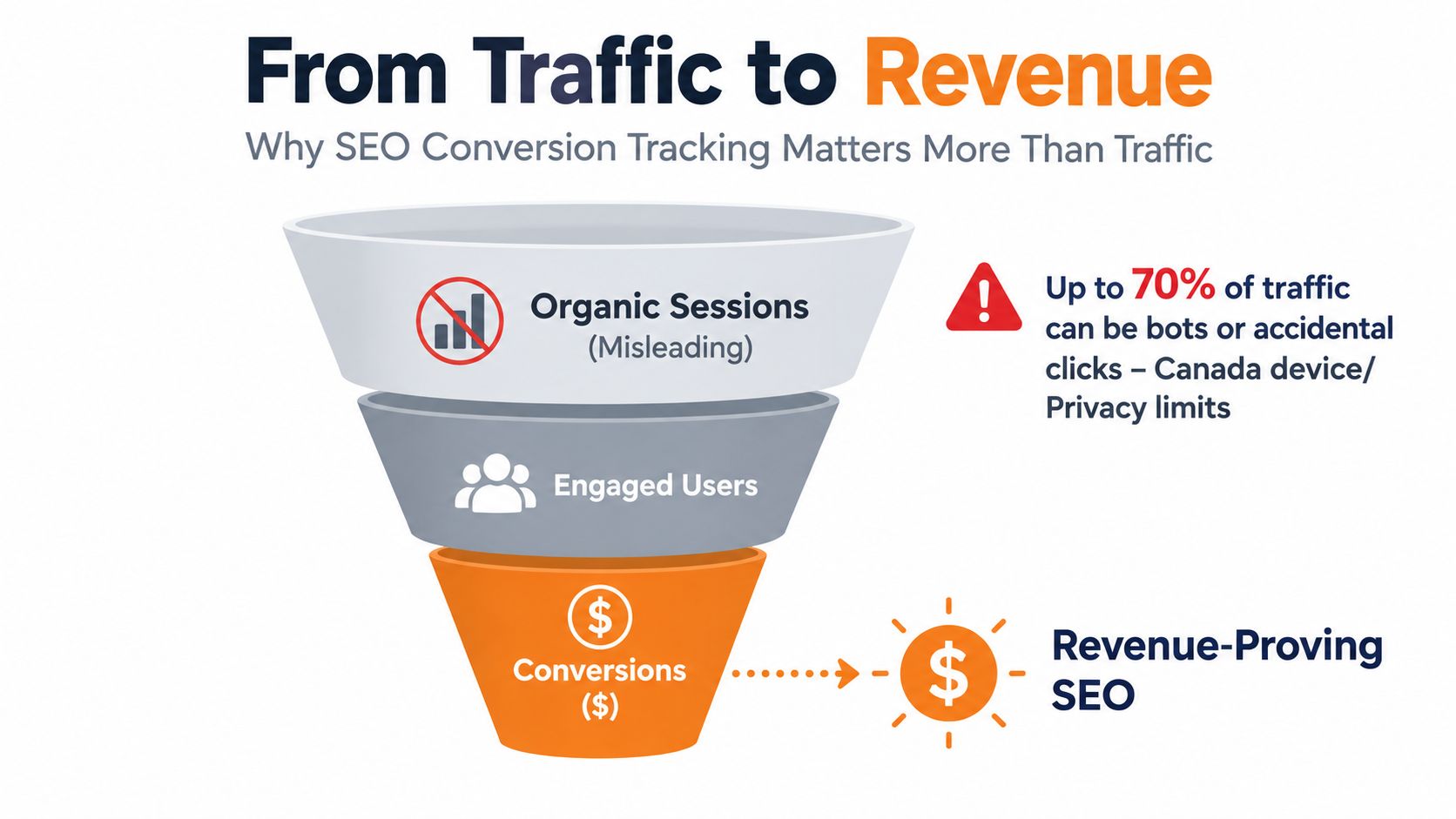
A familiar pattern shows up in a lot of SEO accounts. Traffic climbs, branded searches improve, a few blog posts start pulling in visits, and everyone assumes the channel is working. Then someone asks a simple question: which organic visits turned into revenue? That's where the room gets quiet.
Traffic isn't useless. It's just not enough to run the business.
What vanity metrics hide
A local roofing company might get organic visits to service pages, blog posts about insurance claims, and location pages. That doesn't mean the SEO programme is healthy. If those visits don't become calls, quote requests, or booked inspections, the rankings are just activity.
For an online store, the same mistake shows up differently. Teams celebrate organic sessions while checkout friction, poor mobile UX, or broken cross-domain tracking kills revenue attribution. Canadian benchmark data makes the point clearly. Online shopping conversion rate in Canada reached 2.0% in Q3 2024, the highest quarter in the period analysed was 2.6% in Q4 2022, and projected 2026 reporting puts the median e-commerce conversion rate at 2.34%, with top quartile at 3.81%, while mobile conversion is 34% lower than desktop and cart abandonment is 69.4% according to Canadian e-commerce conversion benchmarks from Statista. A single sitewide average won't tell you what's happening by device, category, or funnel stage.
Practical rule: If you only track organic sessions and final sales, you'll miss the middle of the journey where most SEO revenue problems actually live.
SEO tracking is a governance issue
In Canada, measurement isn't only a marketing preference. It has a governance logic behind it. The Government of Canada's communications directive requires departments to use official web analytics to evaluate and optimise digital content, and to establish performance indicators for large advertising campaigns, as outlined in the Government of Canada communications directive. That matters because it reinforced a simple standard. Digital work should be measured against outcomes.
For SEO teams, that means three things need to exist before the tool setup starts:
- A named business goal tied to revenue or pipeline, not just visibility
- A defined KPI such as booked appointments, qualified leads, purchases, or recovered carts
- A reporting cadence that someone reviews and uses
What good conversion tracking changes
When SEO conversion tracking is set up properly, teams stop arguing about pageviews and start deciding where to invest. You can see which landing pages drive booked calls, which content themes assist later purchases, and where mobile users drop out.
That's also where CRO gets more honest. A page with lower traffic but stronger conversion quality often deserves more attention than a page that ranks well and sells nothing.
Mapping Business Goals to Measurable SEO Conversions
Most tracking mistakes happen before anyone opens GA4. The event plan is wrong because the business model wasn't translated into measurable actions first.
A local clinic, a law firm, and an e-commerce brand should not share the same conversion map. They also shouldn't mark every click as a conversion just because GA4 allows it.
Start with the revenue event, then work backwards
The cleanest way to choose SEO conversions is to identify the moment that matters commercially, then list the actions that reliably lead to it.
For local service businesses, final revenue often happens after a phone call, an estimate, or an appointment confirmation. For e-commerce, the revenue event is usually a completed purchase, but there are supporting signals that tell you whether SEO traffic is moving toward that outcome.
When final sales happen offline or later in a CRM, micro-conversions become useful. Not all micro-conversions are equal, though. A click on a contact page is weak. A booking start, quote request, or call from a high-intent service page is usually much stronger.
| Business Type | Macro Conversion | High Signal Micro Conversion | When to Mark as Key Event |
|---|---|---|---|
| Local service business | Completed lead or booked appointment | Call click, booking start, quote request, store-locator use | Mark as key event when the action consistently signals sales intent |
| Lead generation with offline close | Qualified lead in CRM | Form completion with service type, callback request, location selection | Mark as key event when offline close delays final revenue reporting |
| E-commerce brand | Purchase | Add to cart, checkout start, product category engagement | Mark as key event when it helps diagnose revenue leakage before checkout |
| Multi-location business | Confirmed appointment or enquiry | Location page click to call, directions click, appointment start | Mark as key event when location intent matters to close rate |
Weight micro-conversions instead of pretending they are all equal
In privacy-limited setups, observed conversions can be incomplete. That's one reason many teams overcount junk events. They're trying to fill the data gap with volume. It doesn't work.
A better approach is to weight micro-conversions by commercial intent. For example:
- High weight actions might include a completed quote request, a financing application start, or a booking confirmation step
- Medium weight actions might include click-to-call, a calendar open, or starting checkout
- Low weight actions might include store-locator use, brochure download, or deep scroll on a service page
You don't need fake precision here. What matters is consistency. If the business agrees that one action is a stronger buying signal than another, your reporting should reflect that difference.
A thank-you page tells you that something happened. A weighted event model tells you how close that action was to revenue.
Document the event before you build it
Before any tag goes live, write down four things for each conversion action:
Definition
What exactly counts as the eventOwner
Who is accountable for the business process behind itDestination
Whether it lives in GA4 only, a CRM, a booking platform, or all threeUse case
Whether the event is for reporting, optimisation, audience building, or offline revenue matching
This step sounds boring. It saves a lot of cleanup later. Most messy analytics accounts aren't broken because GA4 is difficult. They're broken because nobody agreed on what a conversion meant.
Setting Up GA4 and Google Tag Manager for Clean Conversion Data
A common failure looks like this. Organic traffic is up, form fills look healthy in GA4, and the sales team still says lead volume is flat. The problem is usually the setup, not the channel. Events fired twice, weak parameters, consent gaps, or broken cross-domain sessions can make SEO look better or worse than it is.
Clean collection is a revenue governance issue. In Canada, consent choices and platform limits reduce what you can observe, so the job is not just to mark events as conversions. The job is to collect enough reliable context that finance, marketing, and sales can reconcile what happened.
Configure the property properly
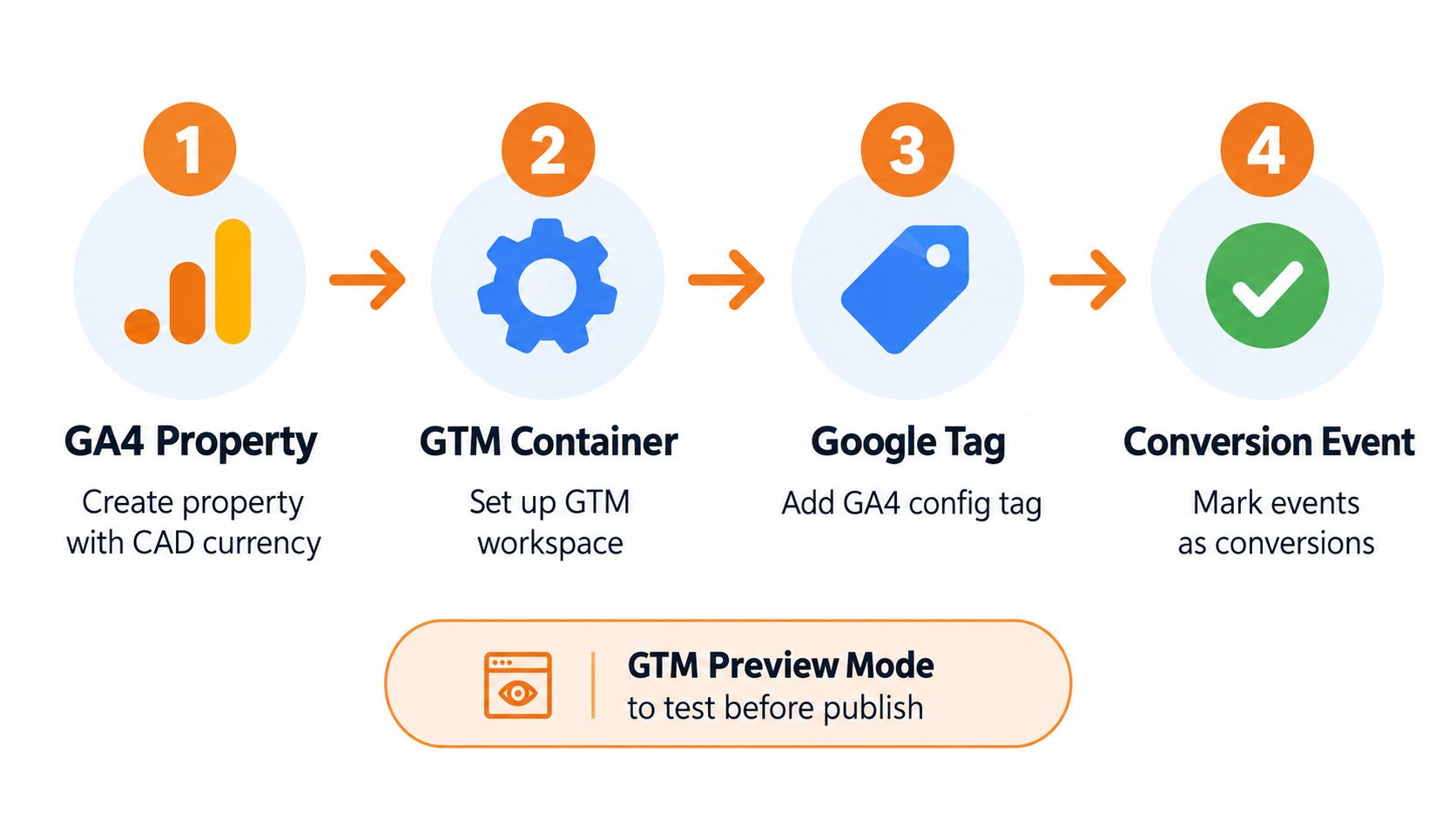
Start with the GA4 property settings before you touch event logic. Set CAD currency, the correct reporting time zone, internal traffic rules, and cross-domain measurement if users move from the main site to a cart, scheduler, or financing platform. If those basics are wrong, revenue reports will never line up cleanly with operations or CRM records.
For Canadian businesses, this GA4 setup guide for Canadian businesses is a useful reference for property setup, validation, and common implementation mistakes.
A clean build usually follows this order:
- Create the GA4 property with the right business settings
- Deploy through Google Tag Manager so tags live in one controlled system
- Install the Google tag once and route event tracking from there
- Enable cross-domain measurement before traffic starts flowing
- Define event parameters that explain commercial context
- Mark only decision-grade events as conversions after testing
Build events that answer business questions
Event names should stay simple. Event parameters do the heavy lifting.
generate_lead or form_submit can work if the parameters tell you what happened. Pass values like service line, page type, location, product category, appointment type, or form intent. That is what lets an SEO lead separate a high-intent quote request on a service page from a newsletter form on a blog post.
This matters even more when consent mode reduces observed data. If you lose some session detail, strong event structure still gives you a usable picture of channel quality and intent by page group, category, and location.
Useful event design often includes:
- Form context such as quote request, contact, financing, wholesale, or consultation
- Page context such as service, location, blog, collection, or product page
- Commercial context such as category, brand, treatment type, booking type, or store location
- Value context such as estimated lead class or micro-conversion weight for reporting
If paid and organic are reviewed together, consistent event design also makes channel comparisons less messy. The same collection discipline applies in this overview of Google Ads conversion tracking, especially around trigger quality, naming, and conversion selection.
Use single-fire discipline in GTM
Duplicate events distort everything downstream. I see it most often when a form event fires on button click, then fires again on successful submission, or when both GA4 hard-coded scripts and GTM tags send the same event.
Check each strategic event for three things:
- One completion trigger tied to the confirmed action
- One firing path inside GTM
- One naming standard so GA4 does not split the same action into multiple versions
A short QA pass in preview mode is not enough. Test with real paths, real devices, consent accepted and denied, and both main-domain and third-party steps. Booking tools and checkout platforms are where clean plans usually break.
Validate against business reality
Use Realtime and DebugView during setup, then compare GA4 counts against what the business received over the next week. For lead gen, that usually means CRM submissions, call logs, and booked appointments. For e-commerce, it means checkout records and revenue totals.
If GA4 shows more leads than the CRM, investigate duplicate firing, thank-you page reloads, spam submissions, or forms that fail after the event fires. If GA4 shows fewer, check consent behaviour, blocked scripts, cross-domain breaks, and server latency.
A clean DebugView session is only the first check. Reconciliation is the one.
If GA4 and the CRM disagree, treat that as an implementation problem to solve, not a reporting quirk to ignore.
Set up consent mode and server-side tagging with realistic expectations
Consent mode changes what you can observe, especially for Canadian sites trying to respect privacy without losing all measurement. Build GTM so consent state is read before analytics and ad tags evaluate. Then document which conversions are observed directly, which are partially modeled in GA4, and which must be confirmed later in the CRM.
For higher-stakes setups, server-side tagging helps reduce browser-side loss and gives you more control over what is sent, when, and with which identifiers. It does not restore data a user never consented to share, and it does not fix weak event design. It does make collection more stable, which matters when SEO reporting is used to defend budget or forecast revenue.
That is the standard for clean conversion data. Accurate enough to optimize, strict enough to audit, and connected enough to match what the business sold.
Connecting Ecommerce CRM Calls and Bookings to SEO
Most SEO tracking setups stop on the website. Revenue doesn't.
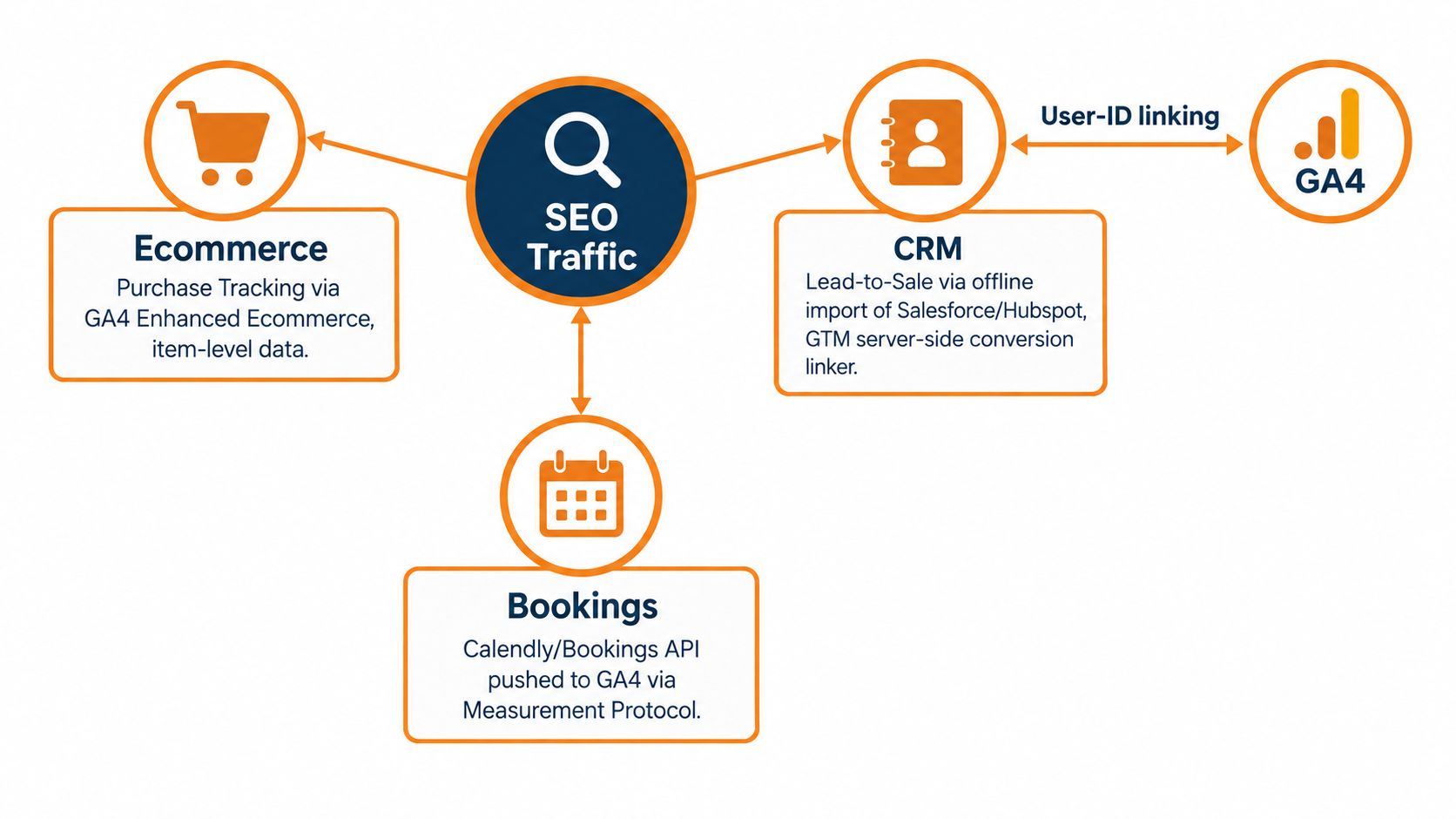
If a customer buys on a separate checkout, books through a scheduler, calls from mobile search, or closes later in a CRM, you need the tracking stack to follow that path. Otherwise, organic looks weaker than it is, or worse, you credit the wrong channel.
E-commerce tracking needs item detail and checkout continuity
For stores, purchase tracking isn't enough on its own. You want to know what category, product type, and landing path drove the sale, especially when SEO performance differs across collections or educational pages.
If the customer journey spans a main content site and a separate cart or checkout domain, cross-domain measurement has to hold attribution together. Without it, the checkout can overwrite the source and make organic contribution disappear from the final report.
A solid e-commerce SEO setup usually includes:
- Purchase events with item and category detail
- Checkout milestones so you can see where SEO traffic drops out
- Landing page to purchase analysis by product line or collection
- Observed versus modelled interpretation when consent reduces visibility
For brands trying to tie product merchandising and SEO together, e-commerce growth strategy work often overlaps directly with tracking design because category structure, UX, and checkout flow all affect what you can measure reliably.
This walkthrough is useful if you want a visual example of how the moving parts fit together.
CRM linkage is what turns leads into revenue data
For lead generation businesses, conversion may happen days later after a salesperson qualifies the lead, books the consult, or marks the deal won. GA4 alone won't know that unless you connect the systems.
The practical move is to pass identifiers and context into the CRM at lead capture. That may include:
- Form type so sales knows what the person asked for
- Service or product category so reporting can split quality by intent
- Landing page or source detail so SEO pages can be matched back to revenue
When teams skip this, they end up with “SEO leads” in one system and “closed deals” in another with no clean bridge between them.
Calls and bookings need their own tracking layer
For local businesses, phone calls are often the conversion. A click-to-call event is useful, but it isn't the same as a connected call, a qualified call, or a booked appointment.
That's why local SEO tracking usually benefits from dedicated call tracking and booking instrumentation. Depending on the stack, that can include a call intelligence platform, click-to-call events in GTM, and appointment scheduler events passed into GA4.
Good booking measurement usually separates:
- Booking start from booking completion
- General enquiries from sales-intent bookings
- New patient or new customer actions from returning clients
Server-side tagging helps when browser-side data gets patchy
Canadian privacy conditions make this more important than many teams expect. In BC, PIPA can treat IP addresses, device identifiers, and browsing data from analytics tools as personal information, and the Office of the Privacy Commissioner of Canada reported 696 business breach reports affecting 20,328,495 Canadians in 2025–2026, according to the OPC annual report. That doesn't mean analytics stops. It means collection, consent, retention, and minimisation need to be designed deliberately.
Server-side tagging can help create a more durable measurement layer, especially when browser-side collection is blocked, shortened, or inconsistently passed. It isn't magic. If consent is denied, you still have legal and platform limits. But server-side architecture often gives teams better control over what is collected, how it is routed, and how identifiers are managed across systems.
The goal isn't to collect everything. The goal is to collect enough, lawfully and consistently, to make defensible revenue decisions.
Attribution Reporting and Dashboards That Prove SEO Value
Once the data is collected, the next problem shows up. Teams read the wrong report.
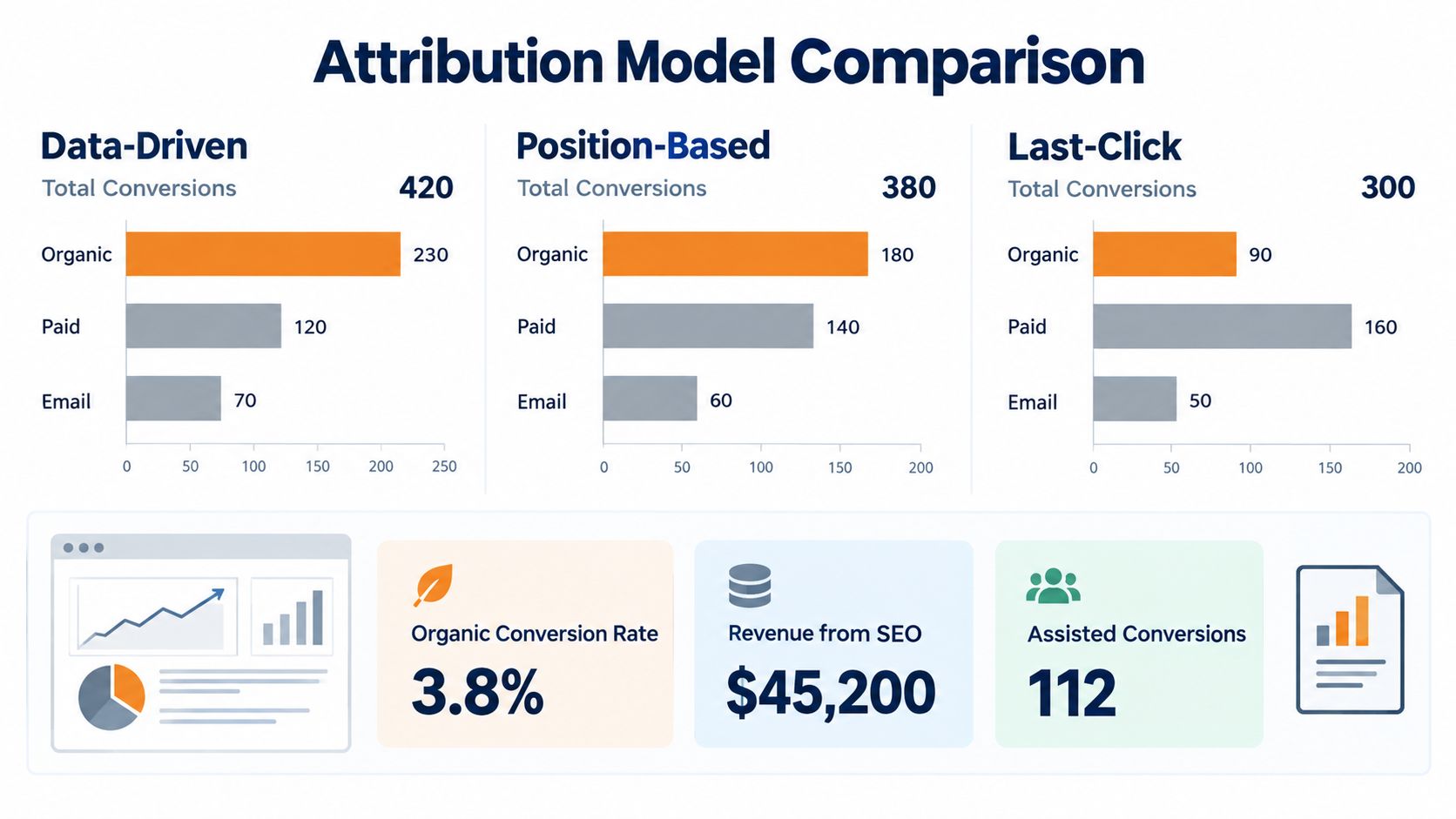
A lot of SEO work influences conversions without owning the final click. Educational pages assist later branded searches. Collection pages introduce products that convert after email or direct return visits. Local landing pages trigger calls that become bookings after a follow-up. If you judge SEO only on last-click conversions, you'll understate its commercial role.
Look beyond last click
GA4 gives you ways to compare attribution views, but the numbers only become useful when you segment properly. Organic performance should be reviewed by device, landing page group, and business category, not as one blended line.
A useful dashboard for SEO usually isolates:
- Organic sessions and engaged users by landing page type
- Key events and purchases from organic traffic
- Assisted conversion paths where organic appeared earlier in the journey
- Mobile versus desktop conversion gaps
- Funnel drop-off from landing page to final action
That last point matters. If organic traffic enters well but stalls at booking start or checkout start, the SEO team may have done its job and the UX still needs work.
Use Search Console with conversion reporting, not in isolation
Search Console tells you what people searched and which pages earned clicks. GA4 tells you what those users did afterwards. Put those together and the reporting gets far more actionable.
A practical workflow is to compare high-click organic landing pages against actual conversion contribution. That quickly surfaces pages that attract curiosity but not commercial intent, versus pages that may pull less traffic but produce stronger outcomes.
Current guidance on GA4 for SEO emphasises key events, custom events, and conversion reporting within a short processing window, but the harder strategic issue is deciding which user actions predict revenue under privacy-limited conditions. That gap is discussed in SE Ranking's GA4 and SEO guide, especially around choosing stronger micro-conversions instead of relying only on a final thank-you page.
Build dashboards for decisions, not for decoration
The best SEO dashboard is usually not the flashiest one. It's the one a founder, marketing lead, or sales manager can use to decide what to fix next.
I'd include views like these:
- Organic landing pages by revenue signal so top-performing pages are obvious
- Assisted versus direct organic conversions to avoid under-crediting SEO
- Device split reporting because mobile and desktop behaviour differ materially
- Observed versus modelled outcomes when consent mode reduces visible conversions
For bigger teams, an enterprise SEO dashboard structure can help centralise those views across regions, categories, or store groups without forcing everything into one blunt KPI.
A useful dashboard should help you cut something, fix something, or fund something. If it only reports activity, it's not doing enough.
Troubleshooting Optimization and Your Next Steps
The fastest way to waste months of SEO reporting is to assume the setup stays accurate after launch. It won't. Forms change, booking tools update, consent banners get replaced, and developers accidentally break triggers all the time.
That's why how to track SEO conversions needs an operating rhythm, not a one-time implementation.
What usually breaks first
If your numbers look off, check these before you change strategy:
- Double firing events caused by click triggers and success triggers both counting the same action
- Missing parameters that leave forms, categories, or booking types impossible to separate later
- Cross-domain referral loss that overwrites organic attribution when users hit checkout or schedulers
- Consent state errors that suppress or distort reporting unexpectedly
- Thank-you page dependence that fails when forms submit inline or bookings complete off-site
A mismatch between GA4 and the CRM doesn't always mean one system is wrong. It often means they are measuring different moments in the same journey.
What to optimise after tracking is stable
Once the data is trustworthy, the next wins usually come from refining what the events mean and what the user experiences before the conversion.
That can include:
Revising micro-conversion weights
If some actions repeatedly lead to sales and others don't, update the weighting.Improving form UX
Reduce friction, shorten unnecessary fields, and separate low-intent enquiries from revenue-driving requests.Testing call routing and booking flow
A strong SEO page can still underperform if calls go unanswered or the scheduler is clumsy.Reviewing organic landing pages by quality
Some pages bring traffic. Other pages bring buyers. Keep the distinction visible.
Keep an event log
Every serious setup needs a plain-language event log. Nothing fancy. A shared document is enough if it stays current.
Include:
- Event name
- Business definition
- Trigger condition
- Parameters passed
- Marked as key event or not
- Destination systems
- Last QA date
That single habit saves a lot of confusion when someone asks why a conversion count changed three months later.
Audit the setup quarterly. Privacy rules evolve, platforms change, and GA4 never stays still for long. The teams that treat conversion tracking as revenue governance, not just analytics admin, end up making better SEO bets and cleaner CRO decisions.
If your SEO reporting still stops at traffic, Juiced Digital can help wire the full measurement layer, from GA4 and GTM to CRM attribution, call tracking, and e-commerce reporting built for privacy-conscious Canadian businesses. If you want a cleaner view of what organic search is producing, visit Juiced Digital.